Turn on suggestions
Auto-suggest helps you quickly narrow down your search results by suggesting possible matches as you type.
Showing results for
Get 50% OFF QuickBooks for 3 months*
Buy nowThe Item details section does not showing in bills, can you please help me to solve this.
I want to buy items to resell them

I forget where, but in company settings you have to turn on item details.
Hey there, @Anas2008.
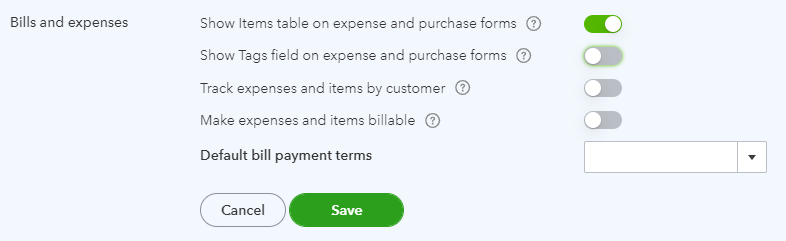
I'd be glad to share the steps on how to show the Item details section in your Bills window. That way, you'll be able to add a Product/Service table on expense and purchase forms.
Here's how:
You can use these articles for more details and tips about tracking your inventory in QuickBooks Online.
Please let us know if you need more assistance. I'm right here together with my colleagues to help you more. Take care and stay safe.
Mine is turned on but the Items table doesn't have qty and rate anymore? I can't figure out how they disappeared.
Hi lmoorecalvarydevsvcs,
The QTY and RATE are default columns in the Item details section of a bill. Therefore, they should always be there.
Let’s do some browser troubleshooting steps to see if the missing-columns behavior is caused by random browser issues.
To start, you’ll want to sign in to QBO in a private or incognito browser. This step ensures that your browser doesn’t reuse cached data, which may have been outdated, misconfigured, or corrupted.
Keyboard shortcuts for opening a private browser:
If you see the mentioned columns while in a private browser, you'll want to clear the cache. However, if the problem persists, try signing using other browsers to know if this only exists to the one you use or not.
Please let us know how the instructions turn out so I can help you again if needed. Take care and have good one.
Hello. If at the Account and settings - Expenses -Bills and expenses section no "Show Items table on expense and purchase forms". There is only "Show Tags field on expense and purchase forms". What does it mean?
It has nothing to do with cache. And they are not always there. If you turn them off in a template, they will be missing as well. Evidently messing with them in invoices affects how your bills look which is ridiculous.
Hello everyone. I appreciate your updates regarding this issue wherein the Show Items table on expense and purchase forms is missing from your settings. I want to point you in the right direction for further help.
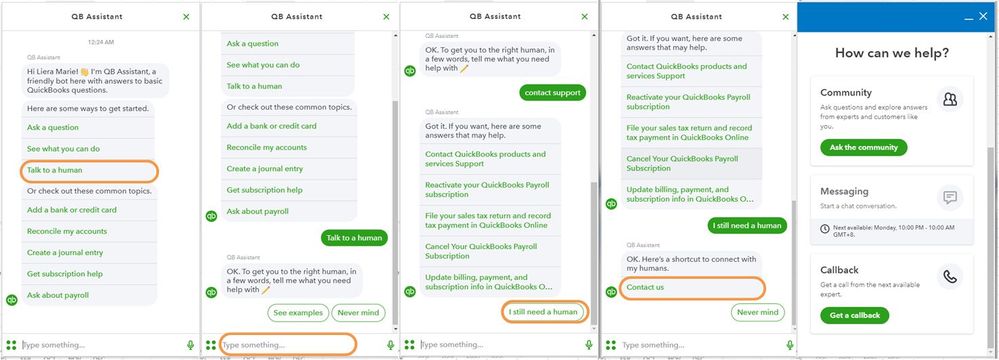
Considering the information you've shared, it'd be most beneficial to contact our Customer Support team. This will allow them to conduct more comprehensive research and provide you with guidance regarding the subsequent actions to be taken. Here's how:
Important: Kindly note the hours of operation to make sure experts are available for assistance.
Feel free to visit this link about handling bills and vendor payments: Enter and manage bills and bill payments in QuickBooks Online.
Come back to this post if you have other concerns or follow-up questions about bills or QuickBooks in general. I'll be around to provide extra guidance. Stay healthy and safe!
What edition of quickbooks online allows you to do this?
What edition of quickbooks online has this ability
Thanks for joining the thread, @millennialconsultinging.
Regarding the Item Details section, it is exclusive to QuickBooks Online Essentials, Plus, and Advanced versions. But if you're referring to tracking bills, it is available for all QBO subscriptions.
If you're still unable to see it, I recommend contacting our QuickBooks Online Support Team. They can investigate this issue further and find a possible root cause so you can use the feature again.
Here's how:
Please ensure to check their available hours to address your queries promptly.
Check this handy article to learn more about tracking and recording bills: Enter and manage bills and bill payments in QuickBooks Online.
Moreover, these resources can help you with keeping track of your business and handling reports as well as saving their current customization settings:
You can post anytime if you still have queries about your vendor transactions in QuickBooks Online. Please know the Community has your back. Take care always.
Mine is still missing after following the instructions multiple times and using several different browsers. There is no quantity or rate column in the Item details section when entering a bill.
So I figured out that if you go look at the template you are using for invoices, check the content section of the template. If you turn off the rate there on the default invoice template, it will disappear from bills. Not sure it is supposed to work that way but that is how it works for me. I think it is glitch. I would like to have it on bills but not have it on invoices and I cannot make that happen at all.
A warm welcome to you in the Community space, @SA8201. I know how important it is for you to work seamlessly on your business. However, if the ability to enter quality and rate under the item details section is not working, we recommend that you contact our support team.
Our engineers are doing everything they can to solve the problem. As soon as we make progress in finding a solution, you will be kept up to date and will receive a notification via email.
To contact support:
Feel free to visit these articles as your reference in entering and managing bills and bill payments in QuickBooks Online and managing bills, payment, and subscription info in QuickBooks Online.
Please don't hesitate to leave a reply if you have more concerns. We are here to offer additional help. Keep Safe!
The "Turn on the Show Items table on expense and purchase forms." is not included in my Expense Settings Page. I can only see:
The "Turn on the Show Items table on expense and purchase forms." is not included in my Expense Settings Page. I can only see:
Show Tags field on expense and purchase forms
Default bill payment terms
I can only see "Show Tags field on expense and purchase forms" & "Default bill payment terms" on my Expense Settings Page
Hello there, @oyemi. I understand the importance of having the option to "Show Tags field on expense and purchase forms" in QuickBooks Online (QBO). Let me share some information about this feature.
The "Show Items table on expense and purchase forms" feature is available in QuickBooks Online Plus and Advanced. If you have Simple Start or Essentials, this option won't be visible. You may want to upgrade to access this feature. Here's how:
To upgrade your subscription, here's how:
To understand more about Intuit pricing and plans, see the below articles:
For future reference, I'm adding a link to our online tutorials. These videos can help you run your business using QuickBooks: Video tutorials for QuickBooks Online.
If there's anything else you need help about bills and expenses, let me know by commenting below. I'll be more than happy to help. Take care and have a great day.
for me still not show the items in the bills
Hi there, @Rohit007.
Let me share info as to why items aren't showing in the Bill form.
If you're referring to the Item details field in the Bill, this isn't available in the QuickBooks Online (QBO) Simple Start subscription. You can, however, upgrade your subscription to Essentials, Plus, or Advanced to add Item details.
Yet, if you have a higher subscription. You might forget to turn on the Show Items table on expense and purchase forms in the Account and settings. Here's how:
If the same issue persists, let's perform some troubleshooting steps to determine if this is a browser-related issue. The initial step is to access your QBO account via incognito mode. This does not store cache files that may cause odd behaviors when running web-based programs. Below are the shortcut keys you can use:
Then, try to access the Item details field in the Bills. If the items are now showing, clear the cache of your regular browser to eliminate piled-up data. If the issue persists, you can use another supported browser or device. It might be that the current one you're using has a temporary issue with the program.
After performing the steps above, if the issue still happens, I recommend contacting the QBO Care Team to help you fix this. They will be able to pull up your account in a safe environment and provide you with the exact resolution.
You might want to see the status of your inventory. Check out this article: Use reports to see your sales and inventory status.
Don't forget to leave a comment below if you have additional questions about the display field of your bill form. I'll be willing to help you. Keep safe and have a good one.
This worked for me!
I had to go to:
1. Account and Settings.
2. Sales
3. Under Products and Services. Turn "On" "Track quantity and price/rate"
4. It will re-appear in you Bills
Thank you!!!
This worked for me!
1. Go to "Account and Settings"
2. Click on "Sales"
3. Turn on "Track quantity and price/rate"
4. It re-appeared in Bills.


You have clicked a link to a site outside of the QuickBooks or ProFile Communities. By clicking "Continue", you will leave the community and be taken to that site instead.
For more information visit our Security Center or to report suspicious websites you can contact us here