Welcome to QuickBooks Community, ellis4. I'll help you delete it.
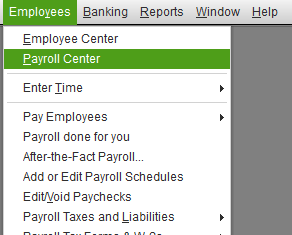
We can go to the Payroll Center to remove workers comp in your payroll liabilities. The steps below will help us accomplish this task.
- Go to the Employees menu.
- Select Payroll Center.
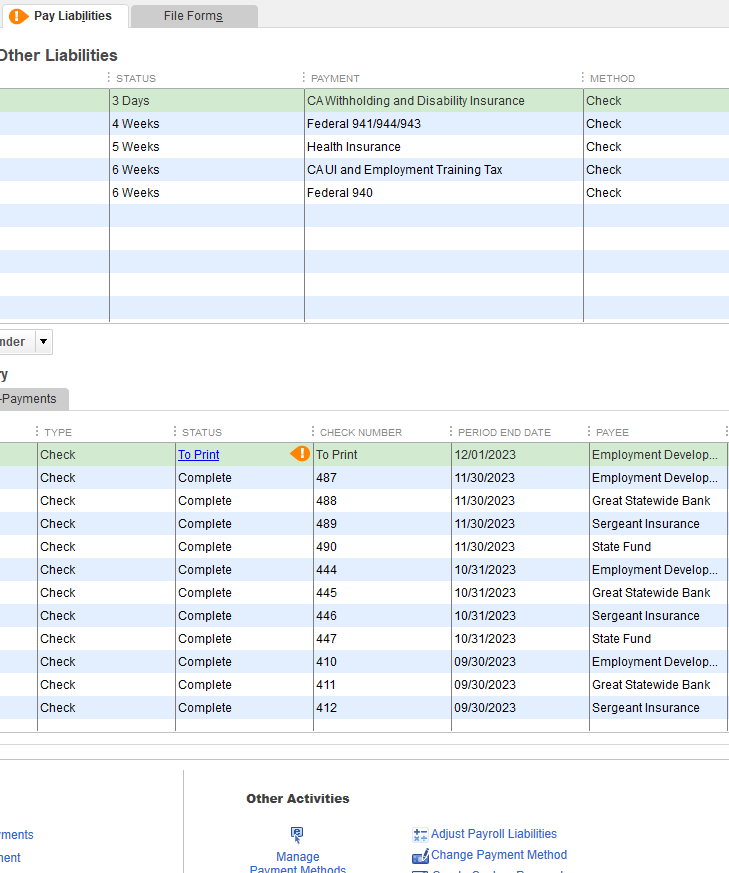
- Select the Pay Liabilities tab.
- Select Change Payment Method from the Other Activities drop-down list.
- In the QuickBooks Payroll Setup window, select Benefit and Other Payments.
- Select Schedule Payments, and double-click the payroll item to edit.
- Under Payment Frequency, select the I don't need a regular payment schedule for this item option.
- Select Finish, and select Finish again.
For details, we can the links below:
If we need to check on our employee's total wages and payroll summary, this article will help out with the process: Create a payroll summary report.
That's it. If you have more questions about payroll forms and managing employees in QuickBooks Desktop payroll, please know that I'm here to help. Take care!


