Turn on suggestions
Auto-suggest helps you quickly narrow down your search results by suggesting possible matches as you type.
Showing results for
Get 50% OFF QuickBooks for 3 months*
Buy now
Hi AJH53, Thank you for bringing this to our attention—we understand how disruptive it can be when QuickBooks Desktop ProPlus24 isn’t opening, particularly when you're trying to manage critical business tasks. Rest assured, we’re here to assist you in resolving this issue as quickly as possible. Let’s work through some troubleshooting steps to identify the cause and get everything running smoothly again.
Before we proceed, could you please describe any error messages you encounter when trying to open QuickBooks Desktop (QBDT)? A screenshot, if available, would be helpful in offering a tailored solution.
When launching QuickBooks Desktop, avoid clicking the icon repeatedly, as this may prevent the program from opening correctly. Allow sufficient time for the application to initialize before attempting to access it again. If you see a "QuickBooks needs a subscription" message, you're likely using an outdated version or your subscription has expired. To resolve this, download a supported version or verify your subscription status through your Customer Account Management Portal.
If QuickBooks doesn't respond or you receive an error message stating it has stopped working, please refer to this article for detailed information on possible causes: Fix issues when QuickBooks has stopped working.
To address these issues, download and install the QuickBooks Tools Hub. It works best on Windows 11, 64-bit.
Here's how:
Note: If you can't find the icon, search in Windows for "QuickBooks Tool Hub" and select the program.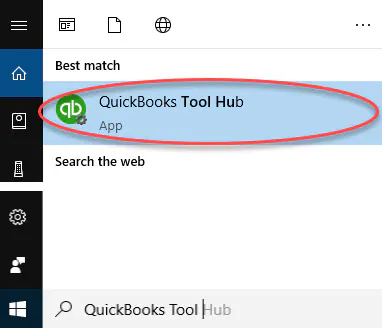
Refer to Step 2 in the article for detailed instructions on resolving issues where QuickBooks Desktop won't open.
If the problem persists, I recommend connecting with our Live Support team. They can safely access your account to review the error message you’re encountering and offer a solution.
We’re dedicated to ensuring your experience is seamless, so please don’t hesitate to reach out if you encounter any issues or have questions in the future. I’m always happy to guide you through solutions, offer helpful tips, and help you navigate any changes with ease. Thank you for choosing us to assist your success is our priority. Take care!
Same here... So aggravating I have been trying all weekend to get mine to work. I have uninstalled and re installed the program tried the tool hub and nothing is working. Just get a grey screen.. Guess I will call support on Monday.


You have clicked a link to a site outside of the QuickBooks or ProFile Communities. By clicking "Continue", you will leave the community and be taken to that site instead.
For more information visit our Security Center or to report suspicious websites you can contact us here


