Welcome to the Community, Biomere_Bob. I appreciate your detailed information.
Some subscribers have suspected in another thread that this is caused by the QuickBooks Messenger service. You can try accessing your Task Manager utility and manually closing the program. Detailed steps for using Task Manager can be found on Microsoft's website.
If that doesn't sign your user out, I'd recommend trying to restart the computer you're using. This will reset QuickBooks in the process, and should sign the user out. Since you're using a server, you'll need to restart your server. This is the computer that hosts your data file.
In the event you continue seeing your admin user as signed in when they're not active in QuickBooks, you'll want to get in touch with our Customer Care team. They'll be able to pull up your account in a secure environment, conduct further research, and create an investigation ticket if necessary.
They can be reached while using QuickBooks.
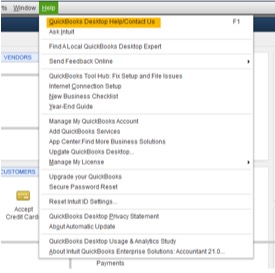
Here's how:
- In the top menu bar, go to Help, then select QuickBooks Desktop Help/Contact Us.
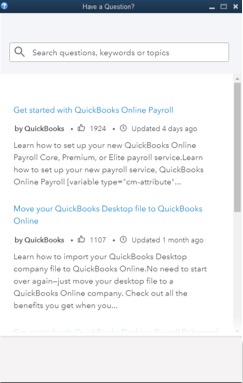
- Enter a brief description of the topic you need help with.
- Follow your on-screen prompts to get in touch with a live agent.
Be sure to review their support hours so you'll know when agents are available.
Please don't hesitate to send a reply if there's any questions. Enjoy the rest of your day!



