Turn on suggestions
Auto-suggest helps you quickly narrow down your search results by suggesting possible matches as you type.
Showing results for
SALE EXTENDED 70% OFF QuickBooks for 3 months* Ends 12/8
Buy now@seanemery612 I'd be interested in this answer as well.
That being said, Intuit seems to have a hard enough time consistently upholding the "buy now pay now" approach, let alone something like this.
QuickBooks offers similar functionalities like the buy now pay later you've mentioned, @seanemery612. While QuickBooks Online (QBO) doesn't have a built-in buy now, pay later feature, you can enable the customer financing option in your QuickBooks settings. I'll explain this in detail.
QuickBooks Online customer financing leverages the power of Credit Karma to allow your customers to see customized financing options alongside the estimates you send. There are no costs to your business and your customer pays a competitive APR to the lender they select (based on credit approval) via Intuit Credit Karma's marketplace.
Keep in mind that this option isn't available for invoices as of today, since it can take several days for financing funds to be received by the customer/borrower.
To enable it, here's how:
For more information about financing options, check out this article: Understand QuickBooks Online customer financing options.
Additionally, after your customer accepts the estimate, you can convert it directly into an invoice to save time. The estimate and the invoice are linked, which helps keep your books accurate.
Moreover, did you know that you can schedule a free consultation with our QuickBooks Live Expert Assisted? They can offer tips and guidance about managing your QuickBooks Online account, specifically for handling your sales.
I'll gladly assist you further if you need more help with financing options in QBO. You're always welcome to continue this thread or post another concern in this forum and I'll be here to lend a hand.
Hello,
I created a test estimate and sent it to my other email. I made sure to enable the customer financing option in the account settings. When i opened the estimate, there was no customer financing available. I feel like something or some step is missing. Is there a way to contact Quickbooks to check the issue?
Thanks
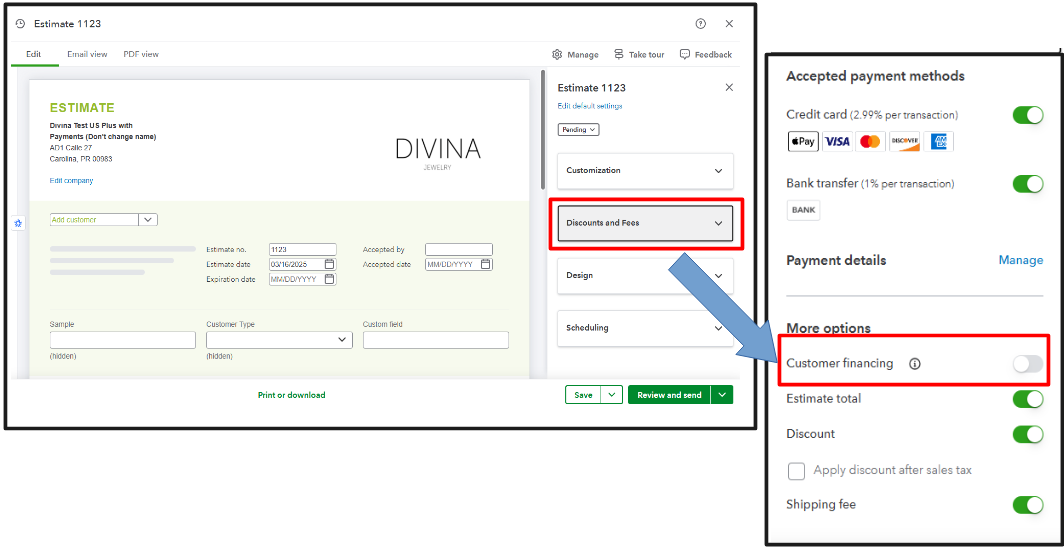
Thanks for coming back here, @seanemery612. Please know that there's another tab in the estimate form you'll need to tick to ensure that the Customer Financing option will show. Let me share this with you.
Turning on Customer Financing in the Account and Settings tab doesn't automatically mean it's included in your estimate. You'll need to have an Intuit Credit Karma account to activate it as one of the payment methods. If you do, you also need to tick the option in the Discount and Fees section in your estimate form.
Also, there's a way to contact QuickBooks Live Support if you need further assistance in setting up your Customer Financing option. Here's how:
Additionally, I'll share this article, which provides a guide on how you can modify your sales form and make it look more professional before sending it to your recipients: Customize invoices, estimates, and sales receipts in QuickBooks Online.
Feel free to return here if you have additional questions about adding the Customer Financing option to your estimate transactions. We'll ensure to assist you promptly. Take care, and have a good day.


You have clicked a link to a site outside of the QuickBooks or ProFile Communities. By clicking "Continue", you will leave the community and be taken to that site instead.
For more information visit our Security Center or to report suspicious websites you can contact us here


