Turn on suggestions
Auto-suggest helps you quickly narrow down your search results by suggesting possible matches as you type.
Showing results for
Get 50% OFF QuickBooks for 3 months*
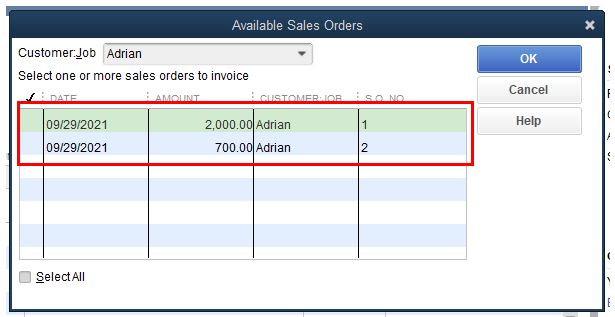
Buy nowWhen we are creating an invoice, QB asks to select the Sales Order to link to the Invoice.
===
===
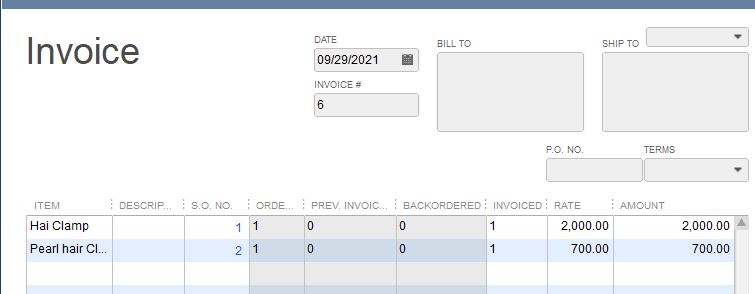
When we select the sales order and items, those items appear on line one of the invoice in the item section with the linked Sales Order.
===
===
Here's where the problem begins, as you can see in the Invoice image the sales order is for 2,700 items, but if one Bin has 2,000 and another Bin has 700, we would need to have two item lines. One item line for the 2,000 in Bin A and a 2nd line for the 700 items in Bin B. The items are stored in two different bins and will be picked from two different bins. When we add the 2nd line for the 700 items, that 2nd line is UNLINKED from the selected Sales Order. You may not select the sales order or key in the sales order number for the 2nd line. You may invoice the customer using the two items lines, but ONLY the line linked to the sales order will show the quantity due the customer reduced. Worse yet, the sales order remains open because the 2nd line is NOT linked to the sales order.
The question is, How do we link the 2nd line to the Sales Order? Let me know if you need additional information.

Thank you fore the screenshots, Toonces. This gives me a visual representation of your concern.
For the system to show two line items on the invoice page, you'll have to create two sales order. Once created, the system will prompt you to select the available sales orders.
Also, if you want to process payments online, you can check this article: Receive and process payments in QuickBooks Desktop.
Keep me posted if ever you need extra help in processing payments. I'll get back to you the soonest. Keep safe!
The users are NOT going to like that one bit. This is going to double and triple their work.
Your screenshot shows two different items. My example is for one item in two different bins.
This question has nothing to do with payments. Why would you even bring that up?
Allow me to join you and provide a few information about how invoice links to sales order, Toonces.
I know how you want to see the same sample screenshot that you've provided in the thread so you can follow it easily. @Adrian_A may have illustrated it differently but with the same goal. Generally, when only one (1) line is added in Sales Order (SO), it will also show one (1) line when invoiced. You'll want to create a sales order with two (2) the same line items and with different bins so it would show the same in your invoice. This way, you'll be able to select 2 items when converting sales order to invoice.
In addition, you may also want to find out more about managing reports in QuickBooks Desktop, go through this article for your guide:
Keep in touch if you have any concerns about linking invoices to sales orders. The Community is always here to help 24/7.
When the sales order is created, the inventory may not have been manufactured yet. The manufacturing manager uses open sales order report to decide what goods to produce and when. The sales order has a due date on it.
The items on the sales order will not have a bin at the time of the creation of the sales order. When goods are made they are put in bins until that bin is full and then onto the next open bin. When the build assembly is created in QB, the user inputs that bin.
When the user creates the invoice, they look for available quantity in the bins on the create invoice screen.
As you can see, the user must be able to also link the sales order with each item on the invoice. There is no predetermined bin for them to input on the sales order and/or select from the select sales order pop up window.
If there was a drop down list in the Multiple SO Invoice screen in the SO No column, one could select the Sales Order to link OR as with Bills, use a Button to link a related Sales Order.
As it is now, the Sales Order will show as open because the inventory items are invoiced on two lines, in two different bins, but the Sales Order is a single line for the inventory items.
===
===
===
If there was a way to link the Sales Order by each item line as the invoice is created/edited, then Sales Orders would show as fully invoiced and not back ordered.


You have clicked a link to a site outside of the QuickBooks or ProFile Communities. By clicking "Continue", you will leave the community and be taken to that site instead.
For more information visit our Security Center or to report suspicious websites you can contact us here


