Turn on suggestions
Auto-suggest helps you quickly narrow down your search results by suggesting possible matches as you type.
Showing results for
CYBER MONDAY SALE 70% OFF QuickBooks for 3 months* Ends 12/5
Buy nowGood day,
I have a question with QB and looking for some help. We received a partial delivery for an open purchase order we had from one of our suppliers. We received it into inventory with a bill the items that were received like we normally do, but noticed that the Purchase Order on QB was being shown as closed even though we still have missing items. On the Purchase Order page on QB, the items table shows a Received Column and a CLSD column. For this particular Purchase Order I am talking about, all the items have a checkmark on the CLSD but not all of them shown as received.
I am looking for help trying to understand why the Purchase Order is being shown as closed even though there are still items that have not been received.
Thanks!
Hello there, JCTorrellas. Let me help you fix the issue about your Purchase Order (PO) in QuickBooks Desktop.
When converting a Purchase Order to a bill, the PO window will show as Received in Full. To convert partial items, simply edit the quantity in the PO.
Here's how:
If someone mistakenly closes a Purchase Order (PO), all the items listed in it will also be marked as closed. To fix this, you just need to change the status of the PO to open, and then it will appear as a billable transaction.
To do this, follow these steps:
For more tips, while handling your purchase orders and other vendor entries, you can check out the resources from this link: Enter expenses, pay bills, write checks, and manage suppliers.
Let me know if you have any other questions about purchase orders in QBDT. I'll be right here to help. Have a good one!
Good day,
I'm not sure if I explained myself correctly. I'll break it down to see if I can explain it better.
1) We place PO with Vendor
2) The Vendor splits the PO and only ships to us what they have currently available, the rest of the items ordered will be shipped to us when they become available.
3) We receive the partial order from our vendor
4) We enter the items into inventory with a bill
5) When entering the bill, we only leave the items the items that were received. All the other items that are still pending are not included in this bill
6) The problem that we have is that even though the bill was only entered for the items received, the PO related to the bill is being marked as closed even though there are items that have not been received.
We re trying to understand why the PO is being marked as closed? Also, on the purchase order window there is a column labeled Received and another on called CLSD. What action triggers a change on those columns?
Thanks!
Thank you for responding and providing more information about your purchase order, JC. I'll help you navigate and manage your transaction effectively.
Typically, an open purchase order with outstanding items won't be closed automatically unless you manually select the Mark As Closed option. I recommend using the Verify and Rebuild tool to ensure the accuracy of your company data. The Verify tool detects common file issues, while the Rebuild tool resolves them, safeguarding the integrity of your financial information.
For data verification:
For data rebuilding:
For detailed instructions, refer to this article: Verify and Rebuild Data in QuickBooks Desktop.
Moreover, the Received column in your Purchase Orders shows the quantity of items received when generating the Bill, with a checkmark in the CLSD column if the item is received in full.
You may find the following articles helpful in tracking your expenses in QuickBooks Desktop:
Should you have any additional questions or need clarification about your transactions, kindly reply to this post. Your inquiries are always welcome, and I'm here to ensure you receive the support and information you need.
Hello, I am experiencing the exact same problem as JCTorrellas. I have taken the steps to Verify and Rebuild, but the PO is still marked as closed and all items received, when that is not the case.
Hello,
I am experiencing the exact same problem as JC. I have verified and rebuilt the data, but this did not seem to solve the issue. The PO was partially received, but it now shows it was received in full and the line is marked closed.
Thanks.
We'll provide details on how the purchase order feature works so you can track the items you order and receive in QuickBooks Desktop (QBDT) accordingly, EIT2024.
In QBDT, recording the full quantity of items through an Item Receipt will close your purchase order and show it as Received in Full. Editing the quantity on your bill will maintain the same status. In your case, we'll have to delete the Item Receipt to re-open your purchase order transaction. To do this, here's how:
After that, pull up the purchase order and enter an Item Receipt transaction that reflects the right quantity received.
On the other hand, if you've reentered the partial quantity on the bill but still closed the purchase order, this can be an issue with your company file. You can fix this using QuickBooks File Doctor.
Additionally, purchase orders are an essential part of your Accounts Payable workflow in QBDT that helps you track the goods and services you order. You might want to check out this article to learn more about this procedure: AP scenarios in QuickBooks Desktop.
Feel free to reach out to us if you have any more queries or if there's anything else you'd like to know about managing purchase orders and vendor transactions in QBDT. We'd be more than happy to assist you.
This is something Quickbooks might want to check on.
I followed all of your suggestions and did not work.
I have had this issue several times before and opted to remove the items I wanted to received in my second shipment and create a new PO and sales order to be linked.
But that is not the desired and best procedure.
My issue now is that it keeps the PO open for the unreceived items, however, when I wish to receive my second shipment this PO # is not listed in the open sales order list for this vendor.
This issue started when the 24.0 update was completed.
I know this hasn't been an easy process for you, BECKSG. I appreciate your time in doing all the suggested steps given by my colleagues.
Let me make it up to you by ensuring the issue in your purchase order gets investigated.
Since none of the troubleshooting steps fixes the issue, I recommend contacting our QuickBooks Support Team. They'll use their tools to check the system and see what's preventing you from receiving your second shipment. It'll also allow them to submit a ticket to our engineering team to alert them about the issue if necessary.
Here's how to reach them:
After fixing the issue, do you need to verify and check where your company stands in terms of expenses and accounts payable? I'll add this article if you need help in the future: Customize vendor reports.
Feel free to drop by again if you have more concerns about your data, network settings for QuickBooks, and entries. I'm here to help.
This is something Quickbooks might want to check on.
I followed all of your suggestions and did not work.
I have had this issue several times before and opted to remove the items I wanted to received in my second shipment and create a new PO and sales order to be linked.
But that is not the desired and best procedure.
My issue now is that it keeps the PO open for the unreceived items, however, when I wish to receive my second shipment this PO # is not listed in the open sales order list for this vendor.
This issue started when the 24.0 update was completed.
Can someone tell me did you ever find a way to fix this? We just made the change to QuickBooks Enterprise using advanced inventory from NetSuite and this is a huge problem for us!! Thanks in advance
Thanks for joining the thread, @Sfalcon77. Let me help you get past this issue.
If you have an open purchase order with outstanding items, it won't be closed automatically. You'll need to manually click the Mark as closed button.
To resolve the problem, you can utilize the Verify and Rebuild tool. The verify tool finds common issues, and the rebuild tool fixes them.
Here's how:
For more detailed information, visit this article: Verify and Rebuild Data in QBDT.
If the issue persists, manually close the purchase order by clicking the Mark as closed button. I also recommend reaching out to our support team for further investigation.
Moreover, you can accept inventory with or without a bill after recording a purchase order. For more details, check out this article: Receive inventory.
Shoot me a reply if there's anything else I can help you with besides purchase orders and partial bills. I'd be more than willing to assist you. Take care.
I follow the steps to Open a closed Purchase Order and when I double click the PO, I see a Mark as Closed to click on but am unable to find the Mark as Open that is described in the steps given
Hello, StashVSP. Let me provide additional information about opening closed purchase orders.
The reason you're only seeing the Mark as Closed option instead of Mark as Open when opening a closed purchase order is due to the way the purchase order was closed. The Mark as Open option is only available for purchase orders that were manually Marked as Closed.
For purchase orders that were automatically closed due to being linked to a bill, the Mark as Open button will not be available, and only the Mark as Closed button will appear. While the Mark as Closed option remains visible, it will not perform any action since the purchase order is already closed. In this case, you’ll need to manage the linked bill first.
Let me know in the comments if you have follow-up questions about managing your purchase orders.
I have adjusted the linked bills so that the Purchase Order should not have enough billed to allow for it to be closed. I am unable to figure out a way to open it. The final order which closed it was an Item receipt. I adjusted down the item receipt so that there should be insufficient stock to close the PO.
Hi there, Stash.
Since you mentioned that you adjusted the bill, you have the option to mark the associated purchase order (PO) as Open.
Please know that as long as the bill connected to the PO is properly updated, and the PO does not show as Received in Full, you can mark the PO as either open or closed. For reference, I’ve attached a screenshot below: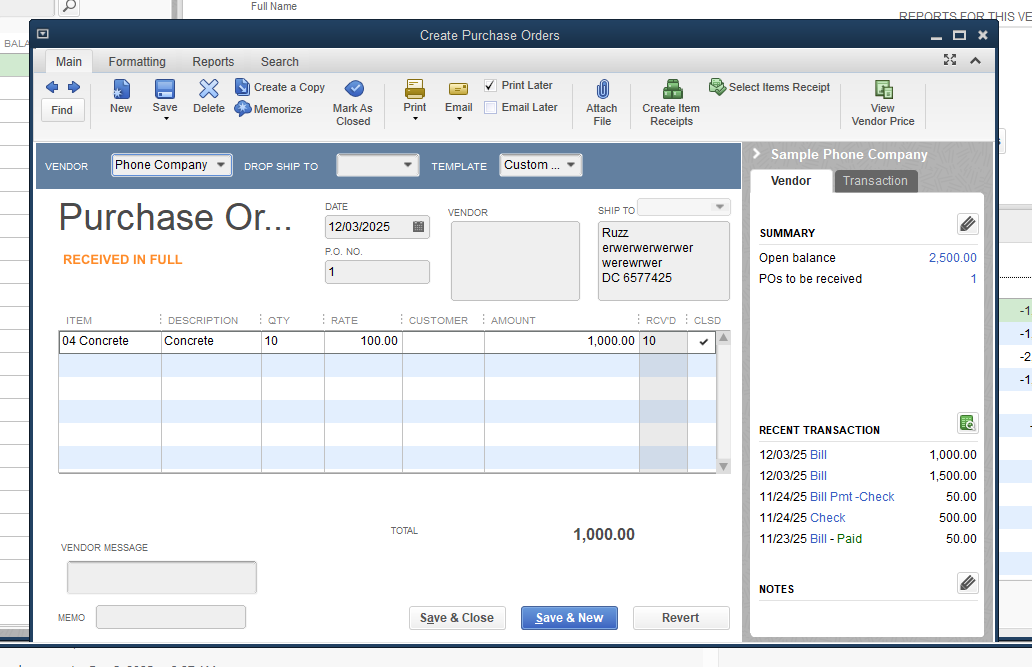
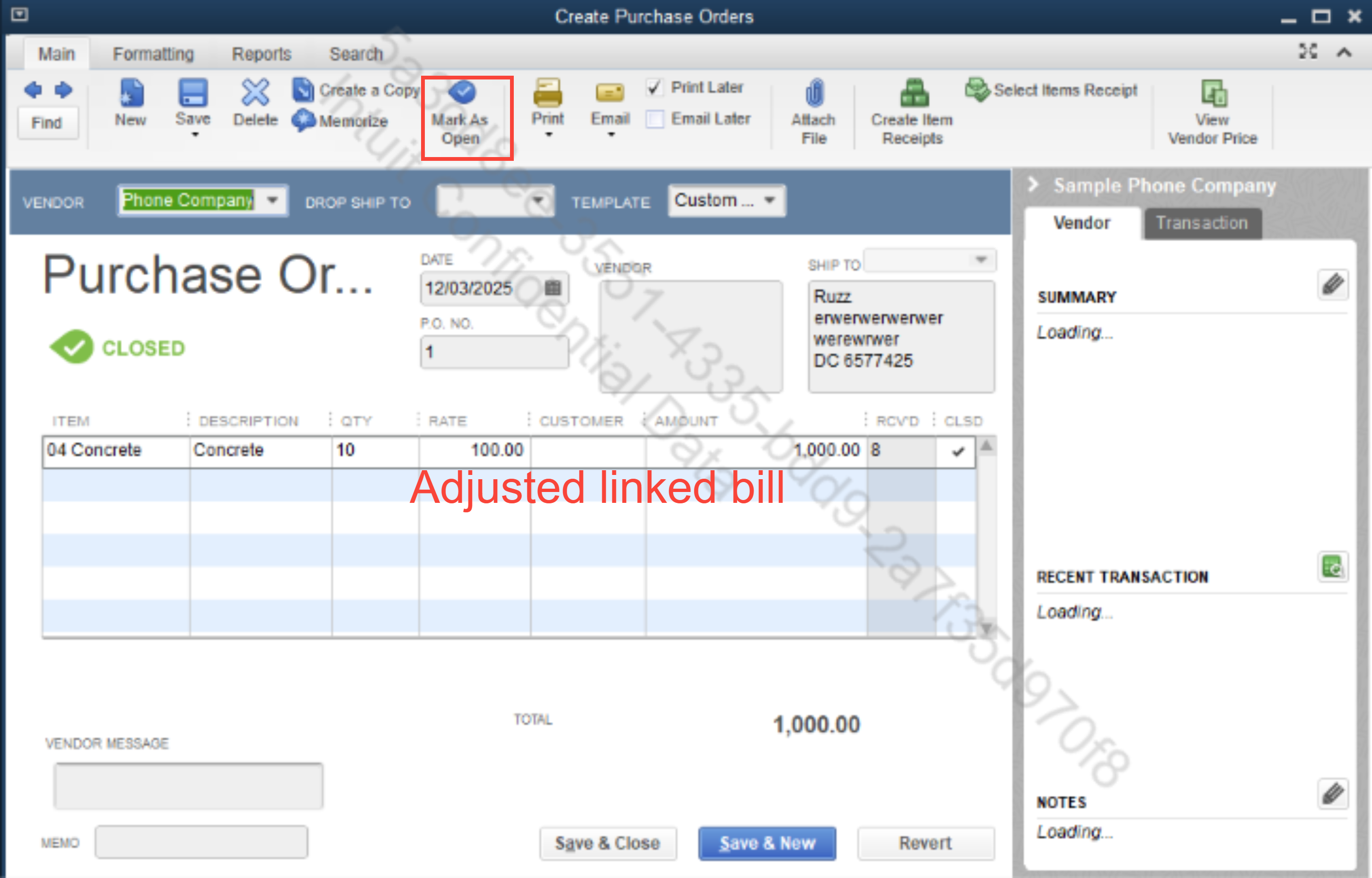
If the option to mark the PO as Open or Closed doesn't appear, log out of your account and log back in to refresh the company file. This will update the system and ensure the options and statuses display correctly.
If you have additional questions, don’t hesitate to revisit this thread.


You have clicked a link to a site outside of the QuickBooks or ProFile Communities. By clicking "Continue", you will leave the community and be taken to that site instead.
For more information visit our Security Center or to report suspicious websites you can contact us here


