Turn on suggestions
Auto-suggest helps you quickly narrow down your search results by suggesting possible matches as you type.
Showing results for
Get 50% OFF QuickBooks for 3 months*
Buy nowI have a new account and paid subscription done, but the I cant logged in and continuously shown the massage ,
I make the new company and that's logged in but this was not …

Hi there, @araesthetics. Let's work together to get you up and running smoothly.
It's possible that there might be a delay in processing your subscription. Give it some more time and try again later. You can refresh the page by pressing the F5 key or using your browser's refresh button. You may also review your account status by following these steps:
Additionally, errors can occur due to temporary glitches. Cached data can also interfere with the proper functioning of web applications. These files are stored to help websites load faster when you revisit them. Clearing them will do the trick.
First, let's try accessing your account through an incognito window to rule out the possibility of a webpage issue. You can refer to these shortcut keys to open an incognito window in all supported browsers:
If it works, you may have accumulated too much historical data in your browser. I'd recommend clearing its cache so you can access QuickBooks with a clean slate. You can also use a different supported browser to see if the issue persists.
If none of these steps work, I recommend reaching out to our Customer Care Support team. They have the expertise to thoroughly investigate the situation. If necessary, they can raise the issue to our engineering team for a more in-depth resolution.
Here's how:
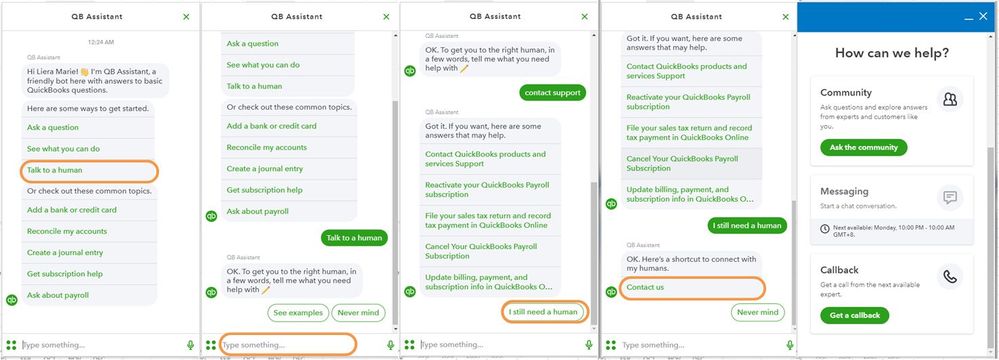
Additionally, this article offers guidance on initiating your QBO journey and making necessary adjustments to settings: Get Started with QBO.
Feel free to return to this thread whenever you need additional assistance in accessing your account. The Community is here to help you anytime. Stay safe and be well!
It may be because QBO seems to be having issues today. We have a office of about 100 employees and everyone seems to be having QBO issues. Pages are not loading or white screens seems to be the theme today
Still its not working and shown as
Still Waiting , please do the needful
Thank you for your swift response, @araesthetics. We appreciate you for diligently performing the steps my colleague provided. Allow us to help you direct to the best possible help.
Since the troubleshooting steps weren't able to fix the issue. We recommend contacting QuickBooks Online Live Support. They have tools to review your account status and check for possible errors.
On top of this, they can also perform a thorough study of this issue and create an investigation if needed. Feel free to follow the steps below to contact support:
After the issue is fixed, you can utilize these articles in managing your QBO account:
A huge thanks to you, @araesthetics, for choosing QBO as your partner in managing your business finances. Rest assured, we'll do our best to answer your queries as soon as possible. Keep safe, and have a good day.
Welcome to the Community, Abdul. I appreciate you providing us with a screenshot of the error you received. Let me help you overcome this so you can access your account seamlessly.
Accessing your QuickBooks Online is indeed essential to continue with your business activity. To rule out possible webpage issues, I recommend utilizing a private browser. It will help you avoid discrepancies related to your browser's cache that might be corrupted.
You can always refer to these keyboard shortcuts depending on your browser:
Once you successfully log in to your account, you can switch back to your regular browser and clear the cache. Alternatively, you can use another supported browser.
For further details on recovering your Intuit account when you have trouble signing in and managing your QuickBooks Subscription, you can refer to these articles as your guide:
Please inform us immediately if you have additional clarifications regarding your QuickBooks Online Account. I'm always here to lend a hand.
i try but its not work same problem
We appreciate you taking the troubleshooting steps provided by my colleague, @abdulrauf13118.
Since the steps weren't able to fix the issue, we recommend contacting our Customer Care Support Team. They have the expertise and tools needed to review your account status and identify any possible errors that may be causing this. Rest assured, we will work diligently to resolve this and ensure you have a seamless experience with our services.
Here's how to contact our support:
Once this is resolved, you can connect your online bank to your QuickBooks Online account, and the transactions will automatically be downloaded and categorized. Furthermore, it will help you save time updating your bank feeds.
For future reference, to review and approve your downloaded transactions, you can refer to this article: Categorize online bank transactions.
Feel free to reach us back here in the Community if you need more help in managing your QBO account. We're always here to assist you.
i talk to customer care but they say they don't know how much time he take to solve my problem its some wrong thing happen in my account but my account is new how this is possible and they say they don't know they take i don't know how much time to solve me problem

Same issue with me as well. Kindly provide any solution to this.
I appreciate you for updating us in the thread, @Anonymous.
Allow me to share information on how you can access your Quickbooks Online account seamlessly.
Have you tried performing the troubleshooting steps provided above? Like clearing the cache, refreshing the page, and reviewing your account status?
If the issue persists, I suggest contacting our Customer Care Support Team. They have tools to identify and examine what hinders you from logging in to your company. Please follow the steps below:
Once settled, I'll add this article again to help you get started: Get started and adjust settings after you sign up for QuickBooks Online.
Don't hesitate to hit the Reply button to inform us in the thread if you have further questions about your account in QuickBooks Online. We're always willing to help.


You have clicked a link to a site outside of the QuickBooks or ProFile Communities. By clicking "Continue", you will leave the community and be taken to that site instead.
For more information visit our Security Center or to report suspicious websites you can contact us here


