Good thing you posted your concern here on the Community page. I'll gladly share some insights about the Categorized section on the Banking page.
The "Categorized" section displays all transactions that have been categorized from the bank feeds. These are the records you've already successfully matched or added to your financial records.
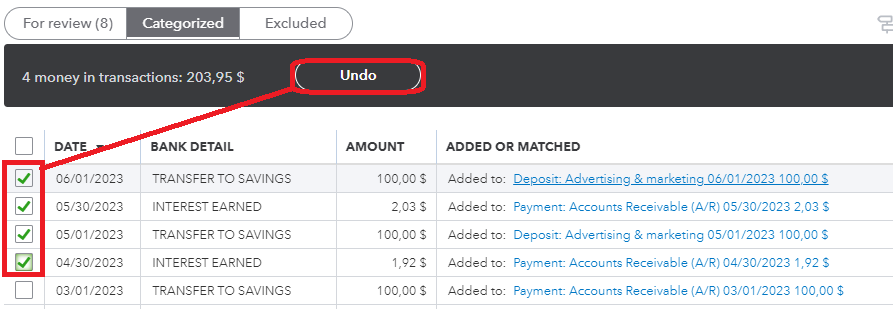
The Undo button indicates that once you click on it, the transaction will no longer show up under the categorized tab. It places them back in the For review section. Please know that the transactions there don't affect your books, only the ones under Categorized.
On the other hand, if you want to undo multiple transactions all at once, you can click the box for each to save time. You can refer to the screenshot below for visual reference.
To learn more about categorizing transactions, you can read through this article: Categorize and match online bank transactions in QuickBooks Online. This is also to ensure that your transactions will go to the correct accounts.
Moreover, it's important to reconcile your bank after categorizing to maintain the accuracy of your records.
I'm willing to provide more information about other areas in QuickBooks. Just reply with the details below and I'll get back to you.


