Happy to help, @efish123.
I'll make sure that you can send an email to all of your vendors at once in QuickBooks, Online. This way, you can save time and finish your other tasks.
Ensure that the email address for your vendor is added to the system. So, it will show up there, and you can send them all at once.
Follow the steps below to enter:
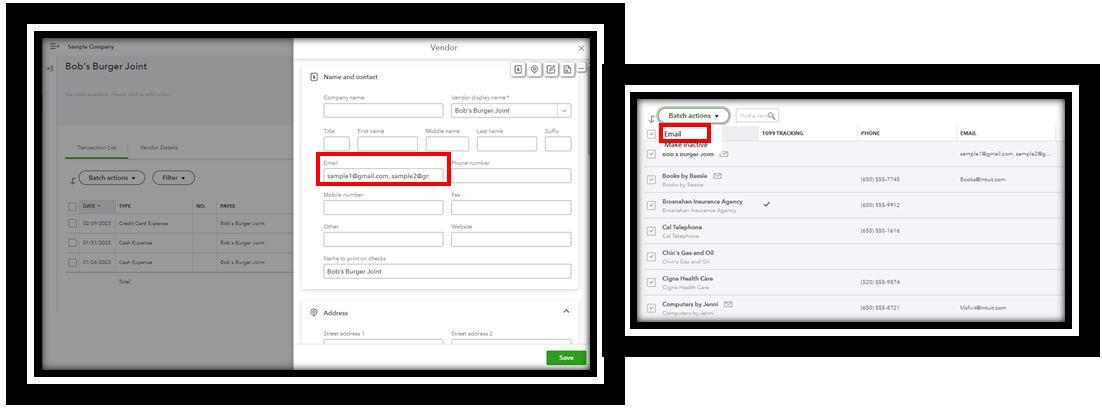
- Go to the Expenses menu and select Vendor.
- Double-click the vendor name and click Edit.
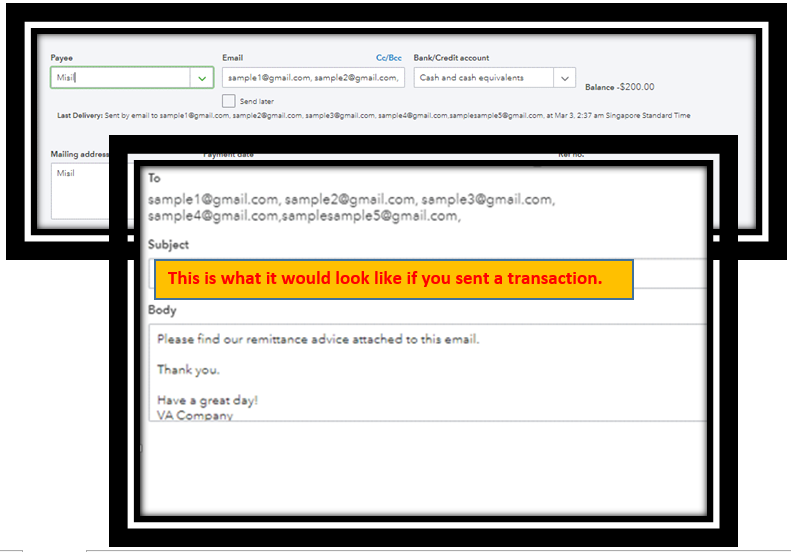
- Type their email in the field. You can add multiple emails by putting a comma between them. You can only use up to 101 characters. For example:
- sample1@gmail.com, sample2@gmail.com, sample3@gmail.com, sample4@gmail.com,samplesample5@gmail.com,
- Click Send.
- Repeat the steps with your other vendors.
- Once done, click the Batch actions again and choose Email.
Check out the articles listed below to learn how to manage your vendor transactions, personal information, and other related matters:
Helping out is something I enjoy doing. So, feel free to ask your vendor questions here. We promise to respond as quickly as possible. Keep safe!


