Get 50% OFF QuickBooks for 3 months*

Buy now
cancel
Showing results for 
Search instead for 
Did you mean: 
Announcements
Simplify payday and set payroll to run automatically on QuickBooks. Explore QuickBooks Payroll
Rajeev-Krishnan
Level 1

where are the purchase orders stored now - this new template is quite confusing

I used to go to Expenses and list my POs but now i cant see a list of POs

1 Comment 1
Nicole_N
QuickBooks Team

where are the purchase orders stored now - this new template is quite confusing

You can still find the list of your purchase orders by navigating to the Expenses menu in QuickBooks Online, Raj.


Once there, head to the Expense Transactions section, where you can use the drop-down menu to select Purchase Orders. It will display your list of purchase orders, similar to how it worked in the previous interface.


See the screenshot below for your visual guide.
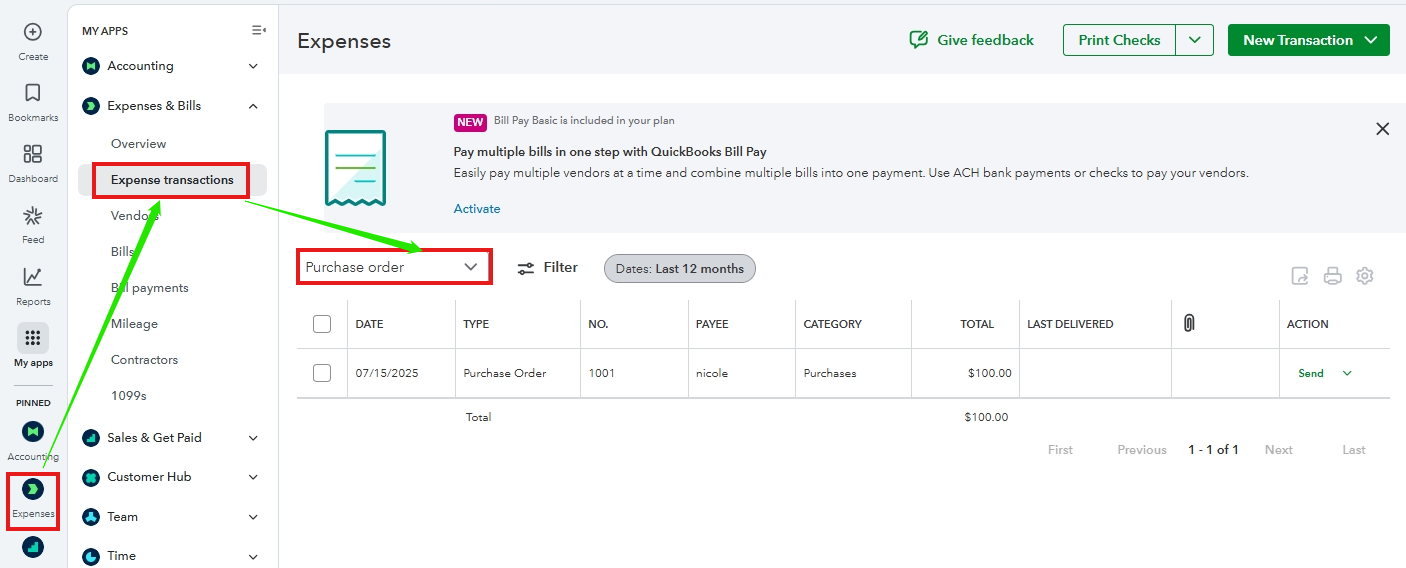


You can also locate it from the Inventory menu as seen in the image below.


PO.png

If you have additional questions or need further assistance navigating the updated interface, please don’t hesitate to reach out. We’re here to guide you every step of the way.

Need QuickBooks guidance?
Log in to access expert advice and community support instantly.

Need to get in touch?

Contact us