Turn on suggestions
Auto-suggest helps you quickly narrow down your search results by suggesting possible matches as you type.
Showing results for
Get 50% OFF QuickBooks for 3 months*
Buy nowHello,
We have a QB33 card reader that wasn't working when we initially received it a few months ago. We recently got it to connect to our phone and set it up to take payments but it hasn't been able to successfully run a transaction, it displays an error message when sliding in a card or just doesn't show anything while the card is in the reader. Additionally, the reader doesn't power on by itself, it needs to be plugged into a power source in order to turn on and stay on. Any troubleshooting steps we can take to help fix this? We've tried uninstalling/reinstalling the gopayments app, forgetting and reconnecting the card reader, and left the reader charging until it shows full battery, but still no fix to the issues we're seeing.
Thanks for sharing your concern in such great detail, @AT-99.
I'm here to ensure you can run a transaction using your card reader. Can you share with us the error message you're getting? Using this new QuickBooks Card Reader (QB33), make sure to update the GoPayment mobile app via Apple Store or Google Play to version 21.08.0
Here's how:
Apple device
Android
After that, update the QuickBooks Card Reader to firmware 1.01.00.11. This can be done after installing the latest GoPayment mobile app update.
Follow these steps:
However, I'd still recommend reaching out to our Customer Care Team support. This way, they can verify why your card reader is not powering unless plugged into the power source.
Here's how:
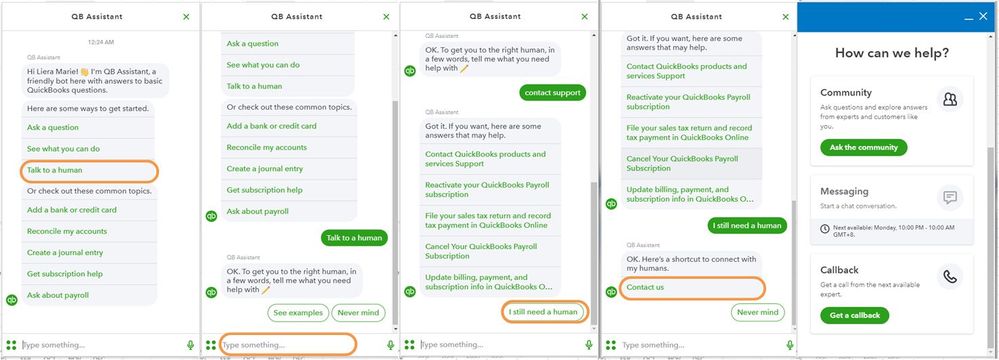
For more details about our support availability, refer to this article: Contact Support.
You can also check out these articles to make sure you get everything up and running
You can leave a comment below if you have any follow-up questions about accepting payments. I'm always here to help. Have a good one.
Hello,
Unfortunately I've updated the card reader firmware but it still does not read cards, it either doesn't do anything when the card is inserted, or it will beep and the connected phone will display a message saying "error reading the card, please remove and follow the prompts". The contactless pay method works but otherwise the chip cards don't seem to be read correctly. Additionally, I'm not able to see the "Talk to a Human" option when I tap on the "Help" icon, I only see "GoPayment Guide", "Tell us what you think", and "About".
I can share some information that will help you fix the error you're having with your QB33 Card Reader, @AT-99.
Since you're still having the error after trying the steps provided above, I suggest reaching out to our Customer Support team. They can isolate the issue you're having in a secure environment and help you in resolving it.
You can reach their customer support from your QuickBooks Online (QBO) account:
You can check this article for more information about the different types of support we offer and their availability: QuickBooks Online Support.
You can also get the phone number for GoPayment (Mobile App) by going to this article: Contact Payments or Point of Sale Support.
Here's more information on how to resolve GoPayment issues: Fix issues with the GoPayment and QuickBooks mobile app card reader.
You can always get back to me if you have questions or other concerns by leaving a comment below. I'm always here to assist. Have a great rest of the day.
You have clicked a link to a site outside of the QuickBooks or ProFile Communities. By clicking "Continue", you will leave the community and be taken to that site instead.
For more information visit our Security Center or to report suspicious websites you can contact us here


