Turn on suggestions
Auto-suggest helps you quickly narrow down your search results by suggesting possible matches as you type.
Showing results for
Get 50% OFF QuickBooks for 3 months*
Buy nowI added a new user with the role of Viewing Reports. But sadly the new user cant see anything.
I want my new user to see only clock in and out times and TIME reports....not any Payroll.
1) what website should this TIME only (T-sheet ) user sign into,
2) The new user is able to log into QB Payroll but is told they are unauthorized
3) When the new user tries to log into Workforce it says there is no associated company was found for user
HELP!
Thanks
LDO
Hi there, LDO. Users with the Viewing Company Reports role can generate all reports, but they are unable to access clock-in and clock-out timesheets.
Currently, there is no specific role that only allows users to view employee clock-in and clock-out times and run time reports. However, you can assign the Standard Limited Customers and Vendors role, which grants access to Time Tracking while keeping payroll information restricted.
After adding the user with the recommended role, they will receive an email inviting them to accept the invitation.
Once they accept, they can sign in to qbo.intuit.com using their associated email address.
After logging in successfully, they can run the Itemized Total Time report to view employees' timesheets.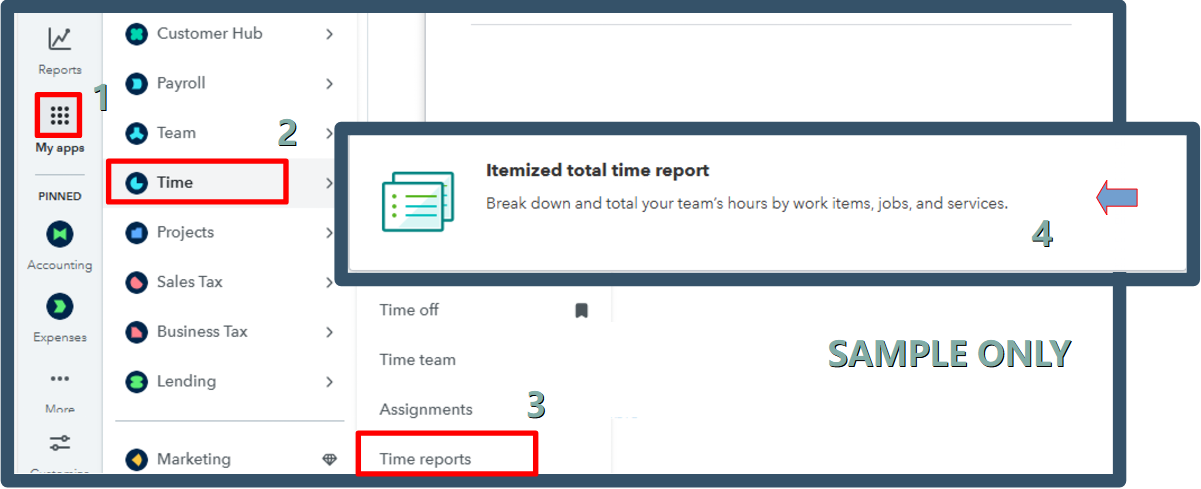
To address your second concern, the message your user received indicating that they are unauthorized occurred because they do not have the necessary permissions and are not the primary admin.
Regarding the QuickBooks Workforce app, please know that it is designed for employees to clock in or out and view their pay stubs.
The new user encountered an error message indicating that no associated company was found during their login to the Workforce app, suggesting they don't have a linked company profile in the system.
Please let us know if you need any further clarification. We're here to assist you.
The new user is not an employee that is paid thru QuickBooks.
So how do ilink a company to her?
Thanks
We only have payroll and time . We do not have accounting,. so we do not have Standard Limited Customers and Vendors role,
The new user is not an employee so she does not get paid by intuit quickbooks online payroll. So how do i link her to a company?
Hi there, LDO.
Currently, QuickBooks Time does not allow an added user who is not an employee to view time and reports. To grant a user TSheets access for these functions, they must be added as an employee to access Time and Reports.
With that said, this would be the perfect time to submit a feedback request to our Product Development Team. Our developers review each request and consider it for future updates.
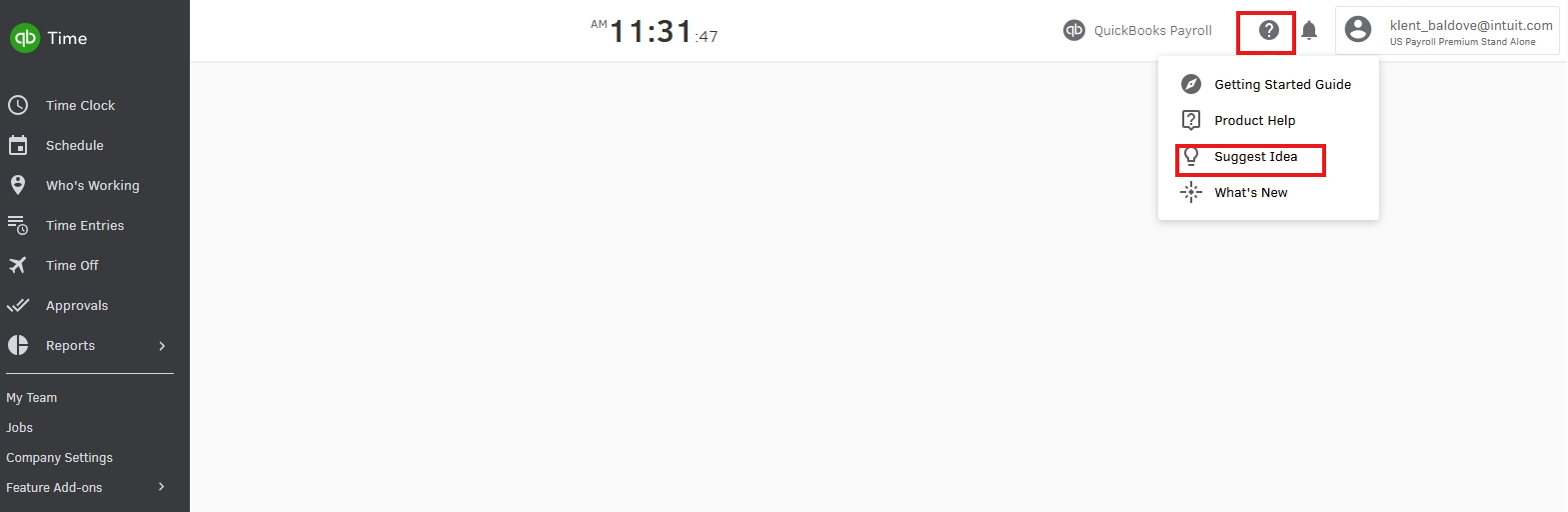
If you have additional concerns related to QuickBooks, feel free to return here for continuous assistance.


You have clicked a link to a site outside of the QuickBooks or ProFile Communities. By clicking "Continue", you will leave the community and be taken to that site instead.
For more information visit our Security Center or to report suspicious websites you can contact us here


