Turn on suggestions
Auto-suggest helps you quickly narrow down your search results by suggesting possible matches as you type.
Showing results for
Get 50% OFF QuickBooks for 3 months*
Buy now
I can see the importance of having the contractor's bank information shown in QuickBooks Online (QBO), usercrustypancake.
Upon reviewing our records, I've found that there's an open investigation regarding your concern. Our software engineers are working diligently to identify the root cause of the problem. We assure you that we are taking all necessary steps to get this rectified as soon as possible.
For now, I recommend contacting our support team. This way, you'll be added to the list of affected users and receive status updates through email or SMS. For a faster transaction, provide this investigation number to our representative: INV-90187. Here's how:
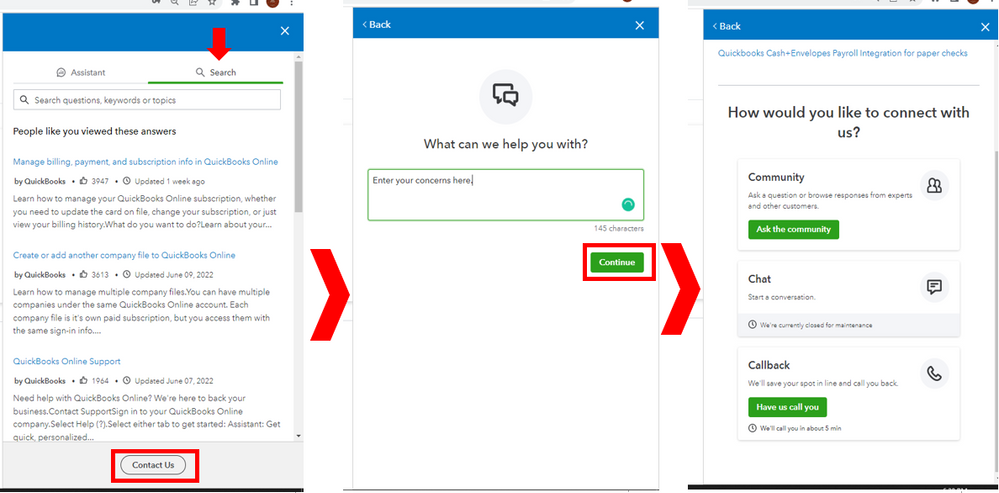
Your patience and understanding are greatly appreciated as we work to address the issue. We look forward to providing you with the best possible experience in the future. If there's anything else that I can do for you, just tag my name in the comment section. Take care!
What's the update on this issue. I just set up a new contractor and am having this same Issue she has all the correct thing in her account but its making me upload information manually, Not even her w9 was shared and her direct deposit info isn't either.
The issue mentioned above was already closed, AIW. No worries, I'll ensure to provide a resolution concerning the contractor's bank information within W-9.
Once the contractor completes all the details from the email invitation, employers will get notified of the completion. After that, it will automatically flow into their W9.
However, if you've received this notification and the bank isn't displaying, we can let your contractors sign out and log back to their profiles. Otherwise, we can advise them to clear the browser cache.
If the issue persists, we suggest calling our QuickBooks Online Payroll Support Team. They have the tools to check the root cause of this case.
To reach them, click the Help button at the top-right corner of your QBO account and select Contact Us to talk with a live agent. Ensure to review their support hours to know when agents are available.
In addition, See these resources about managing your payroll forms and 1099 in QuickBooks Online Payroll.
If you have concerns about your contractor profile, let me know in the comment section. I'm always here to help.


You have clicked a link to a site outside of the QuickBooks or ProFile Communities. By clicking "Continue", you will leave the community and be taken to that site instead.
For more information visit our Security Center or to report suspicious websites you can contact us here


