Turn on suggestions
Auto-suggest helps you quickly narrow down your search results by suggesting possible matches as you type.
Showing results for
Get 50% OFF QuickBooks for 3 months*
Buy now
Hi there, @Beckie.
In QuickBooks Self-Employed (QBSE), you can make your vehicle inactive so it won't appear in your list of vehicles inside your company file. I'll write down the steps below to get you going. To begin, here's how:
See this handy article for further guidelines: Set up vehicles and mileage tracking in the QuickBooks Online mobile app.
Apart from that, I've also got you this helpful article about handling bank transactions inside QBSE: Categorize transactions in QuickBooks Self-Employed
.@beckie, I look forward to having you in the Community space again. Please don't hesitate to leave a comment below if you need further assistance managing vehicles inside QuickBooks. I've got your back. Take care!
I don't see any button to make the vehicle inactive in the Manage Vehicles section. Maybe the button doesn't show up if you have only one vehicle. It says the vehicle is my primary vehicle, maybe that's why? The only options I got are to mark it owned vs leased.
The button does not exist for me. Maybe it's because I only have one vehicle, and it's my "primary" vehicle.
Is there any answer to this question? I have the same issue. There is no way to make it "inactive."
Hi there, gdeleon101.
Allow me to share additional information about making your vehicle inactive in QuickBooks Self-Employed (QBSE).
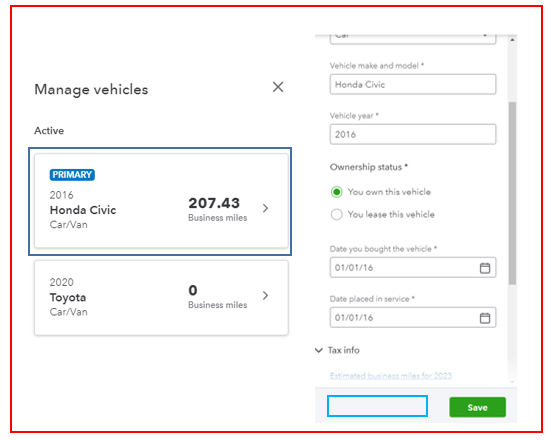
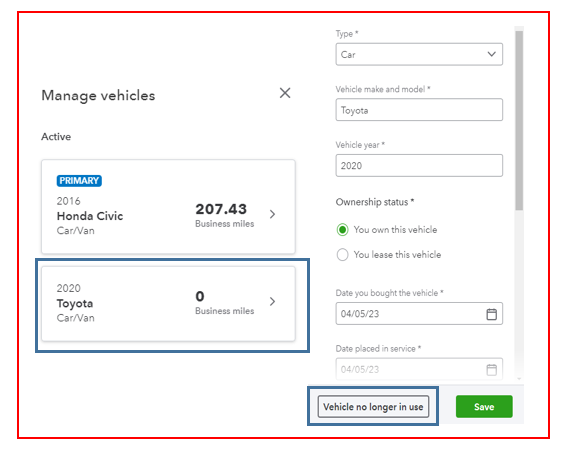
The option to select the Vehicle no longer in use will only show if it's a non-primary vehicle.
Please see the screenshots for your reference.
I've also included some articles that will help you in tracking and managing your business miles:
Keep in touch if you have you have more questions about managing vehicles in QBSE. I'm always here to help. Have a great day!
i'm having the same issue. i dont see a button to remove it, and i dont have a primary vehicle so i cant deactivate it either.
Hello there, @printopossum.
I'll share more details about managing vehicles in QuickBooks Self-Employed (QBSE) to help you track your mileage and expenses accordingly.
For the time being, you can use more than one vehicle for your business. But you can only have one primary vehicle in QBSE. The option to remove or inactivate one is only possible for non-primary ones.
You can refer to this article to learn more about tracking miles and matching expenses for each of your vehicles in QBSE: Track expenses for vehicles in QuickBooks Self-Employed.
Also, you can use the QBSE mobile app to automatically track your business miles. You may want to check out this article for the complete guide: Automatically track mileage in QuickBooks Self-Employed.
Please let me know in the comments if you have other mileage concerns or questions about managing vehicles in QBSE. I'll gladly help. Take care always, @printopossum.
PLEASE. We want to delete the PRIMARY vehicle because we have NO vehicle. Think your answer instead of copy-pasting your manual.
Hi there, @marrrria.
I recognize how crucial it is to delete the primary vehicle for your business. Since QBSE automatically creates a default vehicle in the Miles tab, the option to remove this is currently unavailable.
Discovering new ways to adapt to our customer’s needs is how QuickBooks gets even better. Your feedback helps our Product Development team determine which feature will be implemented in the next update. The change is also based on how popular a specific feature request is.
That said, I suggest sending a recommendation to our product developers. Let me show you how:
I also encourage you to visit this resource to find out how QBSE calculates the mileage: Learn how QuickBooks Self-Employed calculates mileage deductions.
As always, please don't hesitate to comment below if you have any other questions about removing a vehicle from QuickBooks. I'm here to help always. Take care!
Will a vehicle still appear on our taxes if we can't delete it? Will we get in trouble?? What do we do if we just don't have a car anymore?
You won't get any issues with your vehicle information in QuickBooks Self-Employed (QBSE), @jmassoudi. I'll share more details about this below.
Though you don't have a car, the QBSE platform requires you to enter vehicle information to complete your tax details. Since you're unable to bypass this process, you can enter sample or dummy details to do this instead.
The sample or dummy vehicle information won't appear or affect your estimated taxes, even if you're unable to delete it in QBSE. This is because there'll be no vehicle-related expenses categorized and trips entered into the program.
Also, since it's time to file your taxes, you may want to check out this article as your reference in preparing them in QBSE: QuickBooks Self-Employed annual tax guide.
Please keep me posted in the comments if you have other concerns about preparing and filing your estimated taxes in QBSE. I'll gladly help. Take care, @jmassoudi.
This makes no sense.... just give us a way to delete the vehicle.... or give me a car.
Not everyone drives!
Hi, @Darren7070. I can see the importance of achieving this task.
Please know that the option to delete the vehicle that you no longer use is unavailable in QuickBooks self-Employed (QBSE). We can only inactivate them specifically non-primary ones.
For now, it's best to relay your feedback to our product engineers. This way, they can further review which parts of the program need enhancements and consider adding them to future updates. Please refer to the steps below:
Here's some article to learn more about mileage tracking in QBSE:
I'll be in the Community space in case you have other QuickBooks-related questions. Keep safe and have a good one.
QuickBooks has been automatically keeping track of my mileage. It looks like it’s going to make me go through all of my mileage from 2022 and mark them as personal in order to proceed. Is there anyway to bypass that since I can’t claim those miles (I borrowed my boyfriend’s car for work related stuff).
Hi, jmassoudi. I have some information on how you can manage your trips in QuickBooks Self-Employed.
Are you trying to track trips for the current year? If so, you can change the Tax year to 2023 in the Mileage window. This will filter out trips QuickBooks automatically added.
Otherwise, if you're trying to delete the other trips, you can follow the steps below:
I've added this article for more details about automatic mileage tracking: Automatically track mileage in QuickBooks Self-Employed.
You can also use these links as a reference if you need help fixing any mileage tracking issues:
Feel free to get back to this thread if you have other mileage concerns. I'll be here to help.
There. is no such button
I'm here to locate the button you're looking for, Seth.
Beforehand, I'd like to know the exact button you can't see in your QuickBooks Self-Employed (QBSE) account. Is it the button for removing vehicles? Adding additional details will help us provide accurate steps to find it.
If you plan to inactivate a vehicle in QBSE, please ensure this isn't set up as primary. If so, it's the cause why the Vehicle no longer in use button isn't showing.
To rectify this, I recommend making other vehicles primary to inactivate that particular vehicle. Here's how:
After that, you can delete the other vehicle by selecting it and clicking the Vehicle no longer in use button (located at the bottom part). Once done, this will show under the Inactive section.
If it isn't added as primary but the button is still missing, I suggest logging in to your QBSE account via a private window. It'll help us determine whether this is a cache-related issue. The browser you often use utilizes cached data to load web pages faster. However, excess accumulated cache can affect the program's performance and functionality.
The incognito mode will assist us in determining its exact cause since this doesn't save your browsing history and doesn't store cache. Here are the keyboard shortcuts:
Once logged in, inactivate the vehicle. If you can do this, clear the browser's cache. Doing so improves system performance, fixes program problems, and frees storage space. Using other supported browsers also helps us verify if this is a browser-specific problem.
If you're referring to another button in QBSE, please don't hesitate to get back on this thread. This way, we'll be able to provide the assistance you need. Sharing a screenshot would be a great help, too.
Additionally, I've added these resources to help you track miles and match expenses for each vehicle in QBSE. It'll ensure you get the maximum deduction and keep your books organized for tax season:
You can click the Reply button if you need assistance deleting vehicles, trips, or other entries in your QBSE account. I'm always ready to help you out.
This has been an issue for MANY years. I am contemplating cancelling Quickbooks and using alternative software because QB can't make this common request happen. All I want is a "delete vehicle" button.
And yet, Quicbooks has forced me to claim I own a vehicle to proceed with my taxes for YEARS. There is no "delete vehicle" button, and I can't click a button when asked about a vehicle.
This is useless advice if you just simply don’t have a vehicle at all anymore. Every year since I got rid of my car I’ve been forced to claim a vehicle that I don’t have and it’s infuriating.
Same! Every year I finish my taxes screaming at my computer because of the vehicle issue.
Right?! Like what happens if the IRS notices that we’re claiming something we don’t have?!


You have clicked a link to a site outside of the QuickBooks or ProFile Communities. By clicking "Continue", you will leave the community and be taken to that site instead.
For more information visit our Security Center or to report suspicious websites you can contact us here


