Let's go to the customer's Transaction List to locate the associated payment, @troy15. You'll have to delete it from there, so it won't link to your invoice. This way, the system will make the invoice still due or with "open" status again. I'll guide you how.
- Go to Sales from the left menu and choose the Customers tab.
- Locate and click on the customer's name.
- Select the invoice payment.
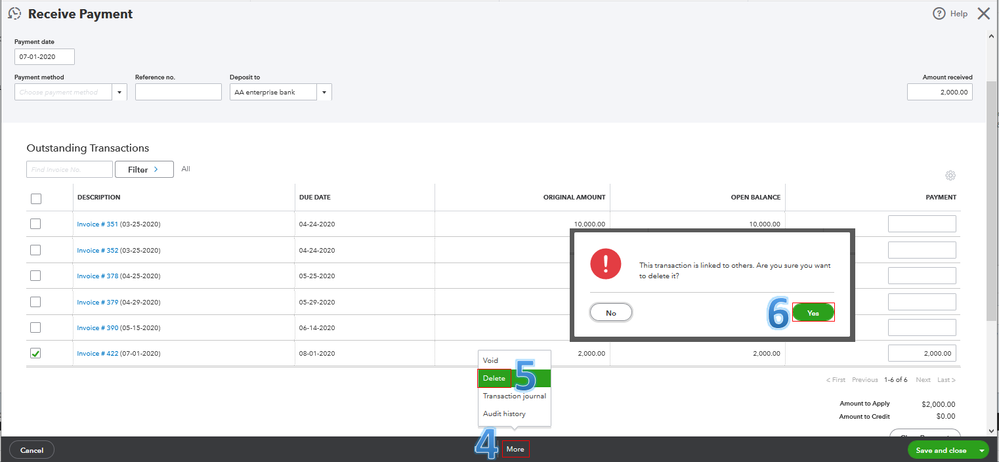
- Click More in the footer.
- Choose Delete.
- Tap Yes to confirm the deletion.
I've attached a screenshot below to show you the last three steps. For the detailed instructions, see Step 2 through this article: Voiding Or Deleting Transaction in QuickBooks Online (QBO).
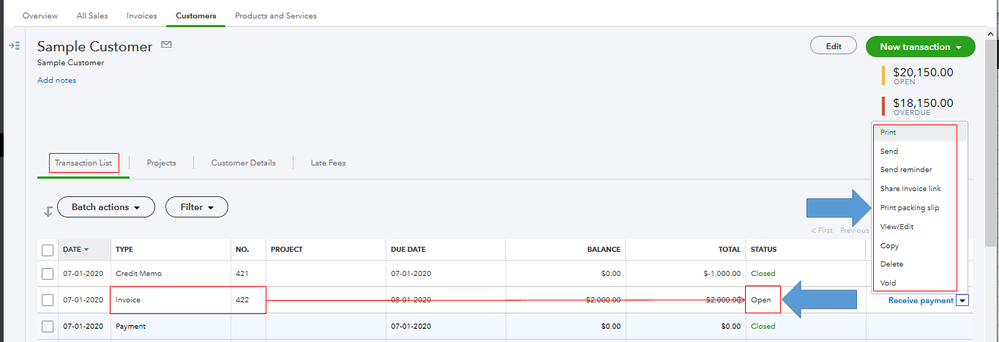
Once done, you'll see Open under the Status column of the invoice from the Transaction List. On this page, you can also view, edit, void, copy, print, or send your customer transactions. See the screenshot below for your visual reference. It helps you ensure their balances are up to date and accurate in QBO. For more details, visit this article: Managing Sales Transactions.
I'll be right here to help if there's anything else you need. Enjoy the rest of your day, @troy15.




