Hi jimpka!
Thank you for taking the time to post in the QuickBooks Community! I'm happy to answer your query about sending an email to multiple customers.
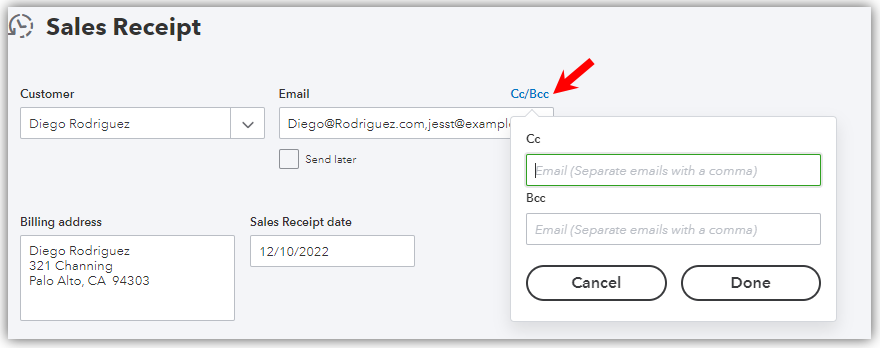
Yes, you can send an email to several customers. For transactions, only one payee can be added to the payee field, and therefore the transaction will only capture his or her email address. However, you can manually add more in the Email field. Just separate them with a comma. You can even add Cc and Bcc recipients.
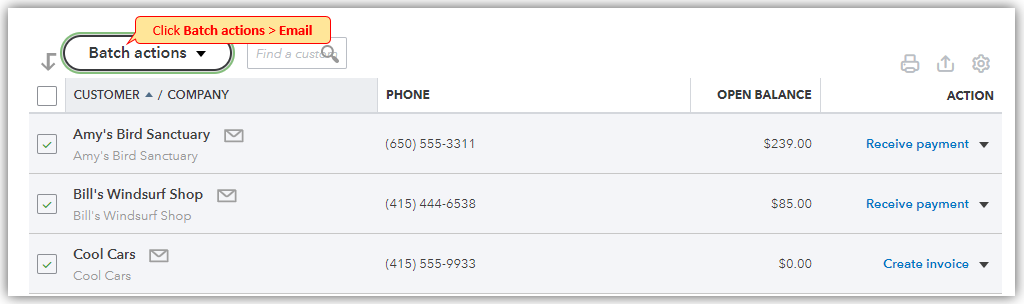
For special email communications, you can go to the Customers section, select multiple customers, click Batch actions, and then Email. This will prompt you to open Outlook where you can compose an email outside QuickBooks.
For item lists, reports, and the like, you can add multiple email addresses from different customers in the Email field. Just put a comma after each of them.
On the other hand, if you need some references for QBO, you can visit the main support page, scroll down a bit, and click More Topics.
Let me know if you have more questions about sending emails to customers. Take care and happy weekend!




