I’m glad to see you here in the Community, @sylvia16.
Can you clarify to me what needs to be canceled?
If you’re referring to your subscription with us, I can provide you with steps to cancel your QuickBooks account. Just follow these instructions below:
- Go to the Gear icon and choose Account and Settings.
- Select Billing & Subscription.
- In the QuickBooks section, click Cancel.
- Click Continue to Cancel, then Continue to Cancel again.
- Answer the short survey, then click Confirm Cancel.
On the other hand, if you mean payroll subscription, ensure to select the cancel payroll option under billing.
QuickBooks will keep your data for up to a year. However, you’re unable to modify your entries anymore. They’re for read-only access. I recommend exporting or printing the necessary financial/payroll report and forms before canceling. Here’s how:
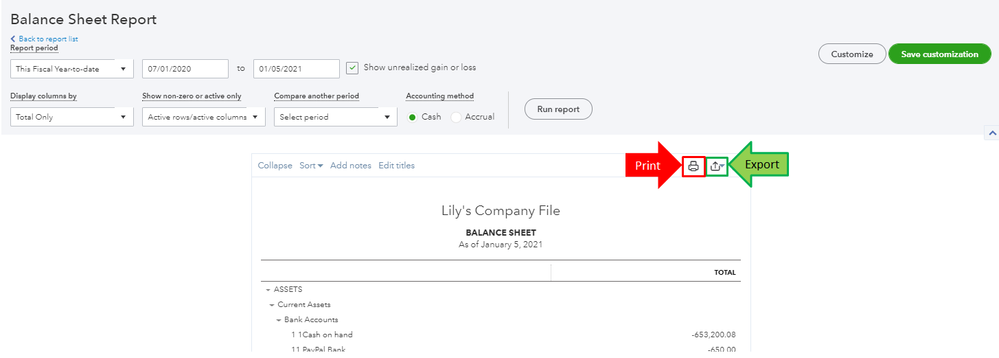
- Go to the Reports menu and select the report you want to print or export.
- Make sure to select the correct dates before running it.
- When the data is correct, click the Print or Export icons.
Get back to me here if you mean something else or have additional concerns. I’m always here to resolve them for you. Wishing you the best!




