Turn on suggestions
Auto-suggest helps you quickly narrow down your search results by suggesting possible matches as you type.
Showing results for
Get 50% OFF QuickBooks for 3 months*
Buy nowWe are moving into QBO mid year. We need to move our P and L into QBO to reflect our current income balance for the year. What’s the best way to do this?

Hi @Jblunier.
You'll want to contact your financial software first to know if they can move their Profit and Loss (P and L) data directly to QuickBooks Online (QBO).
If they're unable to migrate the P and L, I suggest contacting our Care Support team to check if we have internal tools or recommend a third-party application (app) to move your P and L data into QBO. This way, you can view your Profit and Loss data and reflect the current income balance for the year.
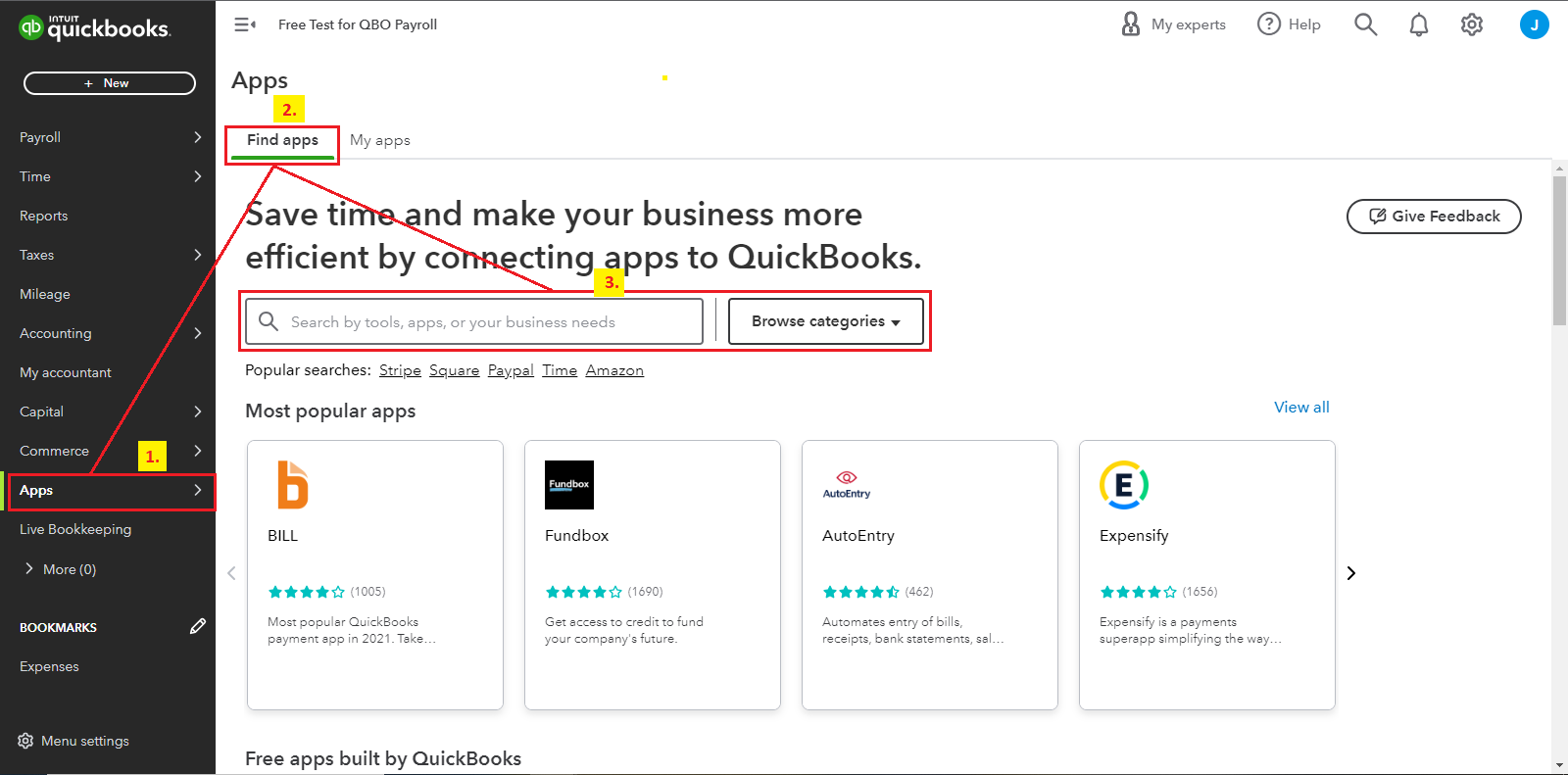
Alternatively, you can check the Apps menu to check if we have a third-party application that can help move your P and L to QuickBooks Online. Here's how:
I like you to check this article for more insights: Install and use apps in QuickBooks Online.
Additionally, you can connect your bank and credit card accounts or upload bank account prior transactions by hand to categorize expense and income transactions. This will also lead you to generate a P and L report to see the current year's income balance.
I'm still here if you need more guidance with generating financial reports. Anytime I can help. Stay safe, and have a prosperous week ahead.
I have talked to our current software team and they are unable to help. Their stance is that QBO is not their software and know nothing about it. I tried the APP menu, but don't see an option to search for apps, it just pulls up mileage. I checked the article you suggested and it wasn't helpful, unfortunately. I am able to make journal entries to get the balances in there?
I appreciate your interest in QuickBooks Online, @Jblunier.
Running a P&L report to see the current income balance for the year is essential to see your business standing. With this, I'll clarify the app menu and article provided above.
It seems that you're using the QuickBooks Online app. That's why the option to search for apps isn't available. You can also track mileage while doing business transactions on the go.
The App menu mentioned is visible on the left pane when you log in to QuickBooks Online via the website. This is where you can find other applications that can integrate with us. From there, you can compare which one best suits your needs. I'm adding a screenshot for reference:
If you're referring to the article about the P&L report provided above, it's specifically for location tracking or various bank accounts. Others use this if they have businesses located in different areas. Since your goal is to run the Profit and Loss report, we can go to the Reports menu. On the reports page, we can filter the date range to get the current income balance.
Once your QuickBooks Online account is all setup, you can manually upload the transactions so the system can summarize the total income and expenses. After that, categorize them so they belong to the correct accounts. Importing the Chart of Accounts is also an option.
See this article to check if the transactions added in QuickBooks match your bank statements in real life: Reconcile an account in QuickBooks Online.
This should help you choose an app that incorporates QuickBooks. If you still have other questions about pulling up the P&L report, add them below. It'll be my pleasure to help you more.


You have clicked a link to a site outside of the QuickBooks or ProFile Communities. By clicking "Continue", you will leave the community and be taken to that site instead.
For more information visit our Security Center or to report suspicious websites you can contact us here


