Get 50% OFF QuickBooks for 3 months*

Buy now
cancel
Showing results for 
Search instead for 
Did you mean: 
Announcements
3MIT33T
Level 1

PO#'s not shown in Open PO reports

I am currently using QB Enterprise edition and very new to the company that has been using it for a while. When running an Open PO's by job report and then customizing the report to show the PO#, nothing is listed.  The PO number is listed in the "Num" column, but that is just a reference #.  Why is the PO# not listed in in the PO column?  Also, when running profitability by job reports, and looking for bills coded against a certain PO, also no PO# is listed.  

2 Comments 2
3MIT33T
Level 1

PO#'s not shown in Open PO reports


JessT
Moderator

PO#'s not shown in Open PO reports

Hi 3MIT33T,


Thank you for the very detailed screenshot and for letting us know that the reports you mentioned do not capture the purchase order numbers in the P.O.# column. 


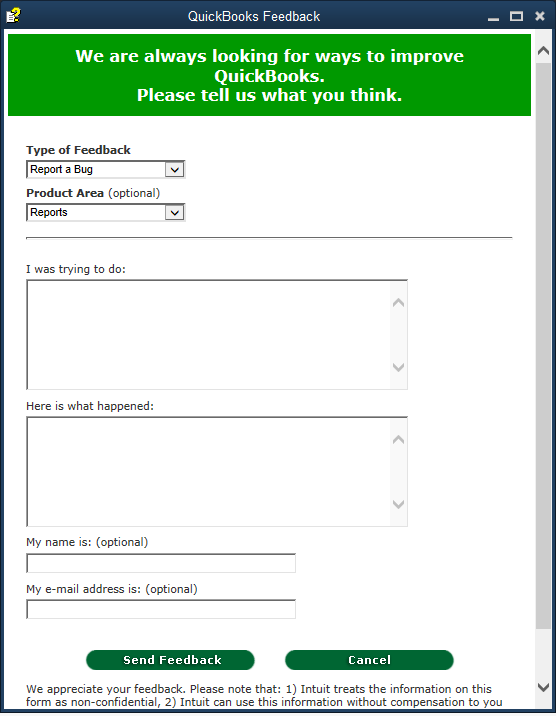
While we are unable to make changes on the report, I'm encouraging you to submit feedback. This way, our engineers knows what happened via a reporting customer and can consider making changes in further updates.


  1. Go to the Help menu.
  2. Choose Send Feedback Online.
  3. Select Bug Report.
  4. In the Product Area, choose Reports.
  5. Describe what you're trying to do and the result.
  6. Click Send Feedback.


You can also check about customizing reports in QuickBooks Desktop, so you'll be guided through getting the information you only need on reports.


I'm jus right here if you need further assistance.

Need QuickBooks guidance?
Log in to access expert advice and community support instantly.

Need to get in touch?

Contact us