Turn on suggestions
Auto-suggest helps you quickly narrow down your search results by suggesting possible matches as you type.
Showing results for
Get 50% OFF QuickBooks for 3 months*
Buy now
I don't use the "save and New" very often. But I just tried it, and it did NOT go back to the vendor drop down.
Cleared my cache, tried in incognito. Still doesn't go to the vendor drop down after clicking save and new.
(And no, I'm not going to contact "Support").
Hi there, heidib-nejaimesw.
I can share some information on how QuickBooks Online works with a computer mouse cursor.
We can perform some basic troubleshooting steps to make sure the issue isn't browser-related. It's possible that local internet cache files are the reason for this unexpected behavior.
Let's start accessing your account using a different or private browser. You can use either of these shortcut keys:
Once logged in, go back to the Bill page. If it works, we'll have to go back to your regular browser and clear the cache to eliminate the junk files. Using other supported browsers is a good alternative too.
You may check out this link for future reference: Enter and manage bills and bill payments in QuickBooks Online.
I'll be around if you need further assistance managing vendors and bills in QuickBooks Online. Please stay safe always!
Unfortunately, your suggestion didn't work. I have had this problem off and on for the past few months with the cursor no longer regenerating as of a few weeks ago. I have over 50 bills to record and my process is slowed considerably with the loss of this feature. PLEASE advise.
I understand your want of the feature, business.
Currently, the option of regenerating the mouse cursor in the Vendor drop-down after clicking on Save and New when creating a bill is unavailable in QuickBooks Online.
I suggest sending us feedback about it. Your insightful comments will be forwarded to our product developers to consider for future updates. Here's how:
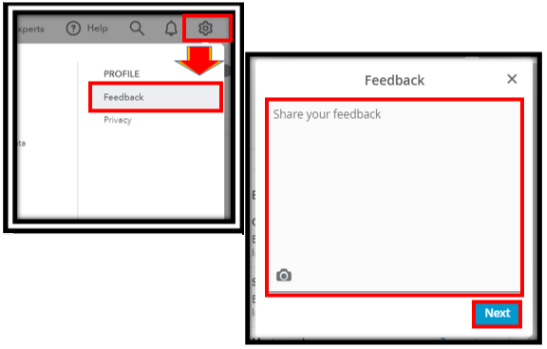
You can also browse through our QuickBooks Online Feature Requests webpage for any feature requests updates.
For future use, see this guide on how to manage bills in QBO: Enter and manage bills and bill payments in QuickBooks Online.
Let us know is you need more questions regarding vendors and bills in QuickBooks Online. Take the best care always!


You have clicked a link to a site outside of the QuickBooks or ProFile Communities. By clicking "Continue", you will leave the community and be taken to that site instead.
For more information visit our Security Center or to report suspicious websites you can contact us here


