Turn on suggestions
Auto-suggest helps you quickly narrow down your search results by suggesting possible matches as you type.
Showing results for
Get 50% OFF QuickBooks for 3 months*
Buy nowAll the Help says just "select Customize" on a report window. I'm not seeing it anywhere. Is there some setting that hides this, that I need to change? Each report header has Filter and Options icons, but that's as close as it gets. I want to make a report that only has a subset of the accounts, and Filter can't do that, apparently. Can someone show me in a screenshot where this Customize button or control exists? QB Mac Desktop 2019.

Thanks for dropping by the Community today, jxh.
I appreciate you for taking the initial steps in trying to customize your report. I’ll help make sure you can create one successfully.
We’ll have to configure your Preferences to show the customize window. Let me walk you through the process of how to accomplish this task.
After setting up everything, you can now tailor the data on the report. You can read through this article for additional information: Customize reports in QuickBooks Desktop for Mac. It outlines the complete steps on how to use the Filter option, format a report, tailor the sidebar, etc.
Additionally, this link contains resources about creating and managing reports: Self-help articles. They’re grouped by topic and you’ll be able to open each one easily.
Reach out to me again you have clarifications or concerns about building reports. I’ll be around to help you. Wishing your business continued success.
I don't find that checkbox, either. I'm in Preferences, Reporting, and it looks like this (attached). I can turn on and off "Display report options window automatically" but I can get to that without this, just using the Options icon in the report window header.
I'm at V18.0.10 R11, which it says is up-to-date.
Now even my reply to your comment is invisible. Are these replies private? Or should anyone be able to see this in the thread of the main post?
To repeat: there is no such checkbox in my Prefs/Reporting pane.
I called a toll-free number that another commenter here suggested was QB Support: It was scammers. They informed me that Customize is a feature that only they can enable (on the Mac, but Windows users get it free). They then tried to do this, discovered some corruption in my records on their servers, not on my computer, and tried to sell me $4000 for a year of support to correct it. I only paid $200 to buy the license for the software in the first place.
Hello again, jxh.
I appreciate you for keeping us updated and providing feedback when customizing a report.
In QuickBooks Desktop for Mac, once you choose a report, you can click Customize at the bottom of the Report Center. The customize panel appears by default, but if you're not able to see it, click the Customize button in the upper right of the window.
Additionally, the Filters tab on the sidebar is also known as the Customize panel. This tab allows you to quickly search through all the report filters to either remove or add a specific one.
For more information about running reports, see the below articles for a guide:
If you have any other questions, feel free to reach back out. Rest assured that all your replies are visible on our end for us to respond. Have a great day.
Thank you for this, but I'm afraid none of it is true on my computer. There is nothing labeled "Customize" anywhere: there is no sidebar. Nothing in the Report Center on on the report window itself says or does Customize;not at the top right, not at the bottom, not under any of the controls or whitespace. At all.
I'd love to show this to someone knowledgeable. Can I talk to you on the phone? Reach me at [email address removed] and I'll reply with a number and a Zoom link.
I just showed all this to my sister-in-law (BS in Accounting) who uses QB every day and she can't see it, either.
Thanks for getting back with additional information, jxh.
This behavior with the missing Customize option on the report is often caused by damaged data. I recommend running the Verify/Rebuild tool. This helps identify the most commonly known data issues within the file and resolves it.
Before we begin with the troubleshooting, let's secure a backup of your company file. Once done, we can proceed to verifying and rebuilding your data in QuickBooks Desktop for Mac.
Here's how:

You can also check out this article for the detailed steps on running the Verify and Rebuild tool in QuickBooks Desktop for Mac: Resolve data damage on your company file.
I'll leave you with a guide to know anything about QuickBooks Desktop for Mac: QuickBooks Desktop Mac 2021 User’s Guide.
If you wish to reach our QuickBooks Mac Support for further guidance with the process. Our representatives can request a viewing session to guide you and make sure your data is secured.
To contact our support, click this link to initiate a live session: QuickBooks Desktop for Mac chat
If you have additional questions or concerns while managing reports, just leave me a comment below. I’ll be around to help you out.
@jxhRE: All the Help says just "select Customize" on a report window.
That help is for QB Desktop Windows. You appear to be using QB Desktop Mac, which Windows left behind long ago.
Thank you for that suggestion. I did the Rebuild and Verify per the instructions, it said it found no problems, but nothing has changed. My report windows still don't say Customize anywhere, and the Prefs/Reporting pane does not show the checkbox about it.
Thanks for keeping us in the loop, @jxh.
It could be an app-related issue. Let's update your QuickBooks for Mac to its latest release to get the updated features and fixes.
Here's how:
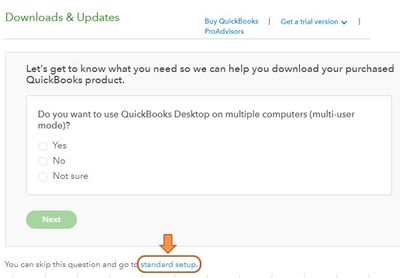

Once done, launch QuickBooks again. Then, pull up any report and find the Customize button. For more info about the process, check out this article: Update QuickBooks for Mac.
If it's still missing, I'd recommend reaching out to our Customer Care Support Team. They can take a closer look at this through screen-sharing. This way, they can perform additional troubleshooting to fix this issue.
Here's how:
Visit me here again in the Community and let me know should you need help in getting your desired report. It's our priority to help you succeed.
@jxhRE: "My report windows still don't say Customize anywhere, and the Prefs/Reporting pane does not show the checkbox about it."
I don't think they ever will as the Mac is different. What buttons do appear at the top of your reports? To the side?
I did finally reach Support (the scammer's bogus 800 number notwithstanding). "Customize" is a red herring: there is no Customize in QB Desktop Mac, or 2019 anyway. Filter is how you get there, and I was able to find "Selected Accounts" and solve my problem at last. They promised to amend the docs.


You have clicked a link to a site outside of the QuickBooks or ProFile Communities. By clicking "Continue", you will leave the community and be taken to that site instead.
For more information visit our Security Center or to report suspicious websites you can contact us here


