Turn on suggestions
Auto-suggest helps you quickly narrow down your search results by suggesting possible matches as you type.
Showing results for
Get 50% OFF QuickBooks for 3 months*
Buy now
Just to clarify your question. Do you need to migrate data in the same Class from first QBO US account to the second (new blank) QBO US account, or else?
https:// quickbooks.grsm.io/US
https:// quickbooks.grsm.io/us-promo
No I have 2 sets of books in the same account. I want to migrate an entire class that is in 1 set of books to the other set of books. Any idea how to do that?
No, I have 2 sets of books on the same account, I need to move 1 class from 1 set of books to the other set of books.
Thank you providing additional information, wgarrott.
Currently, an option to directly migrate classes from one books to another is unavailable. However, you can run the Class List report and then export the list from there. Let me guide you how:
Then, you can look for a third-party application that can import the classes to your other books. I've added this link on where you can search for an app: QuickBooks Apps.
I've also added this reference as your guide in managing classes: Create and manage classes in QuickBooks Online.
Don't hesitate to reach out to us again if you have other concerns or if you need help managing classes. I've got your back!
Hey @Adrian_A ,
Thanks for the info and help! Ok after I export the class data couldn't I just import it myself into the other set of books? I also assume once the transactions are moved for that class I can delete those class transactions from the original set of books? Is there an easy way to locate and delete all of these transactions?
Also, why would I need to use a 3rd party app to import?
Thanks for the clarification.
Hey @Adrian_A ,
Thanks for the info and help! Ok after I export the class data couldn't I just import it myself into the other set of books? I also assume once the transactions are moved for that class I can delete those class transactions from the original set of books? Is there an easy way to locate and delete all of these transactions?
Also, why would I need to use a 3rd party app to import?
Thanks for the clarification.
I've got your back and clarify things for you, @wgarrott.
As mentioned by my colleague above, importing class transactions from one book to another is unavailable in QuickBooks Online. For this reason, you'll need to use a third-party application to perform the task. Otherwise, you can consider running a Class List report then export it from there.
Once you successfully migrate the transactions to the other book, you can have the option to delete the class list if these will not affect your financial info in your original set of books.
To do this, here's how:
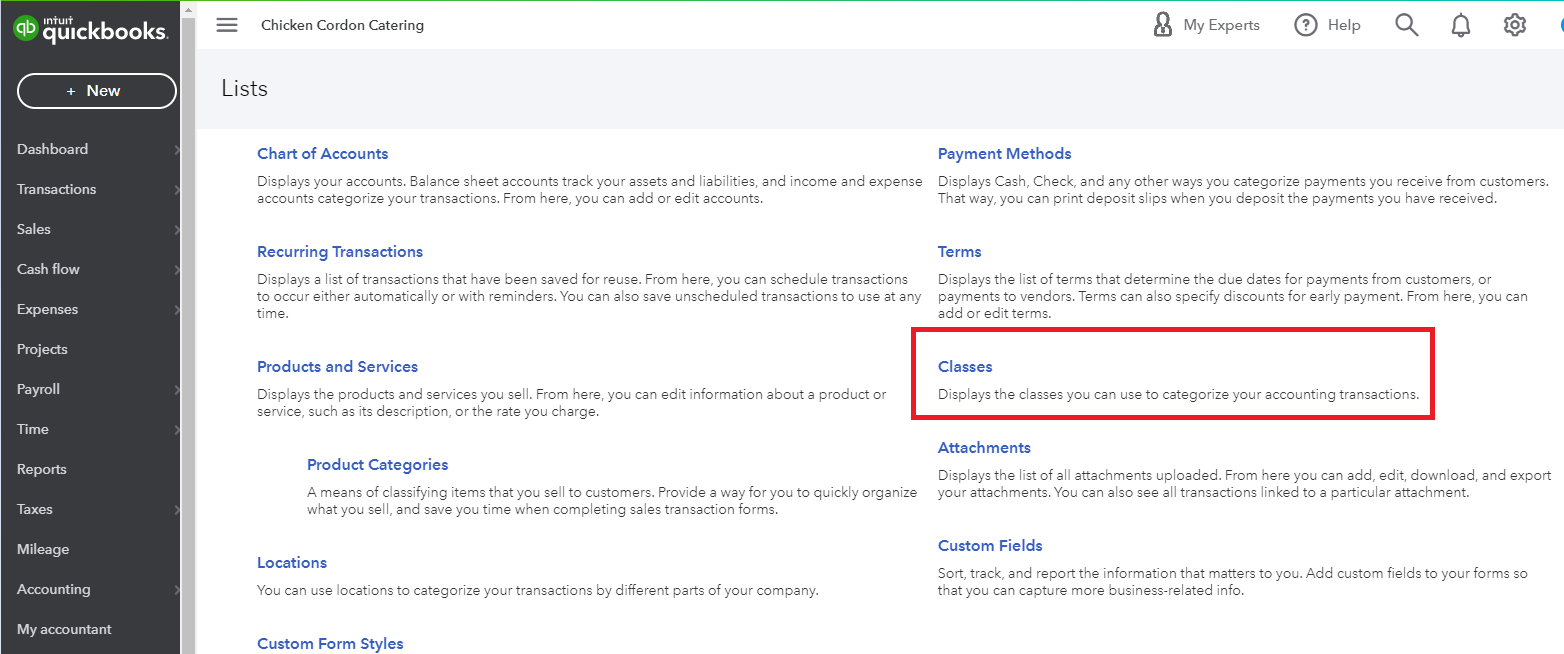
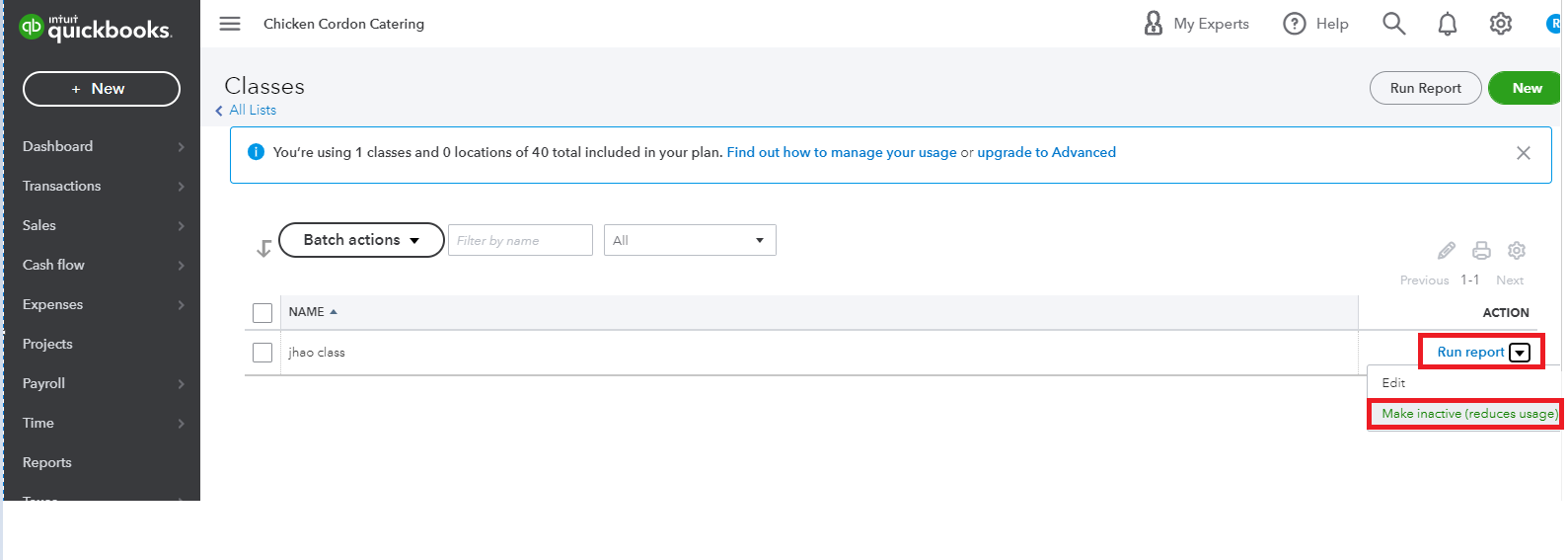
Additionally, let me attach this link to help you manage classes in QuickBooks Online. It covers some steps on how you can add, delete, or restore a class in your account.
Hope that clarifies everything. Let me know in the comment section if you need a hand with class lists. I'll be around to assist you again.
I have an old QB that I want to input into my online account
Hi Alan1948!
It's great to see you in the QuickBooks Community! I'll help you with bringing your data into your online account.
When you say "old", I assume it is a discontinued version, so what you'll want to do is back up your company file. Then, download the trial version of QuickBooks Desktop and restore the backup file to it. After that, you can export your data to QuickBooks Online.
Please check out the steps in these articles:
Feel free to reach back out if you need further assistance. Take care and have a great day!
Do you need to migrate data from QB Desktop into your QB Online account and merge it with the existing data?


You have clicked a link to a site outside of the QuickBooks or ProFile Communities. By clicking "Continue", you will leave the community and be taken to that site instead.
For more information visit our Security Center or to report suspicious websites you can contact us here




