Turn on suggestions
Auto-suggest helps you quickly narrow down your search results by suggesting possible matches as you type.
Showing results for
Get 50% OFF QuickBooks for 3 months*
Buy nowSolved! Go to Solution.

QuickBooks Online copies the QuickBooks Desktop design for printing checks.
Here's the scoop:
Each bank account in QuickBooks keeps track of two check-numbering sequences: One for print stock and one for hand checks.
The assumption is that you'll print checks using printer check stock and hand write checks from a checkbook of standard checks (one you'd carry around) - where the two types of checks each have their own numbering sequence.
QuickBooks does not expect you to raid your printer for the next computer check and then hand write it. If you do that, then you're fighting the design - paddling up a creek without a paddle.
So, when you record checks "to print later", and then go to the batch printing feature, the check number that appears there should be the next check number from your computer check stock - incremented from the last check you printed. And, when you record a check with a check number, that number is your next standard 'hand written' check number.
It does appear that in the history of this thread, the hand check number on the check form was reportedly getting 'stuck' at a certain point, but that is no longer happening for me. If it was a bug it has been fixed.
And so...
If you record a new check, not "to print later" but with your next check number (from your hand checks), and pick Save and new as you record it, you should see the default check number on the new check increment by one. And, when you return to the batch-printing window, the check number there should be incremented by one from the last check you printed. If so, then QuickBooks is working as designed.

Hi there, daybreaker.
Let me share insights about writing checks in QuickBooks Online (QBO).
The application will automatically assign a transaction number to your check once created. In your case, I recommend performing a browser. This fix will assist in getting rid of the frequent errors that hinder the application's effectiveness.
Please start by opening a private window in your browser. It identifies the cache, which frequently causes odd behavior in browsers. The keyboard shortcuts for launching a private browser are as follows:
Once done, proceed to clear the cache in the browser to prevent this from happening again. If you have another supported browser, you can choose that instead.
Furthermore, feel free to browse this article to learn more about creating and recording checks in QBO.
Let me know if you have more questions about transaction numbers in QBO. The Community always has your back. Have a good one!
Hello,
I tried all of the options you suggested and it did not work. The populated field for the next check number remains at 1340 and I must manually input the correct check number each time I create a new check. I created 2 new checks after completing the steps you provided and both times it auto-populated with 1340 as the check number and I had to manually enter the correct number in sequence.
Any further suggestions, or is this indicative of a problem that Intuit needs to correct?
I appreciate your effort in adhering to the steps provided by my colleague above, @daybreakerlawnca.
As I have replicated your concern, the sequence number when writing checks are working as it should.
At times, QuickBooks will have behind-the-scenes glitches or errors that occur. Don't worry, our Customer Support Team can take a further look at your account to see why this is happening and raise a ticket to our engineering team, if necessary.
Here's how:
Additionally, if you need a hand figuring out which check numbers have been used in QuickBooks so far, check out the guide here on creating a check number report to help you sort them.
You can reach out to QuickBooks Community again if you need additional assistance. Simply click reply and I'll get back to you as soon as I can. Have a good one.
I have the same issue using the qb online desktop app. This is a pain to have to change the check number EVERY time I write a check. This new qb is absolutely terrible, the worst software I have ever used. Bring back the old desktop version, I never has problems like I do now.
Welcome to the Community, captain.
As a working design, we have to manually change the check number every time we write a check. To fully assist you well, I'd recommend reaching out to our support team. I'll provide you with the steps below.
Here's how:
1. Log into your QuickBooks Online account.
2. Click on the Help button located at the top of the page.
3. Navigate to the Search tab, enter your query, and press enter on your keyboard.
4. Select Contact Us.
5. Under the Callback option, click on the Have us call you button to input your details.
6. Finally, choose Get a Call to receive a callback from support.
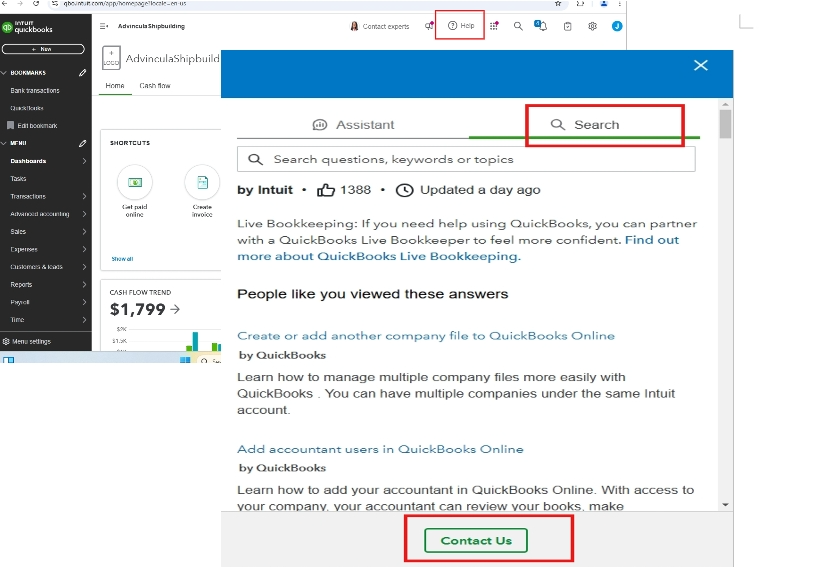
For a comprehensive guide on obtaining assistance with your QuickBooks product or service, check out this article: Get help with QuickBooks products and services.
We can also explore this guide on printing reports by check number in QuickBooks Online: Print reports by check number in QuickBooks Online.
If you have more questions about the check number in QBO, feel free to return here anytime you need assistance. Have a great day ahead.
@JeveeAdvin__la RE: As a working design, We have to manually change the check number every time we write a check.
That is not correct. Have you used QuickBooks Online? Were you actually trained this way, by someone else who also doesn't know how it works?
QuickBooks Online copies the QuickBooks Desktop design for printing checks.
Here's the scoop:
Each bank account in QuickBooks keeps track of two check-numbering sequences: One for print stock and one for hand checks.
The assumption is that you'll print checks using printer check stock and hand write checks from a checkbook of standard checks (one you'd carry around) - where the two types of checks each have their own numbering sequence.
QuickBooks does not expect you to raid your printer for the next computer check and then hand write it. If you do that, then you're fighting the design - paddling up a creek without a paddle.
So, when you record checks "to print later", and then go to the batch printing feature, the check number that appears there should be the next check number from your computer check stock - incremented from the last check you printed. And, when you record a check with a check number, that number is your next standard 'hand written' check number.
It does appear that in the history of this thread, the hand check number on the check form was reportedly getting 'stuck' at a certain point, but that is no longer happening for me. If it was a bug it has been fixed.
And so...
If you record a new check, not "to print later" but with your next check number (from your hand checks), and pick Save and new as you record it, you should see the default check number on the new check increment by one. And, when you return to the batch-printing window, the check number there should be incremented by one from the last check you printed. If so, then QuickBooks is working as designed.


You have clicked a link to a site outside of the QuickBooks or ProFile Communities. By clicking "Continue", you will leave the community and be taken to that site instead.
For more information visit our Security Center or to report suspicious websites you can contact us here


