I can show you how to send an estimate without the details on it, dirkemoore.
You have an option to select either Full details or Summarized details when sending a transaction including estimate. The difference between the two is that the Full details shows the exact data on the PDF file, while the Summarized details doesn't.
Here's an example: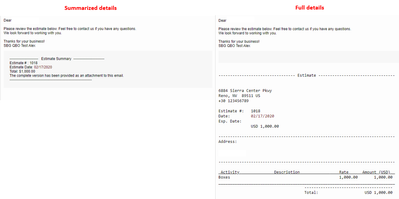
You can follow these steps on how to set it up:
- Go to the Gear icon and select Custom Form Styles.
- Locate your estimate form template and click Edit.
- From the Emails tab, select Summarized details. Click Done to save it.
Here's an article for your guide: Customize invoices, estimates, and sales receipts in QuickBooks Online.
I'll be happy to help if you have more questions. Just comment below.




