Good day, @pdice.
Following recent updates, the Accounting tab has been replaced by the Transaction menu. From there, we can start reconciling our bank accounts.
Beforehand, if your accounts are connected to online banking, we have to ensure to match and categorize all of your downloaded transactions.
To reconcile an account, follow the indicated steps below:
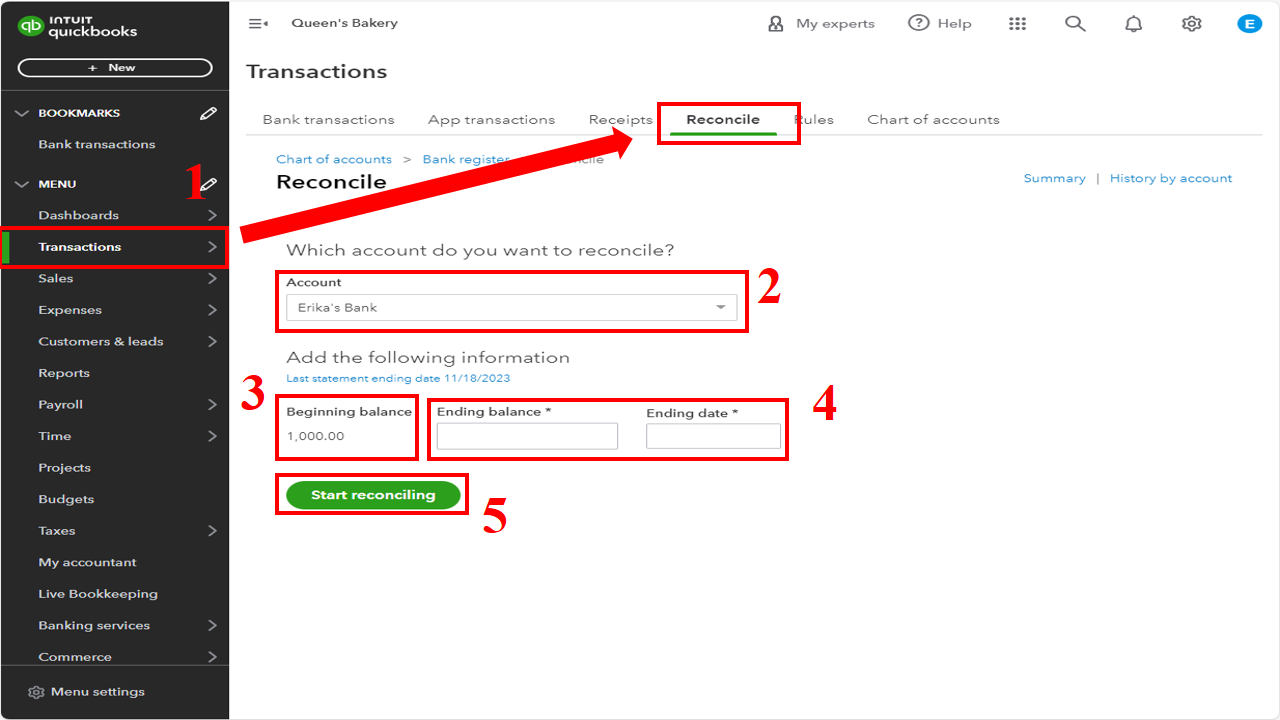
- Go to the Transaction menu and then Reconcile.
- From the Account dropdown menu, choose the account you want to reconcile. Make sure it's the same one on your statement.
- Review the Beginning balance. Make sure the beginning balance matches the closing balance of the previous month.
- Enter the Ending balance and Ending date on your statement.
- Then, click Start reconciling.
However, if you're reconciling for the first time, refer to this article: Reconcile an account in QuickBooks Online.
Furthermore, you can browse this article if you encounter unexpected issues after reconciliation: Fix issues at the end of a reconciliation in QuickBooks Online.
Comment below if you have more questions about reconciling your accounts in QuickBooks Online. Keep safe!




