Turn on suggestions
Auto-suggest helps you quickly narrow down your search results by suggesting possible matches as you type.
Showing results for
Get 50% OFF QuickBooks for 3 months*
Buy nowQuickbooks has wrongly calculated the Q4 payment for my state unemployment filing. Usually the Q4 amount is much less than the Q1-Q3 amounts, and the state's website calculated my payment should be $16.50. (Q1-Q3 were correctly calculated as $49.50. How can I fix this?

Hi there, @GopaTed.
Ensuring your payroll taxes are accurate is key to staying compliant. Let's break down why this may be happening and how to fix it.
State unemployment insurance (SUI) is calculated based on taxable wages up to the state's wage base limit. Ensure your SUI rate is updated to avoid seeing discrepancies. If wages or employee payments have been recorded mistakenly in QuickBooks Online (QBO), they will result in incorrect state unemployment insurance (SUI) amounts.
Furthermore, I recommend contacting our QuickBooks Online Payroll support to correct your SUI tax amount. They have the right tools to guide you through verifying and resolving the need to update your tax amount.
Here's how:
I'm also adding this article that you can use in the future: Resolve a payroll tax overpayment.
By ensuring all transactions and settings are accurate, you’ll not only resolve this issue but also prevent future discrepancies. Let us know if you have additional concerns besides correcting the SUI tax amount.
I see no option for "contact Us" on the page you sent me to! None of the "Help" topics are relevant.
Getting timely support is crucial, especially regarding something as important as correcting your tax filing. Let's work this out together so you can get the help you need, GopaTed.
In the Community, we provide various help resources to address most issues and queries. The "Help" section typically contains topics that cover common questions and troubleshooting steps. However, we understand that sometimes you need direct assistance from a customer support representative. That's where the Contact Us option comes in handy.
Here's a step-by-step guide on how to find the Contact Us option in QuickBooks Online:
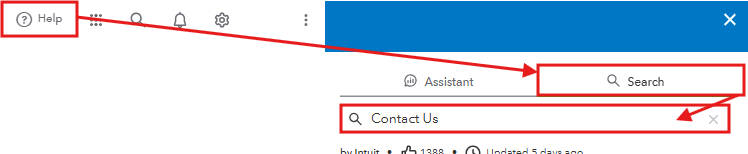
If you still don't see the option, there may be a browser-related issue. If that's the case, I recommend accessing your QuickBooks Online company in an incognito window. This resolves cache-related problems and helps the Help Menu function correctly. Return to your regular browser to clear its cache if it works smoothly in the private window. Alternatively, you can use other supported browsers.
Check out our support hours in this article to connect with our live support team when they're available: Get help with QuickBooks products and services.
For future reference, here's a guide on how to view past tax payments in QuickBooks: View your previously filed tax forms and payments.
Please know that this thread is always open for you to return to if you need further assistance or have other concerns. We care about your experience with QuickBooks and are committed to ensuring that everything gets resolved smoothly.
I understand your human beings don't want to be bothered with dumb questions, but my goodness you make it difficult when there really is an issue!


You have clicked a link to a site outside of the QuickBooks or ProFile Communities. By clicking "Continue", you will leave the community and be taken to that site instead.
For more information visit our Security Center or to report suspicious websites you can contact us here


