Get 50% OFF QuickBooks for 3 months*

Buy now
cancel
Showing results for 
Search instead for 
Did you mean: 
Announcements
Simplify payday and set payroll to run automatically on QuickBooks.Explore QuickBooks Payroll

Reply to message

View discussion in a popup

Replying to:
Mich_S
QuickBooks Team

Reply to message

Thank you for keeping us updated, tom. I'm here to guide you through recording the check against the credit.


You'll need to first record the vendor check as a deposit and use the Accounts Payable account. Let me show you how:


  1. Open the Banking menu, then click on Make Deposits.
  2. Go to the Payments to Deposit window pop-up, and hit OK.
  3. Go to the Make Deposits window, click on the Received from drop-down, and select the vendor who sent you the refund.
  4. Go to the From Account drop-down, and choose the appropriate Accounts Payable account.
  5. Go to the Amount column, and fill in the actual amount of the Vendor check.
  6. Type in the remaining information in the Deposit.
  7. Click on Save & Close.


Once done, you can link the deposit to the credit using the Pay Bills option. 


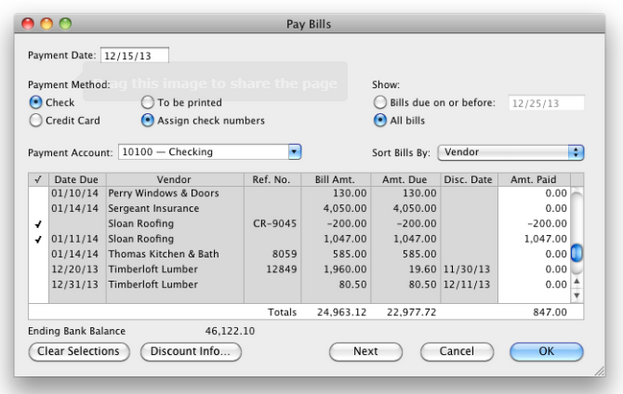
  1. Open the Vendors menu, then click on Pay Bills.
  2. Put a check to both the credit and the deposit we create to link them.
  3. Once done, click on OK.


See the image below for visual reference:


1.PNG


That should now zero out both the vendor balance or credit.


For future reference about QuickBooks Desktop Mac-related concerns, visit our Help page.


Feel free to post back in case you need extra assistance regarding vendor refunds or QuickBooks in general. We're here to back you up 24/7. Stay safe.

Need to get in touch?

Contact us