Turn on suggestions
Auto-suggest helps you quickly narrow down your search results by suggesting possible matches as you type.
Showing results for
Get 50% OFF QuickBooks for 3 months*
Buy nowThanks for joining the Community space, @HCValerie. I appreciate you for reading the thread and following the steps to record the transactions that are double billed.
You'll want to make sure that you choose Accounts Payable when recording the Bank Deposit. This way, you have the option to see the Set Credit option when recording the bill.
Here's how:
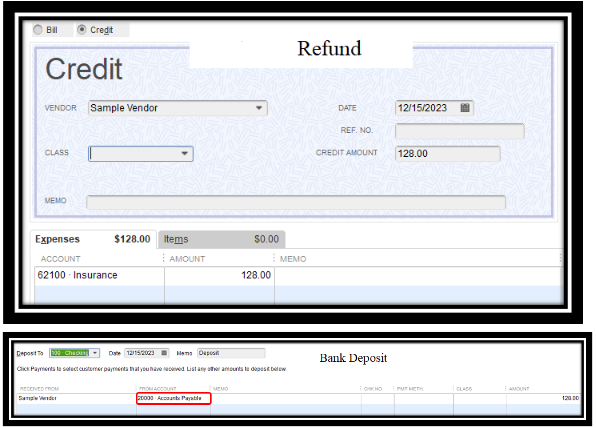
Once done, follow the second and third steps in Scenario 1 to see the set credits option and link the deposit to the bill credit. For complete steps, open this article: Record a vendor refund in QuickBooks Desktop.
I also encourage checking this article to help with outstanding bills for you and track the money you owe your vendors: Accounts Payable workflows in QuickBooks Desktop. To help you manage vendor transactions, you can run reports on QuickBooks Desktop.
Please let me know how the steps go, I want to make sure that you can apply the deposit to the credit. If you have any other questions about QuickBooks, please let me know. I'm always here to help. Stay safe.

