Turn on suggestions
Auto-suggest helps you quickly narrow down your search results by suggesting possible matches as you type.
Showing results for
Get 50% OFF QuickBooks for 3 months*
Buy nowIt's nice to see your post today, tharpsauto.
Changes made on the SUI rates in QuickBooks Online (QBO) applies on your future transactions only.
Here's how to update SUI rate:
If changing the rate has caused a tax over-payment, I recommend contacting your state's unemployment division to confirm the amount overpaid, and how you would like you to apply the credit. For more details, check out this article: Update your State Unemployment Insurance (SUI) rate in QuickBooks or Intuit Payroll
Once you have spoken with your state, please contact our QuickBooks Care Team. They can assist you in for assistance. Here's how you can reach us:
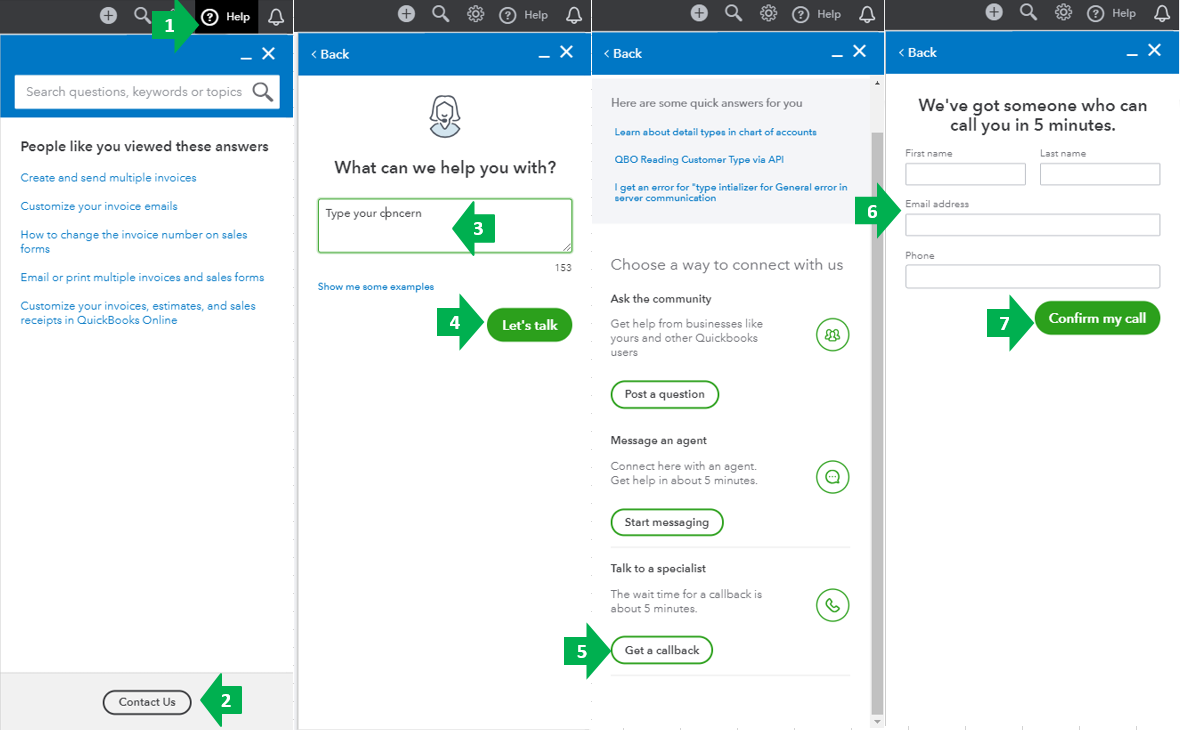
You can check out this article for our contact information. Click on the QuickBooks Online (QBO) drop-down to see the most updated support schedule: Support hours and types.
If you have further questions while managing your SUI rates, please feel free to drop a line. Have a wonderful weekend.

