Turn on suggestions
Auto-suggest helps you quickly narrow down your search results by suggesting possible matches as you type.
Showing results for
Get 50% OFF QuickBooks for 3 months*
Buy nowI can help you fix this, isabelagarden-ho.
You can restore the missing magnifying glass feature in your mobile app by deleting its data. This improves the application's performance and fixes frequent problems that lead to the described behavior. You can delete the app's data either through the app or through your phone's settings.
Clearing the app's data can be done on the app or on your phone settings.
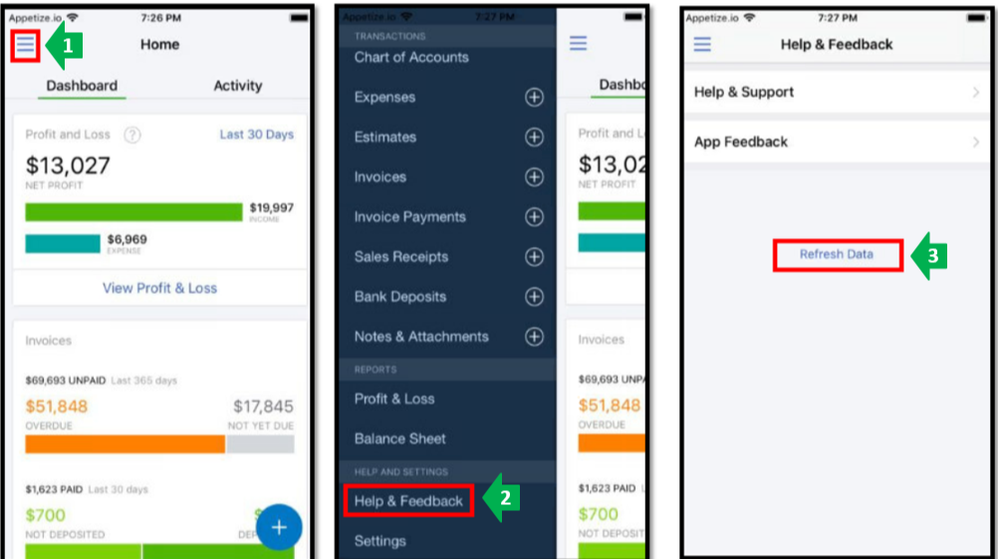
You can refer to this article for additional troubleshooting options to fix issues with mobile app: Mobile App's troubleshooting.
Feel free to visit this article to find answers to your other QBO mobile questions: QuickBooks Online Mobile app FAQ.
If you have any additional queries on managing your QuickBooks, please get in touch with me. I'm always willing to assist. Enjoy your day!

