Turn on suggestions
Auto-suggest helps you quickly narrow down your search results by suggesting possible matches as you type.
Showing results for
Get 50% OFF QuickBooks for 3 months*
Buy nowHi MChrisW!
I'm glad that you're looking to switch from paying your vendor online to using ACH payments. It's great that you have all the necessary information to set this up. I'll be happy to guide you through the process and help you ensure that all future bills from them are paid using ACH payments. Let's get started!
Intuit provides three billing solutions that can be utilized to make ACH payments for vendors in QuickBooks Online. These options include QuickBooks Bill Pay, Bill Pay powered by Melio, and Bill Pay powered by Bill.com. However, it's important to note that not all of them are accessible for every QBO company. We determine the most suitable billing solution for your business in advance.
You will know which of the three solutions has been allocated to you if you attempt to schedule a payment for any of your current bills. So let's open one and click the Schedule online payment button.
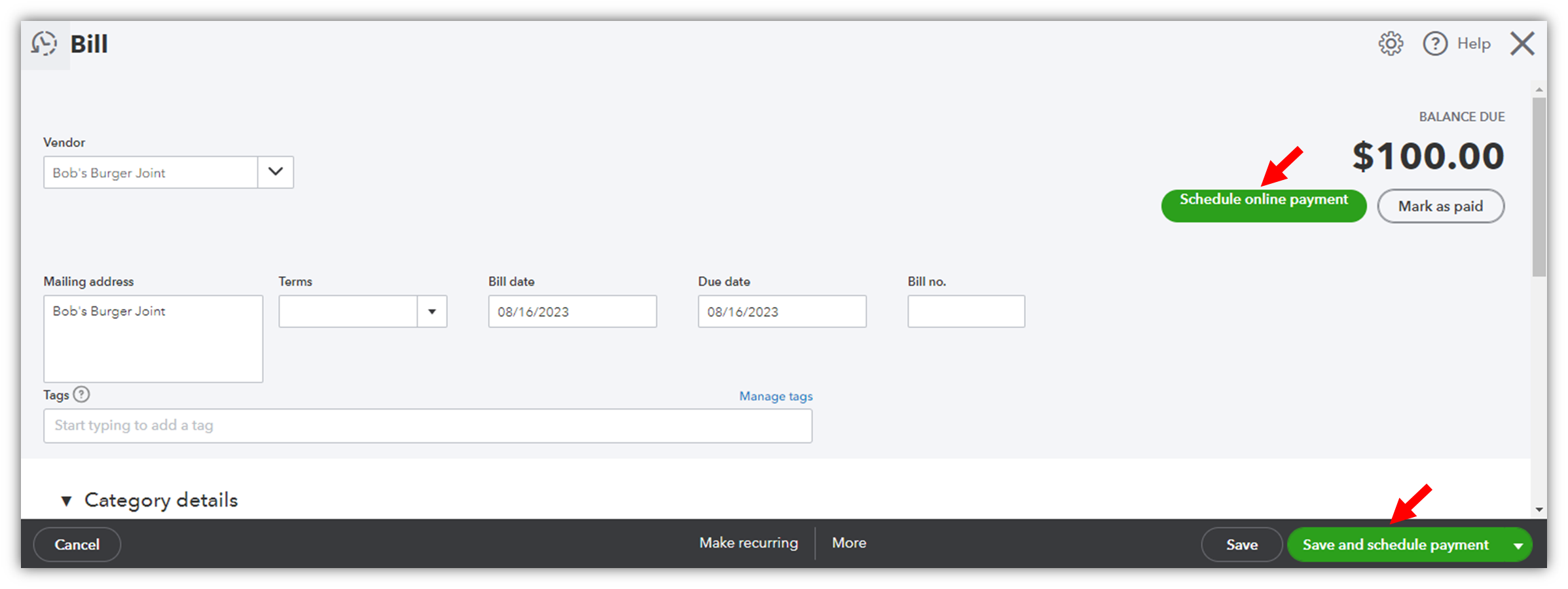


To set up an ACH payment using QuickBooks Bill Pay, check out this article: Learn about QuickBooks Bill Pay. Follow the steps in the Schedule bill payments with QuickBooks Bill Pay section. In step 8, you can choose Bank transfer (ACH).
To set up an ACH payment using Bill Pay powered by Bill.com, refer to this article: Overview of Bill Pay powered by Bill.com. Then, go to the Set up bank transfer to a vendor section to create a payment.
On the other hand, setting up an ACH payment using Bill Pay powered by Melio is quite different because you will need to connect the Melio app. From there, you can schedule an ACH payment, but I'm going to route you to the app's support so they can guide you through the process. The contact information is on the right side of the app information page.
If you have any further questions or need assistance in the future, don't hesitate to reach out. Have a fantastic day ahead!

