Turn on suggestions
Auto-suggest helps you quickly narrow down your search results by suggesting possible matches as you type.
Showing results for
Get 50% OFF QuickBooks for 3 months*
Buy nowHi there, tombay!
Thanks for joining this thread. Let me assist you in adding billable expenses to your invoices.
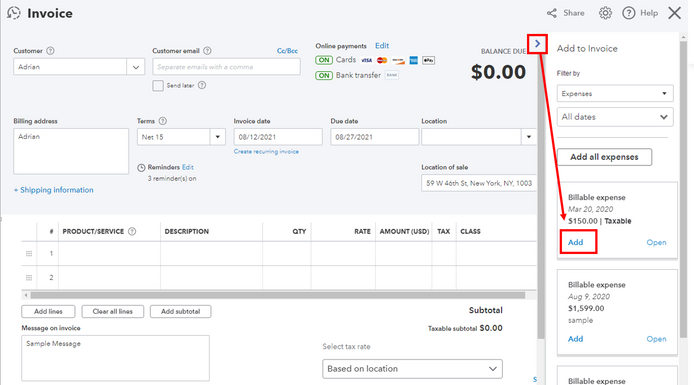
I've added a screenshot for your reference where you can locate the Add button mentioned by my colleague.
If you still can't find it, you'll want to perform some troubleshooting steps. You'll want to use an incognito window and check it from there. Incognito won't save your browsing history which can result in an error. These are some of the shortcut keys:
Also, you'll want to clear the cache and make sure you're using a supported and up-to-date browser. This can help in fixing any browser-related issues.
If what you're seeing on your end is different from the screenshot, you're probably using QuickBooks Desktop. This version has a different process.
When you create an expense or bill transaction, make sure to select a customer from the Customer:Job column, and don't forget to check the Billable tickbox. Then, follow these steps:
Do you need help in balancing your books? Learn the process of reconciliation by clicking this link: Learn the reconcile workflow in QuickBooks.
Leave a comment again here if you have other concerns. Take care!