Turn on suggestions
Auto-suggest helps you quickly narrow down your search results by suggesting possible matches as you type.
Showing results for
Get 50% OFF QuickBooks for 3 months*
Buy nowI can assist you in generating a report that displays the date when an invoice was fully paid,
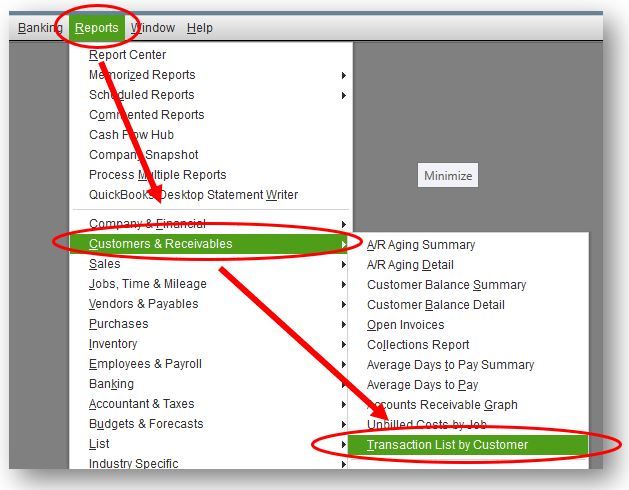
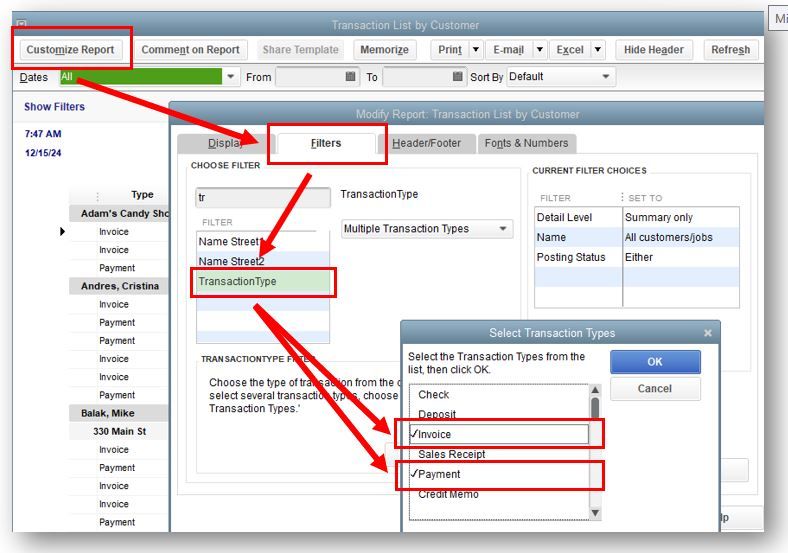
The A/R Aging Detail report shows due and overdue invoices and statement charges. If you want to see the invoices and their payment dates, you can try running and customizing the Transaction List by Customer report.
Here are the steps to follow:
You can check this article for more information about running various financial reports in QuickBooks Desktop. It explains how to customize customer, vendor, item, company, financial, payroll, and employee reports: Customize company and financial reports.
Here's also a guide about saving the current settings that you set for your report, so you do not have to go through the customization process again. It'll guide you with creating, accessing, editing, setting up, and resolving possible issues you'll encounter when memorizing a report: Create, access and modify memorized reports.
Let me know if you need more help running your reports. I'm always here to assist. Have a wonderful day!

