A woman sitting at a desk with a laptop computer.
product update

Accountants now have more flexibility and control over their billing options for QuickBooks clients

Starting November, 2024, you will have more flexibility and control over who pays for your clients’ QuickBooks subscriptions. Through QuickBooks Online Accountant, you can now mix and match the billing options for each QuickBooks product based on what best suits your client and your firm.

This new customization will apply to existing and new clients, and can help your firm standardize your monthly QuickBooks invoice without the complications of variable costs. The ability to split the billing per product might even make it easier for your firm to recommend add-on QuickBooks products to your clients without having to manage the monthly billing and operations.

Sign into QuickBooks Online Accountant, and go to Subscriptions and billing to choose the right billing option for each of your clients’ subscriptions. You'll also have the option to select the desired billing options by subscription when you first add a new client.
What is changing?

Rather than billing either your firm or your client for all of their QuickBooks Online subscriptions, you will now be able to select how to bill each product. For example, you can choose to have your clients directly pay for products with variable fees, such as QuickBooks Online Payroll and QuickBooks Time, while your firm continues to pay for QuickBooks Online. 

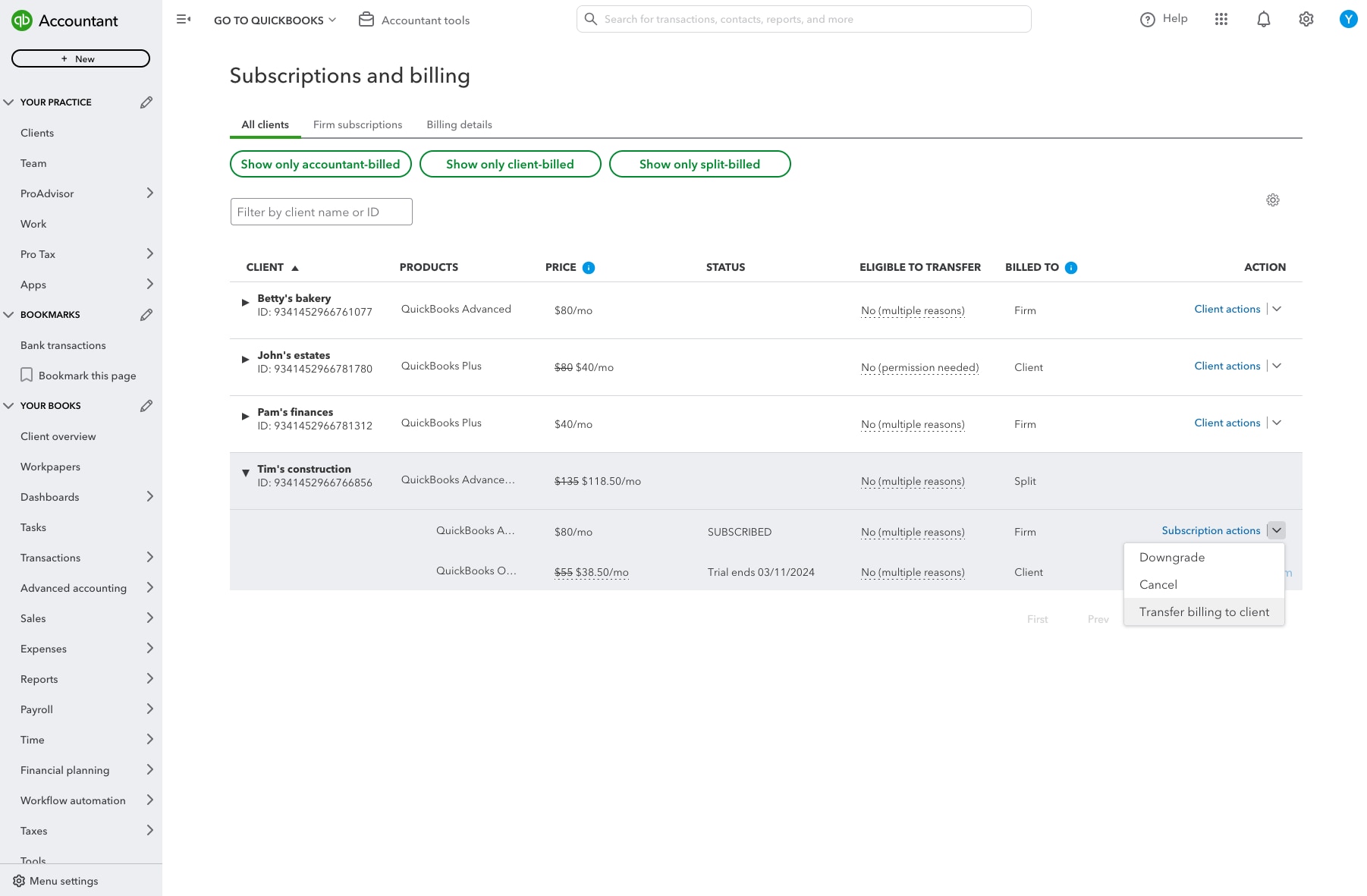
With the launch of this new feature, you’ll see a major change in the Subscriptions and billing page in QuickBooks Online Accountant. We’ve moved things around to make it easier to manage all of your clients’ subscriptions from a single tab where you can easily filter your client list based on how their subscriptions are billed: accountant-billed, client-billed, or split-billed. 

A picture of the QuickBooks subscription and billing  screen

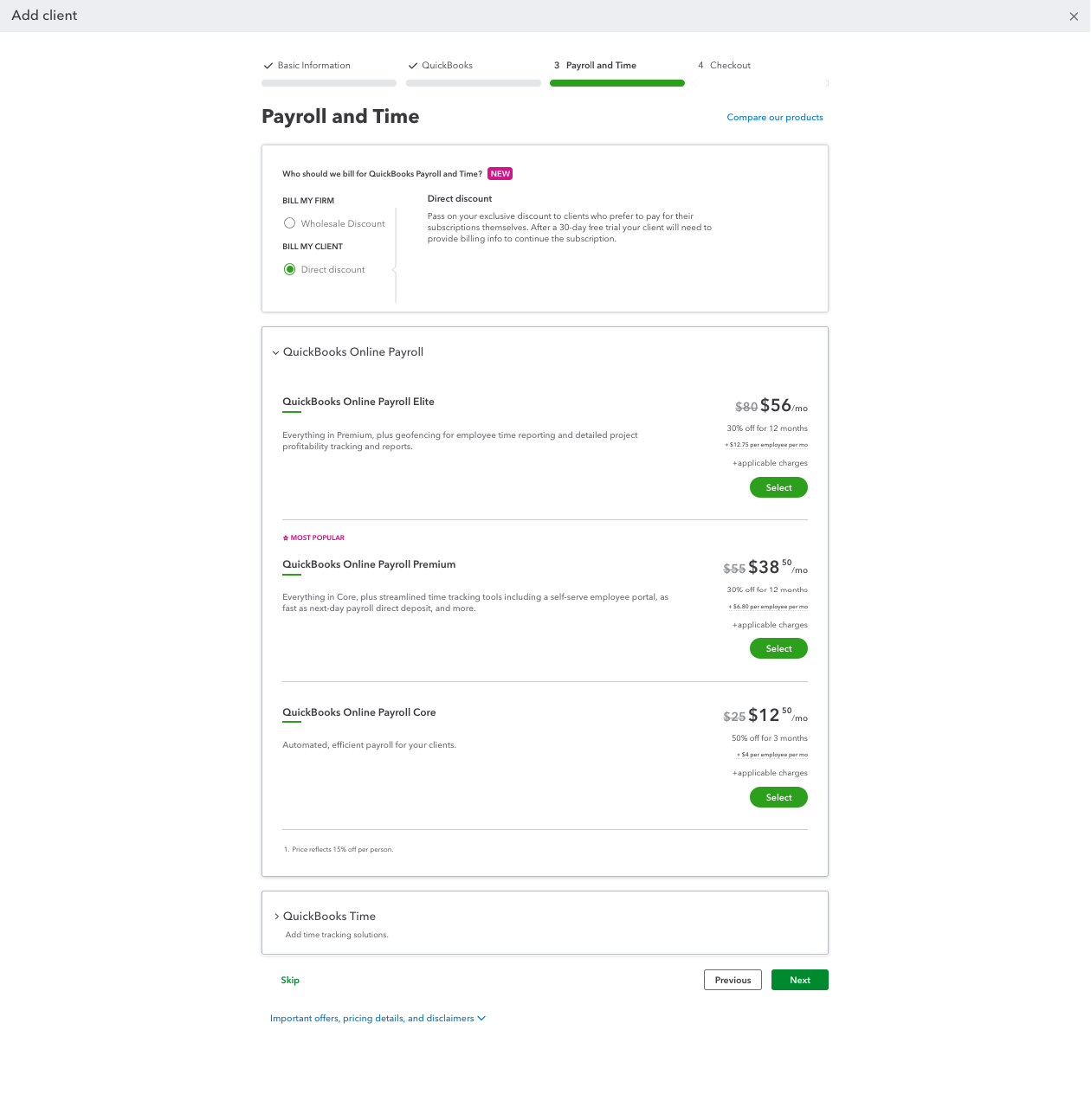
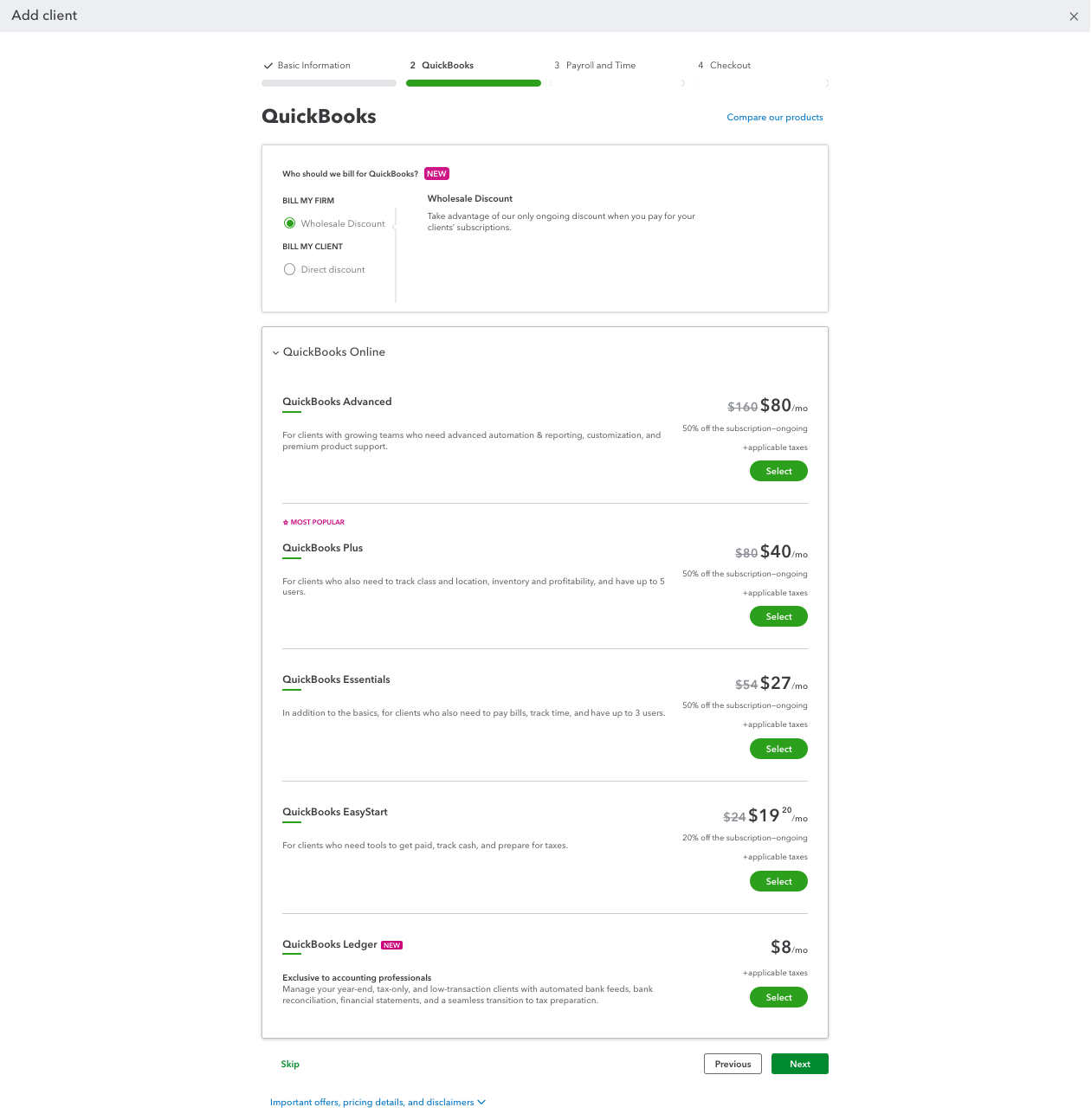
You will also see the Add Client experience now lets you choose whether to bill your firm or your client when you add a new subscription for your client.


A picture of the QuickBooks product screen

Which QuickBooks Online products are eligible for split billing? 


QuickBooks Online, QuickBooks Payroll, and QuickBooks Time are eligible for split billing. When you split the bill, your firm or your client will pay for the cost of the base subscription and any variable fees, such as per-employee fees or transaction fees. You will not be able to split the base subscription from the fees.

*QuickBooks Ledger is not eligible since it is an accountant-only offering through QuickBooks Online Accountant and can only be billed to your firm.

*QuickBooks Payments is not eligible because there is no base subscription cost billed to your firm or to your client. The processing fees for cards, digital wallets, and bank payments will continue to be billed to whomever is processing the payment.


How do I split the billing in QuickBooks Online Accountant?

You can split the billing on the Subscriptions and billing page or when you select Add Client.

From Subscriptions and billing, you’ll be able to add client subscriptions for QuickBooks Online, QuickBooks Online Payroll, and QuickBooks Time, and split the bill by each product.

A picture of the QuickBooks subscription and billing  screen

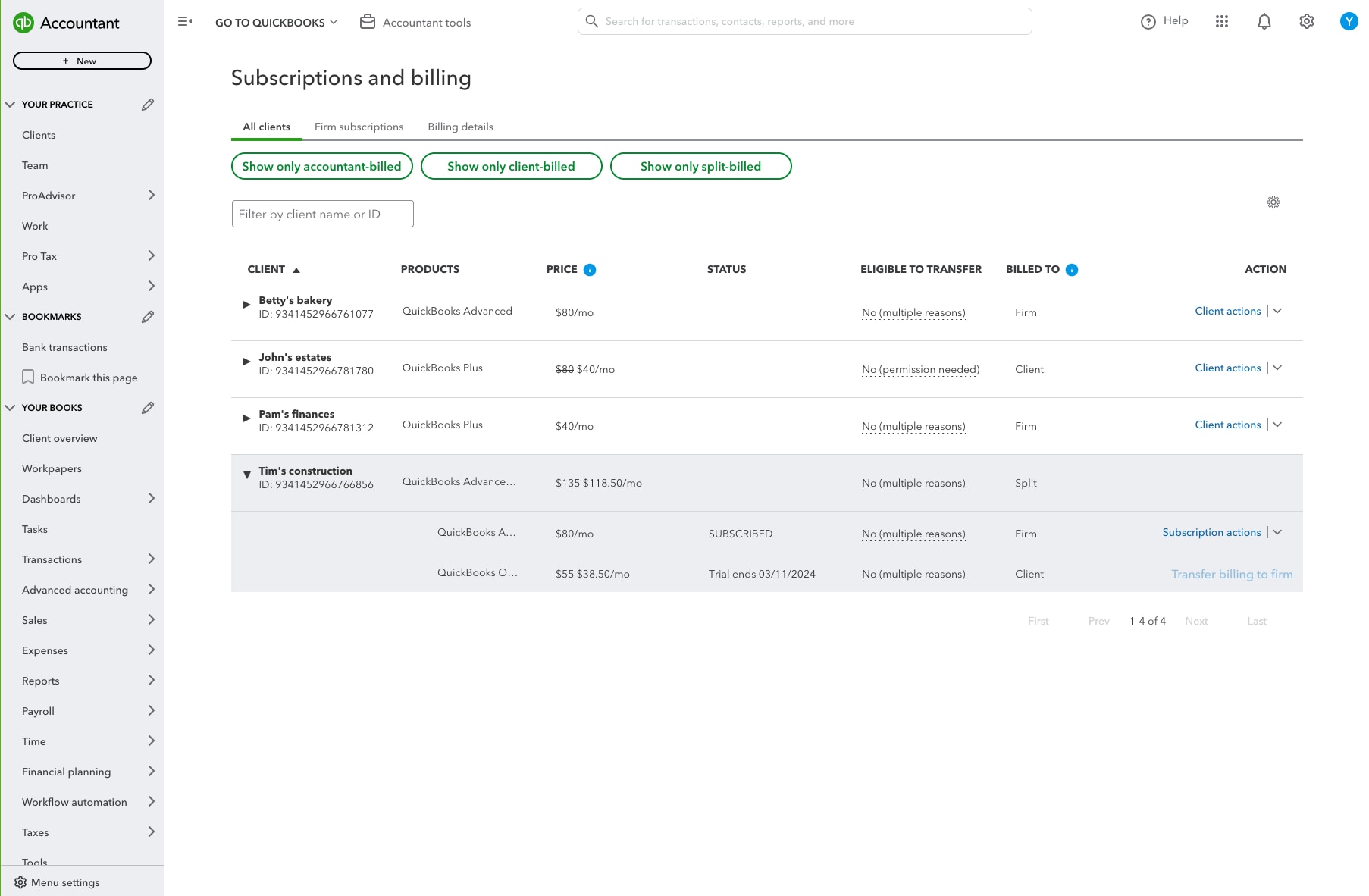
You can also choose to edit clients with existing subscriptions and “split” the bill by each product. For example, if your firm currently pays for QuickBooks Online and QuickBooks Online Payroll, you can choose to only transfer the billing for the existing Payroll subscription to your client.

A picture of the QuickBooks subscription and billing  screen

During the sign-up process for a new subscription, you’ll be able to choose between billing the subscription to your firm or billing to your client. 


A picture of the QuickBooks product screen

If you’re adding a new client and want to choose how they will be billed, select Add Client in the upper right hand corner to begin the signup process. After entering in some basic information, you’ll be prompted to choose a billing option for QuickBooks Online, and then QuickBooks Online Payroll or QuickBooks Time, so you can choose the right billing options for your firm.

Can my clients choose to split the billing without me?


As an accountant, your client could choose split billing themselves in certain unique scenarios. For example, if your client is currently on a firm-billed subscription (accountant paid), the client can subscribe to another QuickBooks product as a direct-billed subscription (client paid).

What happens when I transfer the billing to my client?

Before you transfer the billing, if you haven’t already, make your client the primary admin or company admin of their company file. When you initiate the process to transfer the billing to your client, your client will be prompted to enter their payment information if one is not already on file. Now that your client owns the billing for the subscription, they will be able to make changes directly in their QuickBooks Online product, including upgrading, downgrading, and canceling the subscription. 

Sign into QuickBooks Online Accountant to choose the right billing option for each of your clients’ subscriptions, or call 1-855-348-9670 to speak with a member of the QuickBooks team to learn more and the benefits of splitting the bill.


Your privacy

We collect data when you use our website to improve its performance. Doing so also helps us provide a secure, personalized experience. Select 'Accept cookies' to agree or 'Cookies settings' to choose which cookies we use. You can change your preferences anytime by clicking the 'Manage cookies' link in the footer.

Choose your cookie preferences

Some cookies are needed to make our website work and can't be turned off. But we need your consent to use others that are not essential. You can make your choices below and update them at any time using the 'Manage Cookies' link. To find out more, visit our Cookies Policy.

These cookies are necessary for the site to function. They also help us keep your data safe.
These cookies allow us to enhance your experience and remember your preferences, region or country, language, and accessibility options.
These cookies tell us how customers use our website. We study and organize this data to help us optimise our content and provide you with personalised experiences.
These cookies help us provide you with relevant communications and ads in our products and on other sites.

Looking for something else?

Get QuickBooks

Smart features made for your business. We've got you covered.

Firm of the Future

Expert advice and resources for today’s accounting professionals.

QuickBooks Support

Get help with QuickBooks. Find articles, video tutorials, and more.