Turn on suggestions
Auto-suggest helps you quickly narrow down your search results by suggesting possible matches as you type.
Showing results for
Get 50% OFF QuickBooks for 3 months*
Buy now*Taking over a QB account for a company.
We have an account under banking for our EIDL loan. We have transferred those funds to another account to cover expenses, leaving a very small balance in the EIDL account. We are now making payments on that loan and I am lost on how to track those payments and have the loan visible in QB.
Is there a way to show that loan and payments made to it?

Hello there, @EAKIN.
Let's set up a liability account so you can record your EIDL loan and its payments in QuickBooks Online (QBO).
You'll need to create a liability account to record the loan amount and its payments in QBO and help track what you owe to SBA. To do this, here's how:
Since the loan money was deposited directly into your bank (EIDL) account, I recommend creating a journal entry for the amount. Please follow these steps:
In case your EIDL account is linked to QuickBooks via bank feeds, you can match the downloaded transaction to the journal entry.
Once you're done, you're ready to pay back your EIDL loan or record its payments. For the step-by-step guide, you can refer to this article: Set up a loan in QuickBooks Online.
Also, I encourage you to reconcile your accounts in QBO regularly (every month). This helps monitor your income and expense transactions and detect any possible errors accordingly. You may want to check out this article as your reference to guide you in doing and fixing reconciliation in QBO: Learn the reconcile workflow in QuickBooks.
Let me know if you have other concerns about recording a loan and its payments in QBO. I'm always here to help. Take care, and have a great day, @EAKIN.
Thank you! That was very helpful!
I have that setup now. I see our payment for this loan went through and it is showing up as a transaction in the banking tab. Can I match this somehow so it goes toward the loan in QB?
It's great to help you today, @EAKIN
Yes, you can match and categorize your loan payment with the bank transaction. Here's how:
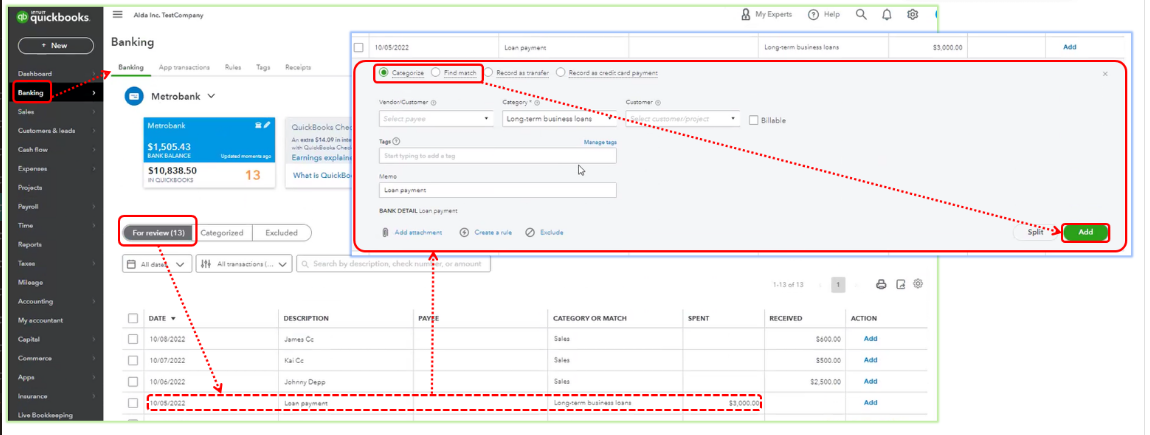
If you have trouble categorizing or matching your transactions, you can also refer to this link for detailed process: Categorize and match online bank transactions in QuickBooks Online.
Additionally, I recommend that you often reconcile your accounts in QBO (every month). This makes it easier to keep track of your revenue and spending transactions and spot any potential problems. You might wish to use the following article as a guide to help you perform and correct reconciliation in QBO: Learn about the QuickBooks reconcile workflow.
If you have further queries about QBO, don't hesitate to leave a comment, I'd be happy to help. Have a wonderful weekend!


You have clicked a link to a site outside of the QuickBooks or ProFile Communities. By clicking "Continue", you will leave the community and be taken to that site instead.
For more information visit our Security Center or to report suspicious websites you can contact us here


