Turn on suggestions
Auto-suggest helps you quickly narrow down your search results by suggesting possible matches as you type.
Showing results for
Get 50% OFF QuickBooks for 3 months*
Buy now
Hello there, @monomythproducti.
Allow me to share some information about failed deposits and assist you in how we can correct and handle this.
In QuickBooks Online (QBO), bank transfer payments can fail due to incorrect bank info or insufficient funds. In your case, the customer might've entered the wrong bank info. To handle this in QBO, please follow the steps below:
First, let's figure out where the failed payment is in QuickBooks:
Next, let's create a service item to track a rejected bank transfer:
Now, we're ready to create a new invoice to record the rejected payment. Recording it keeps your income and A/R accounts accurate:
Lastly, since the payment didn't go through, we'll need to remove it from the original invoice and move it to the newly created invoice:
You can also charge your customer for the failed payment fee, however, it is just optional.
Moreover, QBO has the option to allow users to find or update Directed Deposit funding time, To know more about this, feel free to browse through this article: View or change your direct deposit time funding time in QuickBooks Online.
I'll be around in case you need further assistance with regard to handling failed deposits in QBO. Simply leave a comment below, and I'll get back to you. Keep safe.
I'm having the same issue. I have selected the correct deposit account in settings, then I followed your steps, with the exception of the first instructions.
1. Click on the + New icon and select Bank Deposit.
2. Review the QuickBooks Payments section.
3. Locate the payment on this list. If you see it, it isn't deposited yet. If you don't, it is deposited.
The payment has not been deposited to may bank account, but still does not show in the Quickbooks Payments Section. In fact, I don't even have a Quickbooks Payments section when I select a New Bank Deposit.
I now have two invoices, one showing paid, and one showing past due and still don't have any funds deposited into my bank account. How do i deposit this to my bank account?
Hi Jack, thanks for posting your concern here.
I can help you deposit the paid invoice into your bank account in QuickBooks Online (QBO).
The Payments section that my colleague means is the "payments included in this deposit" section. You can locate this by creating a bank deposit.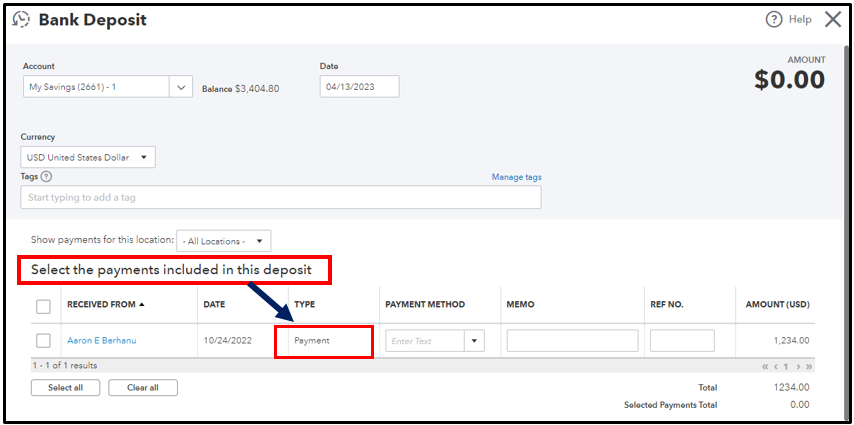
If the payment doesn't show in this section and was not deposited, it might be posted in a different account. Please note that before you make a bank deposit, make sure to put customer payments in your Undeposited Funds account. If payments are in Undeposited Funds, they automatically appear in the Bank Deposit window.
I suggest you review the payment by following these steps:
The payment should now be in the “Select the payments included in this deposit” section of the Bank Deposit window. Then, follow the steps to make a bank deposit.
If you still don't see the payment, proceed to Step 2. I've included this article for the detailed steps: Find missing payments you want to deposit in the Bank Deposit window.
You can also visit this link to learn how QuickBooks Payments deposits work in QuickBooks Online: Common questions about payment deposits.
The Community is here to help if you have additional questions about bank deposits. Keep safe.


You have clicked a link to a site outside of the QuickBooks or ProFile Communities. By clicking "Continue", you will leave the community and be taken to that site instead.
For more information visit our Security Center or to report suspicious websites you can contact us here


