Turn on suggestions
Auto-suggest helps you quickly narrow down your search results by suggesting possible matches as you type.
Showing results for
Get 50% OFF QuickBooks for 3 months*
Buy nowWe want to reward our employees who have good attendance by giving them 8 extra paid time off hours each quarter. I am calling these hours Eureka hours and I have created a PTO call in TIME call Eureka. I didnt created this code in QB online payroll.
I want them to be able to request this PTO from their workforce APP whenever they want to use ir for time off.. Just like vacation.
I created the code but I don't know how to enter a balance for this code in TIME. Not all employees qualified so I will need to pick and choose employees.
Thanks

I think i may have found the place where I add balances, but when I try to save the balance it says:
"you need to configure Accrual Settings for this person before you can adjust their ledger"
Thanks
laura
We can easily streamline this process by enabling the Track Accruals option, LDO.
Here's how you can do it:
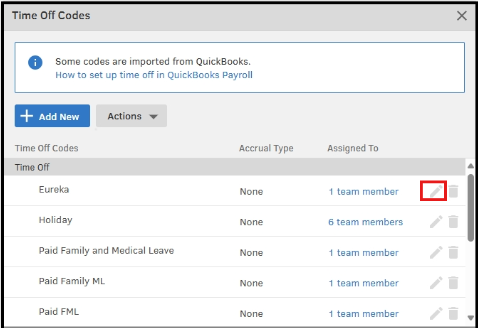
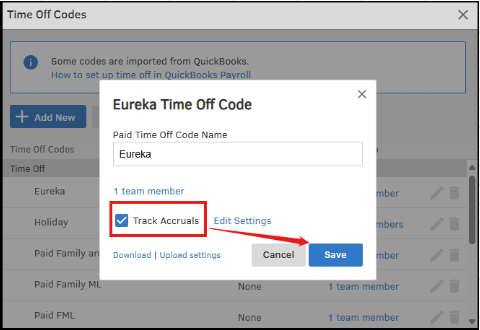
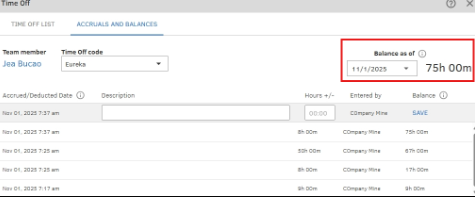
If you have additional questions, feel free to leave them in the comments, and we will assist you promptly.
Not yet! Are the PTO codes you show in your example supposed to show up on an employees stub?
I want the employees to see how many Eureka hours they have taken.
Thanks
LDO
Good evening, @LDO.
Thanks for checking back with us. I hope your day has been great so far.
Since you have your Eureka hours set up in QuickBooks Time, you'll need to set up the Eureka policy in QuickBooks Online (QBO) Payroll and link the time tracking in QuickBooks Time.
In QuickBooks Online Payroll:
Once a time off policy is correctly set up and used during payroll in QBO, the used hours, accrued hours, and available balance should automatically appear on the pay stub.
For more information about this process check out these help guides:
That should do the trick. Please let me know if there is anything else I can assist you with. Have a good one!
Will the fact that I originally set the Eureka PTO code up first in Time before I entered it in Payroll have any adverse effects?
Thanks
LDO
Hey there, LDO. Hope you're doing well!
To answer your question, no, having the Eureka time set up in QB Time first won't matter. As long as it is also entered in QBO Payroll you'll be able to link them.
You know where to come if you have any other questions. Take care!
When I run payroll the eureka hours do not show up. I would have loved to have seen a new line in the run payroll hours called EurekA, if i go to edit the hours before i approve the check i still dont see eureka hours and even worse the eureka hours are added to the regulars hour and at the very least they should be paid time off hours,
The employees can "choose" eureka reward hours to be paid from their workforce app. But they cant see where we paid them the eureka hours. For some reason QB puts the paid eureka hours into the regular cvategory. At the very least the paid eureka hours should show up in the paid time off hours,
please help
thanks
Hi, @LDO. Currently, QuickBooks Online (QBO) does not automatically create a separate line item for time-off codes, such as EurekA, on paychecks.
The reason EurekA hours are categorized under regular hours is likely because the code is mapped to the Regular category in the system. To resolve this, let’s review the mapping of your EurekA code in the Payroll Item Mapping Tool tab.
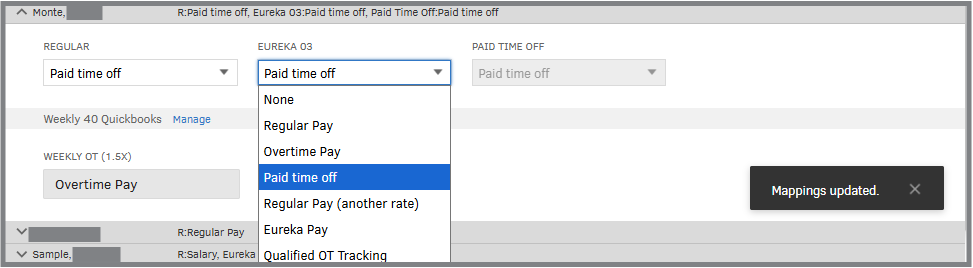
In the meantime, consider adding a memo note to indicate that the paycheck includes EurekA reward hours.
I can see the importance of having clearer visibility for custom hours as a separate line in payroll. We encourage you to provide feedback to help improve QuickBooks Payroll functionality.
Please let me know if there's anything else I can help you with. I'll respond to you promptly.
I do not see Eureka as option in the pulldown. Nor do I see paid time off as option.
I think this would work if i could choose one of these options
edit: I see Paid time off for some employees. But I do not see Eureka as an option in the pull down for any employees.
How do i get Eureka as option in the pulldown?
I probalby have to add PTO in the payroll section, but what about eureka?
Thanks
LDO
Hello, LDO. The reason might be that you need to create a pay type in QuickBooks, as it's essential for payroll setup. Once created, assign it to employees in the payroll section and make any necessary edits.
Here’s how to do it:
Once you’ve edited and assigned the pay type to your chosen employees, you'll need to sync it with QuickBooks Time. To do this:
If you have any additional concerns or questions about QuickBooks, don’t hesitate to reach out to us again. We’re always here to assist you.
Eureka doesnt show up as a pay type under "edit payrolli items"
If i look at an individual employee's page I see Eureka under Time Off. I do not see Eureka as an additional pay type. Could this be the problem?
Thanks
..Also Is Eureka supposed to show up like this or should it be under the greyed out Paid Time Off?
Hi LDO, the PAID TIME OFF code is greyed out because it's pre-defined in the employee's profile. You can modify it directly in the Time Off section of their profile.
While you can edit this, please note that Eureka won't appear there, as that section only displays standard Time off policies labels (Vacation pay, Paid time off, Sick pay, and Unpaid off).
To make this selectable under the codes you have created, you have to set it up as a Pay Type:
Here's how:
Once this setup is complete, you can follow the steps provided by my previous colleague to assign the new payroll item to your employee.
Please let us know if you have more questions.
Why is eureka a pay type. Wouldnt it be a paid time off like vacation?
Thanks
LDO
Also, why do i see Eureka balances in TIME, but the balances are not there when i do payroll?
Thanks
LDO
Thanks for getting back on this thread with your question, LDO. The distinction is even stricter. Eureka is categorized as a Pay Type, similar to Bonus or Commission, because QuickBooks reserves Time Off categories for specific, legally defined purposes of (Vacation pay, Paid time off, Sick pay, and Unpaid time off).
Also, these are designed to handle of fixed Time Off categories:
Because "Eureka" isn't a standard legislative category, QuickBooks defaults to treating it as "Other Earnings" or a custom Pay Type.
Additionally, once a time-off policy is set up, the balances should automatically appear on the pay stub. If you require further information, I recommend contacting our Live Support team. They have specialized tools to review your account and resolve this effectively and efficiently.
Feel free to drop a comment below if you need help with anything else in QuickBooks.
The employees can see Eureka on their workforce hours. They can request eureka hours, but their request does not show up in Time. I see nothing to approve.
Please help.
disregard my last message as the 8 eureka hours are showing up on time, And somehow they got approved already ..... but when I go to do payroll i see this at the bottom;


You have clicked a link to a site outside of the QuickBooks or ProFile Communities. By clicking "Continue", you will leave the community and be taken to that site instead.
For more information visit our Security Center or to report suspicious websites you can contact us here


