Get 50% OFF QuickBooks for 3 months*

Buy now
cancel
Showing results for 
Search instead for 
Did you mean: 
Announcements
Ablojep
Level 2

Payroll

Why are payroll taxes showing as "Accruing"?

I ran payroll for 12/1/2024 to 12/31/2024 last month (December 2024).

QB Online instead reflects payroll for 1/1/2024 to 1/31/2025 and the payroll taxes are showing as "Accruing" and due on 2/15/2025.

Even the year end reports do not reflect the payroll for December 2024.

Did not have this issue before.

I'm on Cash basis.


Thanks for your help.

Solved
Best answer January 12, 2025

Best Answers
KiazzymaeC
QuickBooks Team

Payroll

Thank you for reaching out, @Ablojep.


QuickBooks Online follows Constructive Receipt for payroll reporting. To understand better, Constructive Receipt implies that companies must declare an employee's earnings on the day they are paid instead of the time which the work was done. Employers are required to report their employees' income in the year the money is received or when it becomes accessible to them without any conditions. 


Let's review the paycheck date of the payroll you've ran last December 2024. This is to make sure that the taxes are reported to the correct period. 


Here's how:


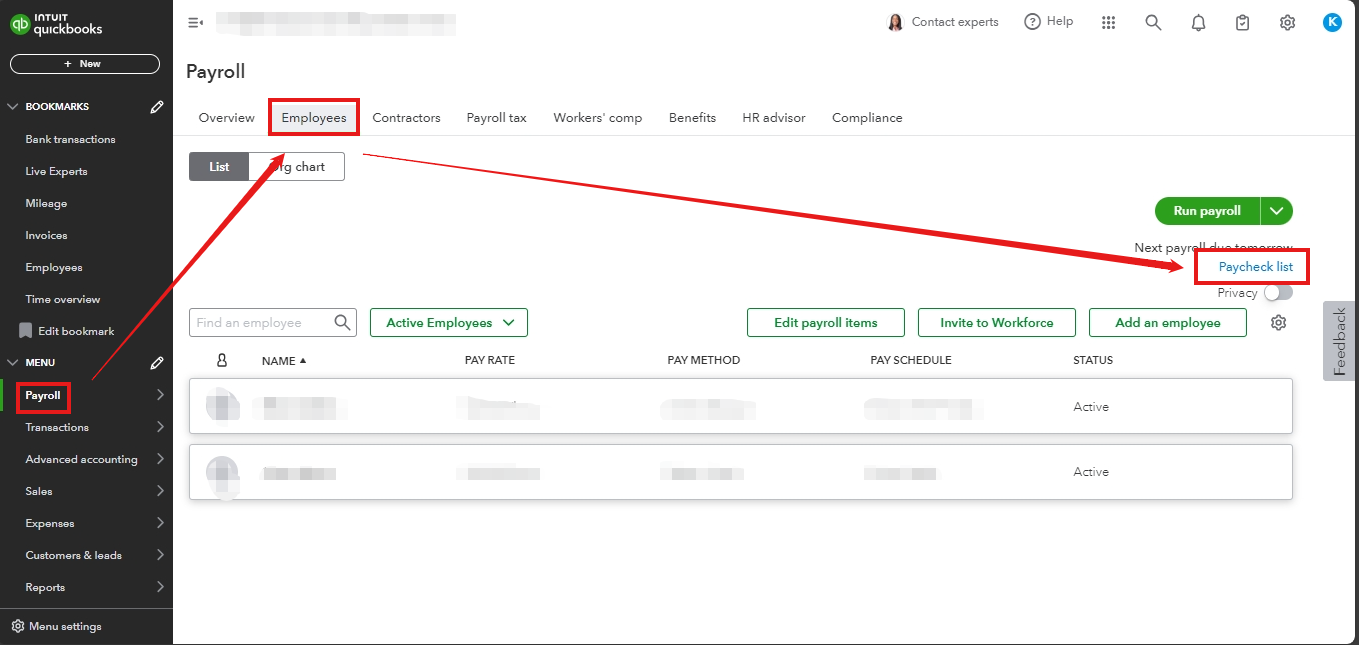
  1. Go to the Payroll menu.
  2. Select Employee, then Paycheck List.
  3. Choose the Pay Date you wish to view.
  4. Review the Pay Date.


If the pay date is showing as 2025, then no further action may be necessary. However, if the checks are dated to 2024 and the taxes accrue in 2025, then I recommend you contact our support team. They will be able to further investigate the issue and help you make the proper corrections.


Additionally, I've included these links for your future reference regarding your payroll reports. These articles will assist you in completing this year's payroll and getting ready for the upcoming year using QuickBooks Online Payroll Core, Premium, or Elite: 


If you have any more questions about your payroll taxes, please feel free to comment below. I'm here to help you!

View solution in original post

1 Comment 1
KiazzymaeC
QuickBooks Team

Payroll

Thank you for reaching out, @Ablojep.


QuickBooks Online follows Constructive Receipt for payroll reporting. To understand better, Constructive Receipt implies that companies must declare an employee's earnings on the day they are paid instead of the time which the work was done. Employers are required to report their employees' income in the year the money is received or when it becomes accessible to them without any conditions. 


Let's review the paycheck date of the payroll you've ran last December 2024. This is to make sure that the taxes are reported to the correct period. 


Here's how:


  1. Go to the Payroll menu.
  2. Select Employee, then Paycheck List.
  3. Choose the Pay Date you wish to view.
  4. Review the Pay Date.


If the pay date is showing as 2025, then no further action may be necessary. However, if the checks are dated to 2024 and the taxes accrue in 2025, then I recommend you contact our support team. They will be able to further investigate the issue and help you make the proper corrections.


Additionally, I've included these links for your future reference regarding your payroll reports. These articles will assist you in completing this year's payroll and getting ready for the upcoming year using QuickBooks Online Payroll Core, Premium, or Elite: 


If you have any more questions about your payroll taxes, please feel free to comment below. I'm here to help you!

Need QuickBooks guidance?
Log in to access expert advice and community support instantly.

Need to get in touch?

Contact us