We appreciate you reaching out to us, dk59. Rest assured, the export function hasn't been discontinued. Let's go over some browser troubleshooting, ensuring you can get payroll data into QuickBooks Online (QBO).
To export your transactions from standalone payroll to QBO, please make sure you're the primary admin and no payroll service is attached to your QBO account. It's also worth noting that you'll need to transfer the primary admin role to a non-firm user if the current one is a Firm user.
If you're already the primary admin and your QBO doesn't have payroll, let's clear your browser cache and export it again. Corrupted data causes unexpected behavior, affecting the export process. You can consider using a different supported browser if the issue persists.
If you're still unable to sync your transactions after troubleshooting, I recommend contacting our Live Payroll Support team for assistance. They have the tools and expertise to identify the root cause of the issue and deliver the best solution.
Here's how:
- Click (?) Help and choose the Search tab.

- Utilize the search option or open an article, then select Contact Us at the bottom of the Help panel.
- Determine how you would like to talk to an expert: Start a chat or Have us call you.
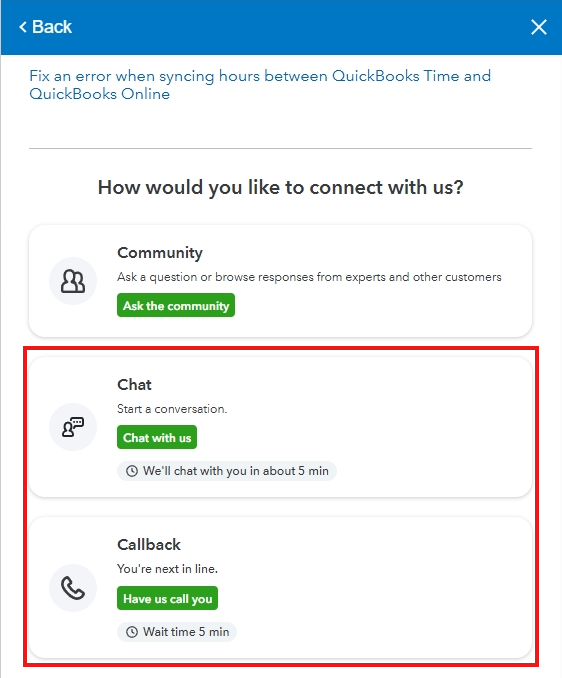
For convenience in the connection process, please observe their support hours.
We always want to make sure you'll be able to perform different payroll tasks seamlessly with QuickBooks Online Payroll. If other questions arise, feel free to respond below. We'll keep an eye on this thread so we can get back to you as soon as possible.


