It is crucial to ensure that all payroll details are accurate and that your records remain intact, MissmissySEI. Let us explore some effective methods to handle this situation smoothly and efficiently.
QuickBooks Desktop doesn't support retaining multiple timesheets for the same period without overwriting the previous one. However, you can still manage two separate paychecks for the same employee within the same pay period by using the following methods:
Manual Entry for Both Paychecks:
1. First Paycheck: Enter the first paycheck details as usual.
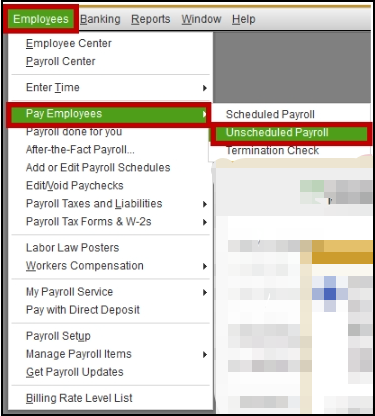
- Go to the Employees menu.
- Select Pay Employees and choose Scheduled Payroll.
- Enter the hours and payroll details for the first paycheck.
- Save and print the paycheck.
2. Second Paycheck: Manually enter the details into the payroll module without using a timesheet. This way, both paychecks are recorded accurately.
- Go back to the Employees menu.
- Select Pay Employees and choose Unscheduled Payroll.
- Enter the hours and payroll details for the second paycheck.
- Save and print the paycheck.
Use and assign Payroll Items:
Create separate payroll items for different pay types (e.g., regular hours, overtime) and assign them accordingly when processing payroll. It helps keep track of different payments within the same period.
- Go to the Lists Menu.
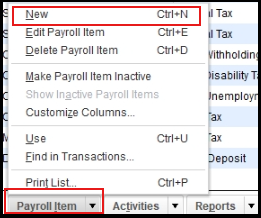
- Select Payroll Item List, then New.
- Follow the prompts to create new payroll items for different types of pay (e.g., regular hours, overtime).
Record Both Timesheets Separately:
Instead of using the timesheet feature, you can manually track the hours worked for each paycheck in a spreadsheet or another document. Then, enter the total hours for each paycheck directly into QuickBooks when processing payroll.
Here's how:
- Go to the Employees menu and select Enter Time.
- Choose Use Weekly Timesheet.
- Enter the total hours for the first paycheck and save.
- For the second paycheck, manually enter the hours directly into the payroll module without using the timesheet feature.
Additionally, I'm adding these helpful articles to ensure your records and entries are accurate and up-to-date:
It's great that you're taking the initiative to manage your payroll manually in QuickBooks Desktop. Together, we can ensure your payroll process runs seamlessly. Our team is here to provide you with prompt support.


