Turn on suggestions
Auto-suggest helps you quickly narrow down your search results by suggesting possible matches as you type.
Showing results for
Get 50% OFF QuickBooks for 3 months*
Buy nowWe have several workstations that are using Quickbooks enterprise 2021, and were using Outlook 2007. Due to some problems we were having with our email provider and outlook 2007 on 2 workstations I installed Thunderbird ver 91 and set it as the default email client. In the past I was using outlook as my primary email client, and had Thunderbird installed to try out. In the past there were 2 occasions when Quickbooks switched to Thunderbird without me doing anything. To switch back to outlook I had to uninstall Thunderbird.
Since setting Thunderbird as the default client on both workstations Quickbooks will not see it or offer it as a choice in the send form area of preferences. I have tried downgrading to an older version of Thunderbird and that did not work. I removed Quickbooks, rebooted the system, then reinstalled Quickbooks, and that did not work.
So in thinking that maybe Quickbooks would not work with Thunderbird I tried one more thing. We have one workstation that we use for processing UPS, and it has Quickbooks installed as a backup in case maintenance is being performed on one of the other workstations. So I installed Thunderbird on that workstation and when I started Quickbooks and went into preferences, send forms Thunderbird was listed as an email choice. I did send a test message from QB using Thunderbird and it work fine.
What do I need to do on the other 2 workstations to get QB to see and use TB ??
Solved! Go to Solution.

Good morning, @partsgray.
Thanks for keeping us updated along the journey. I appreciate you taking the time to use all of the guided steps so far.
I wanted to ask if you are using a 64-bit version of Thunderbird on the other two computers, and possibly a 32-bit version of Thunderbird on the working computer?
Upon further research, some of our users have found that QuickBooks Desktop runs a 32-bit. For the compatibility of Thunderbird to show as an option from their email preferences in QuickBooks, they used a 32-bit version of Thunderbird and seen it listed again.
That said, I recommend installing a 32-bit version of Thunderbird. Then, set it up as the default email as you did before.
However, if this solution doesn't work, I recommend contacting the email provider to see if there're any ongoing issues with the interference of QuickBooks.
Please let me know if you have any questions or concerns. Take care and enjoy the rest of your day!
You've come to the right place for an answer, partsgray.
I appreciate all the steps you've taken so far to resolve the Thunderbird issue in your QuickBooks Desktop (QBDT). I'm pleased to provide troubleshooting steps to solve the dilemma of being unable to use Thunderbird as an email provider in your two workstations.
Failure to use the email provided in the two workstations occurs when the data is damaged. With this, I'd recommend running the verify and rebuild tool. This tool scans your company file for issues and fixes them right away.
Here's how:
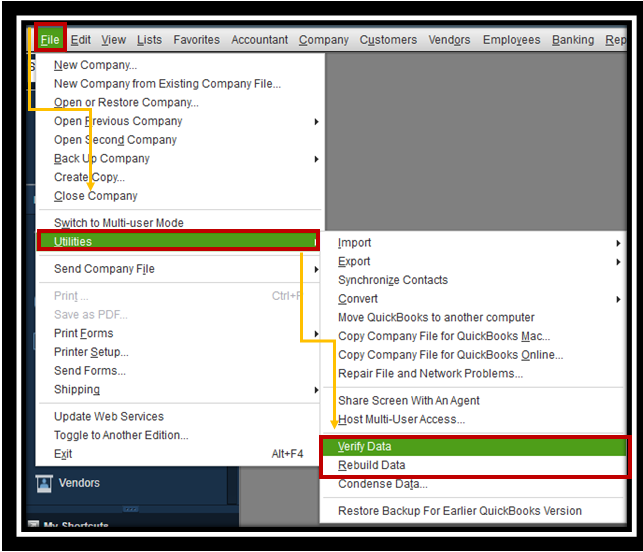
You can also check this article for more detailed steps: Verify and Rebuild Data in QuickBooks Desktop.
Once finished, send a test message using default Thunderbird to the workstation that has the problem to verify if it's performing well.
Feel free to visit these articles below on how to fix it if QuickBooks will not accept your webmail password and other related topics:
I'll be around to help if you need further assistance with dealing with Thunderbird in QuickBooks Desktop. Keep safe, partsgray.
I should have stated in my initial post that this morning I did a backup of the company file which does verify the data. The file was fine and the backup ran to completion. Should I still verify the data ? If so do I need to everyone out of the file ?
Let's make sure to fix this issue, partsgray.
Since you've mentioned that you've already verified data, you'll want to reset the update in each workstation instead to ensure that you'll be able to use Thunderbird on QuickBooks. To do this, follow the steps below:
For more information, please read this article: Update QuickBooks Desktop To The Latest Release. Additionally, you may encounter an error in the process of updating QuickBooks. I've added this article for your guide: Fix QuickBooks Desktop Error.
Reach out to us if you have any concerns when using Thunderbird. We're here to help.
I did as you suggested resetting the updates, and then installing the updates. I had to wait for everyone else to logout of QB before I could login. When I did log back in on Friday TB was still not listed as an option in preferences. At that point I went home for the weekend.
When I came in this morning I logged back in to QB but TB is still not shown as an option,
So any other advise you can give will be greatly appreciated.
Good morning, @partsgray.
Thanks for keeping us updated along the journey. I appreciate you taking the time to use all of the guided steps so far.
I wanted to ask if you are using a 64-bit version of Thunderbird on the other two computers, and possibly a 32-bit version of Thunderbird on the working computer?
Upon further research, some of our users have found that QuickBooks Desktop runs a 32-bit. For the compatibility of Thunderbird to show as an option from their email preferences in QuickBooks, they used a 32-bit version of Thunderbird and seen it listed again.
That said, I recommend installing a 32-bit version of Thunderbird. Then, set it up as the default email as you did before.
However, if this solution doesn't work, I recommend contacting the email provider to see if there're any ongoing issues with the interference of QuickBooks.
Please let me know if you have any questions or concerns. Take care and enjoy the rest of your day!
I have checked and you are correct. The system that is working is 32 bit TB. Can you tell me the preferred method to go from 64 bit to 32 bit ? Should I uninstall the 64 bit version first, or leave it alone and install the 32 bit ?
To all that assisted me, thank you. I am angry with myself for not thinking about the possible conflict between the two architectures. But lesson learned
Thanks for following up with the Community, partsgray.
You can find detailed steps for installing/uninstalling different versions of Mozilla Firefox on their website. Their support articles will detail the recommended method for installing a copy of the 32-bit version browser.
Please feel welcome to send a reply if there's any additional questions. The Community's always here to help. Have a lovely day!


You have clicked a link to a site outside of the QuickBooks or ProFile Communities. By clicking "Continue", you will leave the community and be taken to that site instead.
For more information visit our Security Center or to report suspicious websites you can contact us here


