Turn on suggestions
Auto-suggest helps you quickly narrow down your search results by suggesting possible matches as you type.
Showing results for
Get 50% OFF QuickBooks for 3 months*
Buy nowI need to sign in to Intuit on mu Quickbooks desktop, but instead of the sign in option I see the buffering circle. I have tried signing into Manage your account, that works, but still can't sign into Intuit for the program. My internet is working, I've rebooted the PC, but the buffering persists when I open QB desktop. PLEASE HELP!

I am having the same issue. There are a couple other threads saying the same thing. Of course https://status.quickbooks.intuit.com/ doesn't show anything.
This is happening to me I'm too busy for this!!
Can you login to CAMPS and your license status is Active?
I'm active, but cannot get into merchant services. I can access the books but I'm not signed in.
Thanks for getting in touch with the Community, MRoger. I appreciate your and each other user's detailed information.
I've reviewed our QuickBooks Status page and can confirm there's currently reports of some customers who are unable to sign in to their Intuit Account from within QuickBooks. Intuit's Product Investigations team is currently investigating for a solution for the Intuit Account login window not loading properly.
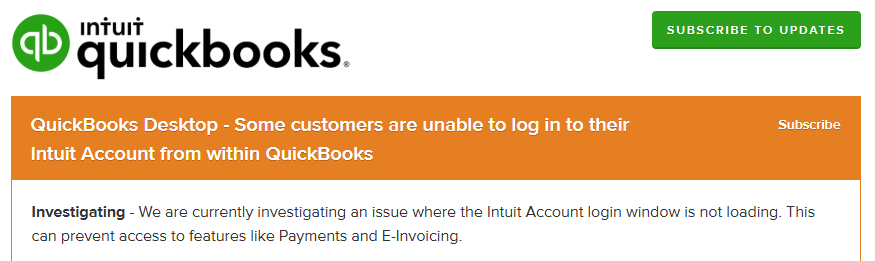
While they're investigating the situation, I'd recommend trying their recommended troubleshooting steps.
Here's how:
If the problem continues after performing the workaround above, you'll want to get in touch with our Customer Care team. They'll be able to pull up your account in a secure environment, conduct further research with you, and create an investigation ticket if necessary.
Also be sure to visit our QuickBooks Status page. From there, you'll be able to select the Subscribe option to subscribe for updates about the investigation.
Please don't hesitate to send a reply if there's any questions. Have a wonderful Thursday!
I am having the same issue. Can not get logged into my intuit account to send emails. Just buffers.
Thank you for reaching out about this matter, Melissa. I understand the importance of logging in smoothly to your Intuit account for your business. Since you're unable to do so, let's connect you with the appropriate team.
While I'd like to offer assistance firsthand, issues like this need a thorough review in a secure environment. That said, I recommend reaching out to our live support team. They have the resources to examine your specific situation and guide you through the necessary steps to resolve this.
To connect with them, here's how:
To learn more about their support hours, please refer to this article: Get help with QuickBooks products and services.
If you have other questions or need further assistance, please don't hesitate to reply to this forum.
I tried using the help with in Quickbooks. Enter in all the information to chat and when it tries to connect I keep getting something went wrong. I am unable to use the receipt management as well as send out invoices. Can on log in to my intuit account within quickbooks. I can go to intuit and log in via the internet but not within quickbooks. It appears others are having the same issue.
If you and the rest of Intuit's team is this incompetent, how are the rest of us supposed to continue to trust you? I've been searching for weeks to get past this and can't. I hate your product. I hate you. And I can't wait until your entire company goes down in flames.
I have same issue with log in within QB. My QB does not even let me ask a question using contact us tab.
My name is Roman. Email is [email address removed]
Please let me know what happens. I can not log in, use contact us window.
Best regards, Roman
Hi Roman,
Could you please let me know what version of QuickBooks Desktop you’re currently using (Pro, Premier, Enterprise, or another version)? Additionally, what specific error message are you seeing on your end when trying to log in? This information will help me better understand the issue and guide you accordingly.
I recommend updating your QuickBooks Desktop to the latest release, as updates often resolve bugs or glitches you might be experiencing. You can also use the QuickBooks Desktop Tool Hub, which is designed to address common problems and errors within the software. This tool can be extremely helpful in resolving login and operational issues you're facing.
Feel free to reply below if you have further questions.
Same problem can log in online but can not sign in within QB tried tool hub for fix but didn't help. Can't send invoices. Fixing the problem is not buying and installing the lates version.
Can not get logged into my intuit account to send emails. Just buffers. I am unable to us Help it does the same thing. I have ran Tool Hub. And i will not be buying a new version.
yes
Good morning, @bucky77.
Thanks for chiming in on this thread.
We appreciate you taking the time out our your day to try these troubleshooting steps. Let's try two more actions before looking further into this issue if need be:
Feel free to reach back out if these actions don't help resolve your log in issues. We want to ensure that you get this taken care of as soon as possible. I'll be waiting for your response!
I have done both and still not working. FYI I first did a lates version install then did and new install. but when i install it it only gave a option of a repair install.
Hi there, @bucky77. I appreciate you performing the troubleshooting steps, and I understand the importance of being able to sign in to QuickBooks Desktop (QBDT).
Since you're unable to use the Help menu in QBDT, you can try following the steps below to have your account checked by our Live Support team to resolve the sign-in issue:
For more information about our contact feature and support hours, please refer to this article: Get help with QuickBooks products and services.
We'll be around to help you if you have any other concerns.
What year version? 2024 or older?
Same issue using QB Premiere 2019 Desktop. It seems to be planned obsolescence. I contacted Desktop Support to plainly be told "support no longer exists for this product" and to switch to online.
The problem- Essentially Quickbooks requires you to log in to your "Intuit Account" every 90 days or you will receive warnings that you will lose access to your data file. Unfortunatly, they seem to now be blocking log ins from inside the older desktop versions- thus starting a countdown on losing access to our data and the program we purchased.
Things I have tried:
- I am able to log into Intuit and CAMPS via all browsers, no errors and license shows valid.
- QB Program and File Dr repair, no change.
- Disabled Firewall, no change.
- Tried seperate network to eliminate router firewall, no change.
- Uninstall and reinstalled program, turned off updates and declined upates, no change.
- Installed program on second laptop running older OS (Win 10) and attempted to "Manage My Account", no change- same spinning circles.
Now when I cancel "You must log in to your Intuit Account" window at program start, I am getting a warning that I will lose access to my LOCALLY STORED data file in 20 days unless I can log in = planned obsolescence.
You can use the trial version of QB 2019 Pro as a workaround or upgrade to QB 2021.
Forgot to add that I bought QB Premiere 2021 (techsoup was still selling it) and the would not register at all, same spinning circles. Tried QBD support and was told same line- this software is no longer supported and cannot be activated/registered.
Hi there, rodneyle.
To effectively address your concern, I recommend reaching out to TechSoup for assistance, as the product you are inquiring about is no longer available or supported. They may provide you with alternatives or additional resources that can meet your needs.
Feel free to return here if you have additional questions or concerns. We're always here to help.


You have clicked a link to a site outside of the QuickBooks or ProFile Communities. By clicking "Continue", you will leave the community and be taken to that site instead.
For more information visit our Security Center or to report suspicious websites you can contact us here


