Turn on suggestions
Auto-suggest helps you quickly narrow down your search results by suggesting possible matches as you type.
Showing results for
Get 50% OFF QuickBooks for 3 months*
Buy now
I have been getting the "subscription will expire" notice for about 10 days. Ours automatically renews each May - so we are good until May 2026. Yesterday, I had 1 day left, so I restarted QB, let all of the latest, greatest updates run, the message disappeared. Today I log into QB - my subscription has expired, I am in "read only" mode, cannot post anything in QB. Tried call the toll free number, got an automated "person". When I finally was transferred over to the human side, a recording said the office was closed, to call back during normal business hours, but did not indicated what the "normal business hours" were. I am completely dead in the water! Very frustrating!
Thanks for following along and sharing your concerns, @SuzanAAM.
This is not the impression we wish to leave you with. Our goal is to ensure our customers get quick and reliable support.
You can use the steps below to connect with our team directly:
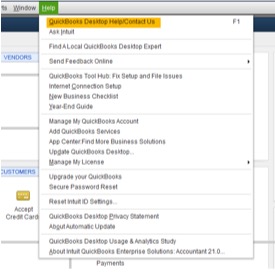
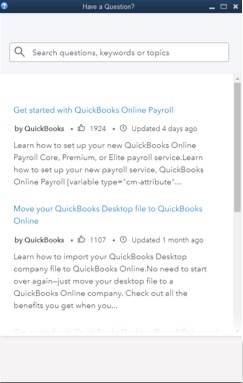
Search for Contact Support, then click on Contact Us to be connected to an expert for help. Note: you need to search for an article before you'll see the Contact Us option.
Please let me know if there is anything else I can assist you with today. Have a good one!
Thanks Tori,
I went through the help options in QB and had someone call to help me resolve this issue. I'm back up and running.
Suzan
If you don't mind my asking, what did they say was the issue to cause the problem and what was the resolution to fix it. Since I started the post in the beginning of the year, there have been so many other customers that related to my problem. But there has not been a direct answer as to why this is happening and what fixes it.
I was told it's due to expired Renewal Tokens. You have to call customer support ask to add tokens to your account
It's happening because of to expired Renewal Tokens. You have to call customer support and ask to add tokens to your account
Apparently they are getting used to the problems and were able to get the problem fixed in a few minutes. We have QB 2024 Plus Annual Subscription Premier. He stated that QB has so many logins assigned to the subscription. Once you reach the assigned login amounts, they have to "load" more on to your QB subscription. I told him I have been using QB for 20 or 30 years and had never had that issue before? He put me on hold for less than 5 minutes and had a supervisor load more on our QB account, I closed QB, reopened it and everything was back to normal. I went in through the Help in QB, then contact us and had them call me.
Got this pop-up message, " QB subscription has expired" I just renewed it last June 5,2025 for $1399.00
Can't work on my QB because it goes to view mode only. Can someone look into this?
Can you login to CAMPS and find your license code there?
What is your license status? Active or Canceled?
I completely understand the inconvenience of being stuck in View Only mode, especially right after completing a renewal, Courage. That's definitely not the experience we want for you, and I'll direct you to our representatives to help you get your account fully accessible again.
Since this involves a subscription payment, I recommend contacting our live experts for guidance on verifying it. They can also review the renewal process you've made and check your account status. Follow the steps below to reach out to them outside the program:
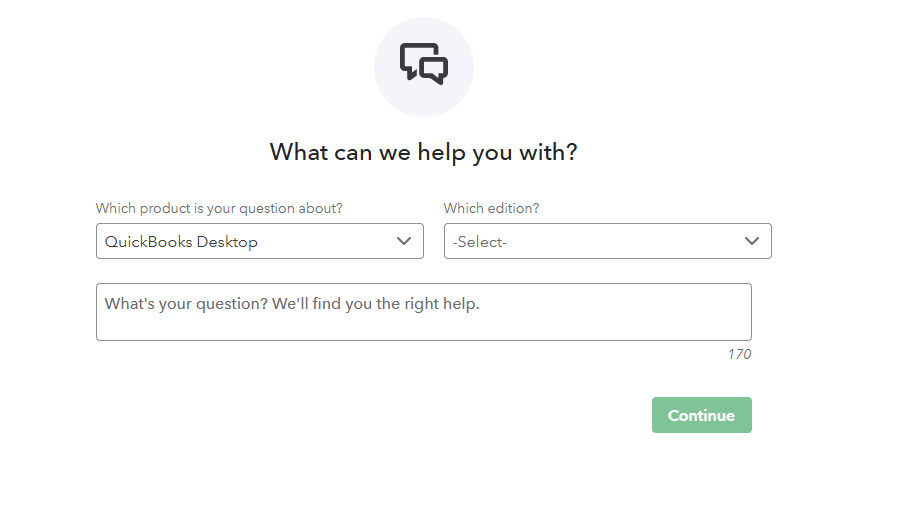
You can manage your QuickBooks Desktop subscriptions and services through the Customer Account Maintenance Portal (CAMPs).
Ping me a reply if you have further questions about your subscription. We're always here to assist you.
Same issue here. Was able to resolve with help from tech rep. Here is what worked. Even though my credit card on file was updated and current (and my license renewed and active), for some reason just confirming the CC and then sync'ing the license from within the software solved it. Note that Setps 2 and 3 did not apply to my version of the portal - I simply went to Step 4.
Another set of steps the tech shared with me were the following -- these were to check the tokens. However I could not find the License/Token Management section he referred to in the QB software. Perhaps it is for Enterprise of a different version. I am working in QB Desktop Premier Plus Contractor Edition 2024 R15P.
I have been having this same issue all year. It pops up every 3 months or so. The support staff comes in takes over my quickbooks via some online thing they do. It is "fixed", and they assure me that it will never happen again. Well, here I am on a Saturday, it says I have 2 days left and I can't get support. Every three months!! Obviously, this is some kind of glitch that QB has planted in the software. No one address the elephant in the room. QB. How can I get support on a Saturday????
Hi Raleightx,
I understand how inconvenient it can be to encounter the same issue after it has been addressed before. Let’s work together on resolving this.
Before routing you to one of our live experts, let’s verify your payment information first and sync your license data online. Doing this will help ensure it matches your QuickBooks Desktop (QBDT) license info and eliminate the pop-up message you've been experiencing.
To verify your payment information, please follow these steps:
Here's how to sync your license data:
If the issue persists, I recommend trying Solution 2 and Solution 3 outlined in this article: Fix subscription has lapsed error in QuickBooks Desktop.
Please note that our live expert support hours vary depending on the version of your QuickBooks product. If you're using QBDT Enterprise, our support is available on Saturday and Sunday from 6 AM to 3 PM PT.
For more details, please check our support hours: Get help with QuickBooks products and services.
Please let us know if you need further assistance.
When is your license renewal date?
If renewal tokens or entitlement flags were corrected by support, what wording did you use to get this escalated to the right team?
We are experiencing this same issue with QuickBooks Desktop Pro Plus 2024. CAMPs shows our subscription is active and current for several more months, and the F2 Product Information screen inside QuickBooks also shows ACTIVE. However, QuickBooks has been displaying a subscription-expiration countdown. We are now down to 2 days.
This has occurred consistently, counting down each day we log in. Rebooting and relaunching QuickBooks previously retriggered the warning. We tested multiple PCs, installs, Windows users, and QuickBooks users. We also updated QuickBooks and ran Help > Manage My License > Sync License Data Online. Sync License data indicates it was successful but the countdown continues.
When I contacted support, I repeatedly explained that billing status and the F2 screen both show active, but the installed product is still showing an expiration countdown. Support continued to respond that the account is active and therefore the popup “does not matter and is no big deal. If we get locked out they will assist at that time." That does not resolve the issue. If the countdown reaches zero and QuickBooks restricts access, the interruption would be beyond costly to our business.
This appears to be a Desktop licensing / entitlement / renewal-token issue, not a billing issue. I am asking Intuit to specifically review the Desktop entitlement record and confirm what expiration date the entitlement service is returning to the installed product. If the popup truly does not matter, Intuit should document that QuickBooks Desktop will continue to function normally after the countdown reaches zero. Has anyone received a confirmed fix from Intuit for this other than general billing verification?
When is your renewal date?
Always the same cut and paste support. EVERY TIME. Update Quickbooks, repair your data file, spend an hour or two running diagnostics, then repair install, then uninstall-reinstall and still, some things never get fixed like that incessant nagging WHATS NEW window that cannot close, nor make a vist to that website as if you will quit nagging me until I do, but it does NOT work and this is NOT NEW. For the ungodly pirate fees they charge it should at least allow the ability to STOP NAGGING ME about whats new. Nothing is new. It is the same code base from 1992, ported from quicken and 20 % price increase EVERY Year and you will loose access to your data unless you BEG for read only access for 60 days. ITS MY !@#$% data and the reason I don't want to give it to you online. The problem is all the competitors are the same price, 689 for 1 USER and 289 for 1 more. Almost a thousand dollars for two users, with online you get 5. Its such a underhanded, dastardly evil regime. Nothing matters at Intuit except making the stock go up while outsourcing support to overseas for reps that can only read a script and repeat the same ALWAYS THE SAME recipe to fix it yourself. This company will never change until users finally vote with their feet.
And they will read you the same fix-it information found above. Waste another 2 hours with them doing the same thing over and over and expecting different results is insanity. It wont be fixed until they FIX it. Just like that Nagging WHATS NEW garrish banner that will not go away without discovering the Window / Close All . AFTER you have done exactly the same fix-it recipe above. This is the cruel and USUAL punishment we get for being suckers every year as Intuit does nothing and rides the renewal cash cow.
Had the same issue trying to reactivate a subscription that had never lapsed, but sloppy programming (again) and causes yet another negative time and cash flow warp. The rep said we had to call, the fix is not documented to resync your license you just past the same information in the window and it is fixed. Another two hours poking at it, and another hour to call support, escalate from the Medulla Oblogata first line support to level 2 Cerebellum support where you might actually get an answer. If not, escalate to the Occipital support level 3 who only will get back to you by email, and answer your question with another question. Go Quickbooks, raise the price and cut back on the support any way possible. It is simply a rotten way to treat your customers whilst boasting about this quarter's profits of the backs of hard working Entrepreneur's held hostage for access to their own financial data.
You can try renewing or resubscribing your license through a reseller. Don't waste your time with support person who are inexperienced and have limited knowledge.


You have clicked a link to a site outside of the QuickBooks or ProFile Communities. By clicking "Continue", you will leave the community and be taken to that site instead.
For more information visit our Security Center or to report suspicious websites you can contact us here


