Turn on suggestions
Auto-suggest helps you quickly narrow down your search results by suggesting possible matches as you type.
Showing results for
Get 50% OFF QuickBooks for 3 months*
Buy now
Thank you for giving us details, GAJodi1.
Before we proceed, make sure to save a back up copy of your company file in QuickBooks Desktop.
If you've already tried to rebuild the data multiple times, but still see an error. We can use the File Doctor to fix company file issues.
First, download and install QuickBooks Tool Hub. You can use this link and follow the instructions on how to download and install the QuickBooks Tool Hub. Once you have the QuickBooks Tool Hub, we can run a quick fix for your file.
Like this:
After that, check if you can still see the error message. If you still get an error message, proceed on running the QuickBooks File Doctor.
Here's how:
The scan will take several minutes to complete depending on you file size. Once done, open QuickBooks and check if you can still see the error message. The scan may say it was unsuccessful even if it already fixes your issue.
If the issue still persists, I suggest reaching our Support Team. They can securely remote into your QuickBooks and investigate further about the error.
Please let me know how it goes. Just click the Reply button below for any follow up questions. I'll keep an eye on your response. Have a wonderful day!
You may try the following methods:
1. Create a backup file and restore it with a new name
2. Run the QB ToolHub
3. Run the Condense Data utility to split the files
4. Chat Support and ask Data Service to fix it
5. Purchase a 3rd party file repair or condense service.
Thanks for the feedback. I have done everything to rebuild file. I am stuck with an Error 350. I have 162 transfer of credit GJE entry errors. All for the same customer we issued a 52k credit memo. I applied those credits to all their open invoices for 12- 2019 thru 2-2020. In order to condense my data, i have to correct these errors.
I am banging my head....the GJE are all correct. Move from Main account to the "wash" account then from "wash" account to the sub account(job site). QBD2019 actually does the GJE for me. I am at the point of doing manual credits for each job site versus a large 1 credit memo and see if that fixes it.
Any ideas?
Thanks for following the suggested steps above, @GAJodi1.
Since you're still getting the same error, I'd recommend reaching out to our phone support. This way, they can use their tools to diagnose the cause of the error 350 and fix it.
Here's how to connect with them:
Please check out our support hours to ensure that we address your concerns on time.
Let me know how it goes by placing your comment down below. I'll be here to provide help. Have a good one.
I'm getting this same error and support is telling me that they can't fix it and that it can't be escalated because support for my software has already ended, even though it clearly states that support doesn't end until 5/31/22. They are requiring that I purchase the new version (which I don't want to do because we are changing software) in order to have someone fix it. Were you able to find a solution?
Are you using QBD 2019 and decided to migrate your data to another accounting app?
I wish I could make it better, angela53611.
Being able to use the QuickBooks version that you want without purchasing a new one is our top priority. Don't worry, we'll make sure to take a look at this further. And, we'll get back to you as soon as possible to let you know what we can do to resolve the issue.
Furthermore, you might also get an unrecoverable error while working in QuickBooks. I've added this article for the most common scenario: Unrecoverable Error in QuickBooks Desktop.
You can always get back to us in case you have any other concerns. Remember, we're always right here if you need further assistance.
I am using QB Desktop Premier Plus 2022, and get two instances of the same "Error 350" (related to GJE's associated with the same invoice) which, after following the above process with QuickBooks Tool Hub/File Doctor, the error remains unchanged. Tech Support viewed my system with me on Friday and went through exactly the same procedure, and also failed to fix the issues.
The QB technician suggested I send the QBW file to QB Tier 2 support for fixing, and this would take an indeterminate number of days to fix (estimated to be 4-5 days), and then they would send me the repaired QBW file. I asked, so what do I do for accounting software in the mean time? The answer: when I get the fixed file back, do all the same processes again on the new file. This was a non-starter since one of the processes I needed to do was run the payroll (as well as keep track of EVERYTHING else that I do so I can replicate it all - and we do a lot everyday that changes the QBW file) ... and I just couldn't wrap my head around the nightmare of trying to run the payroll at a different time later on. I can't actually think when might be an acceptable time to take a multi-business day break from using my accounting system - so this solution of sending my QBW file to QB Support (and losing the accounting system for several days) is a non-starter. I really don't know what to do except to live with these errors (or move to an adult accounting system and dump QB entirely).
A real solution might be for Tier 2 support to contact me when they are available to actually work on the errors, and then get it solved - hopefully at night (EDT). That would give them a good 10 hours when I could manage without the QBW file - but that seems to be too inconvenient for QB Support.
Any suggestions?
We appreciate you for posting in the forum, rsjaffe.
We understand how inconvenient it is to have your file on hold for a few days.
As of now, the best way to resolve these errors is by submitting your company file so our Tier 2 can check the program further.
We'd submit a formal complaint on your behalf and share it with our Payroll Team. You can contact our Phone Support team to learn more about the case.
Feel free to post a reply if you have any questions about your file.
Ok so I have errors after the rebuilding QB Enterprise Pro. Is this ok? I was told we needed to condense the file because it 3 GB. But before we can condense I was told to get the errors to zero. I have verified and rebuilt 10 times it started around 150 errors then went to 76 and the last 5 times I did it was hovering around 85.
So I called in today and quickbooks support said to rebuild 3 times in a row without verify? So I did it same result. Is ok to have errors?
Hi, Millendan.
May I know what specific error you encountered? This way, I'll be able to assist you with the correct solution.
Looking forward to your reply. Have a great day ahead.
Thanks for the reply
Key encryption table, error 282, 323, 350,
It also said it fixed errors 323, 267 and 136 but I see the same errors and detail on the other reports it said it fixed.
Thanks
Dan
Which QB Desktop year version do you run?
2022 Enterprise
I have a feeling the file will need to be sent in. Unfortunately I don't know if we can have the down time so if thats needed we will need to find a way to input transactions while the file is away, We do quoting, sales, payroll....
Thanks for your help
You may have 2 options:
1. Send your company file to Intuit Data Service. Keep working on your file for the time being and use the migration tool after Data Services fixed your file.
https://transactionpro.grsm.io/qbd
https://partners.saasant.com/affiliate/idevaffiliate.php?id=5051_2
2. Purchase a 3rd party condense service and ask them to run the process during weekend. Your downtime will be limited or none.
I appreciate you for coming back to the thread to share the specific errors you encountered. I can also understand that things have been challenging for you and that it's not the sort of experience we want you to have while utilizing your company file. Let me direct you to the right person who can assist you further in investigating the cause of the issue to ensure you can get back on track as soon as possible.
Having unusual errors in QuickBooks Desktop isn't good while running your company file because it might cause damage to your data. Since some errors keep appearing after rebuilding or verifying, I suggest contacting our QuickBooks Desktop again. They have the tools to review your account and conduct screen-sharing to help you see why the problem continues to occur.
Additionally, you can click this article to see detailed steps on how you can Condense Data utility to help streamline your company data file: Use the Condense Data utility.
Lastly, you may refer to this article on how you can update QBDT to keep your software up-to-date so you always have the latest features and fixes: Update QuickBooks Desktop to the latest release.
Stay in touch with me if you have more file concerns or any QuickBooks-related. I'm here to extend a helping hand, Millendan. Have a good day!
Hey thanks a ton for that information. I will definitely do that.
Who do I contact to send the file in to quickbooks? I have talked to them this weekend and they told me the level 2 staff is only available during business hours
Thanks
Dan
Thanks. I will contact Quickbooks support again tomorrow. Should I condense the file with these errors? I could do that tonight if you think that I should.
It is rather frustrating calling Quickbooks support as the Level 1 has had me doing Rebuilds, reset update, more rebuilds, then 3 rebuilds in a row just to start all over again. I don't know what steps are needed to escalate but I definitely need to do that.
I appreciate your reply, @Millendan.
I'll walk you through how to reach out to our QuickBooks Desktop Support team to sort out your concerns.
Please know that before reaching out to a Tier 2 agent, you’ll have to reach out first to a Tier 1 agent. They can give you advice on the best process before condensing the file. Here are the steps to contact them:
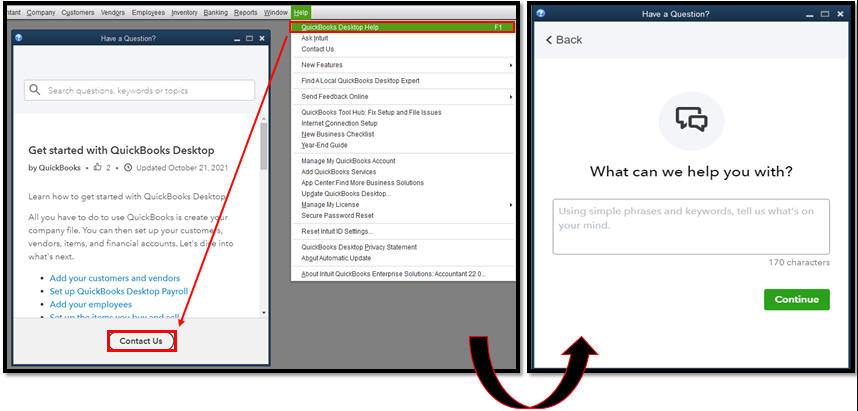
To ensure we can address your concern promptly, please contact us Monday to Friday from 6 AM to 6 PM for QBDT Pro, Premier, and Plus users. Otherwise, contact us anytime, any day for QBDT Enterprise users.
Furthermore, I've added this great resource to help update your QBDT to the latest release and always have the latest features and fixes: Update QuickBooks Desktop to the latest release.
If you have any further questions or concerns about managing your files and other QBDT-related tasks, please know that you can always tag my name. I'm here to help you in any way I can. Stay safe always!
I have a large file 1.6gb with over 120000 targets that would not condense and gave about 10 transfer of credit errors. What finally worked was (after backing up of course) :
1. find the invoice - click on apply payments, find the amount
2. go to company - make general journal entries and find all transactions with that amount.
3. delete BOTH relevant entries (customer).
4. go back to invoice - back to apply payments - reapply - it will re-create the two journal entries with different numbers
It also helped that I installed git-bash prompt (free) which has "tail -f" for monitoring log files. The toolhub program will show you that the log file is in Local/AppData/intuit/quickbooks/etc.
Good Luck!


You have clicked a link to a site outside of the QuickBooks or ProFile Communities. By clicking "Continue", you will leave the community and be taken to that site instead.
For more information visit our Security Center or to report suspicious websites you can contact us here





