Turn on suggestions
Auto-suggest helps you quickly narrow down your search results by suggesting possible matches as you type.
Showing results for
Get 50% OFF QuickBooks for 3 months*
Buy nowI now have duplicate entries and want to know the best way to fix this entry. I would like to keep the details of the invoice. I don't want to delete the deposit transaction because it would mess up my bank reccords.....

Welcome to the Community space, @Zippy33. I'll provide details and outline the steps to remove duplicate deposits in your QuickBooks Online (QBO).
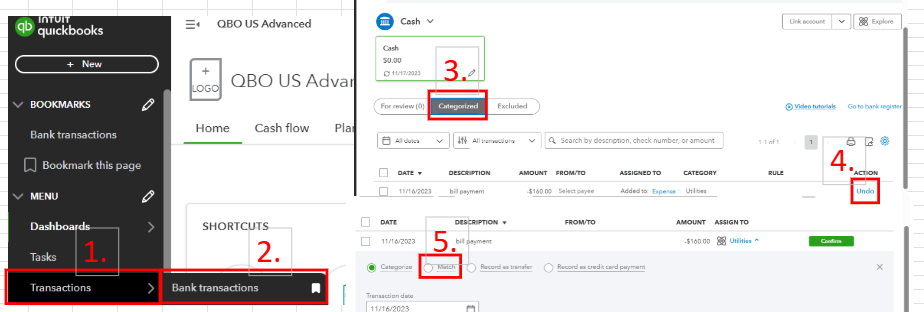
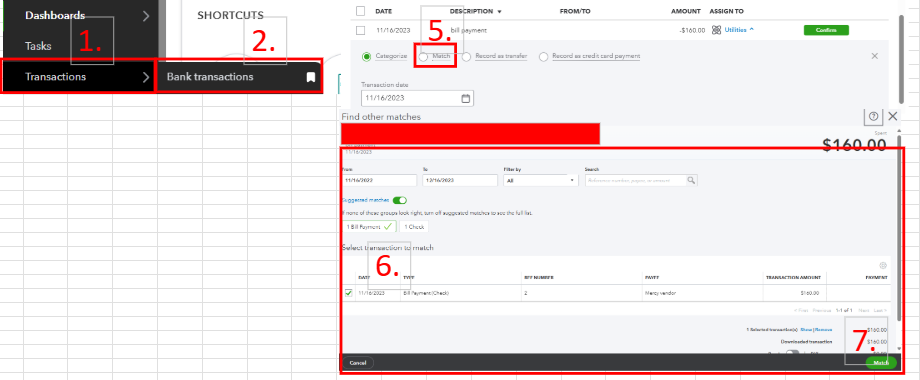
If this happened on your Banking page and you categorized the deposit, you'll want to undo it and consider matching the bank deposit to the transaction. By doing so, duplicates will not appear in your QBO company. These are the steps:
For visual reference, see the screenshot below.
Another workaround is to check the bank register in your chart of accounts and from there. Locate the duplicate transaction and manually delete it.
To prevent this situation from happening in the future, double-check each transaction that goes into your QBO account before categorizing them. By doing so, you can spot possible copies of those bank transactions and exclude them.
Furthermore, you can visit this handy article to help you reconcile bank accounts in QBO: Reconcile an account in QuickBooks Online.
Need assistance managing multiple transactions inside your QBO company? Our QuickBooks Live Expert Assisted can offer tips and guide you to streamline the process of handling this task.
I am here to help you with your QuickBooks questions, so feel free to use the comment section. I can promptly respond and help you with bank deposit concerns. Keep safe.
Thank you for the advice. Do I need to void the A/R entry before doing the Match? I didn't see the A/R record - I think because I previously marked it as "deposited" right?
Hello there, Zippy33.
Right, the invoice is not visible as an open A/R record because you've marked it as deposited If you are referring to voiding the payment transaction when you mentioned voiding A/R, you can do so and directly match the open invoice to the bank transaction. Allow me to provide more information for your complete guidance.
In QuickBooks Online, issuing an invoice increases your Accounts Receivable (A/R) balance. When you receive and apply a payment to that invoice, the A/R balance decreases accordingly. This is why you didn't see the A/R record, as the payment was marked deposited, effectively closing that invoice in the system.
Voiding changes the amounts to zero but retains the original transaction details and date, and will still show in the reports. If you need it to not show up in the reports, we also have the option to delete it if it's legitimately a duplicate entry.
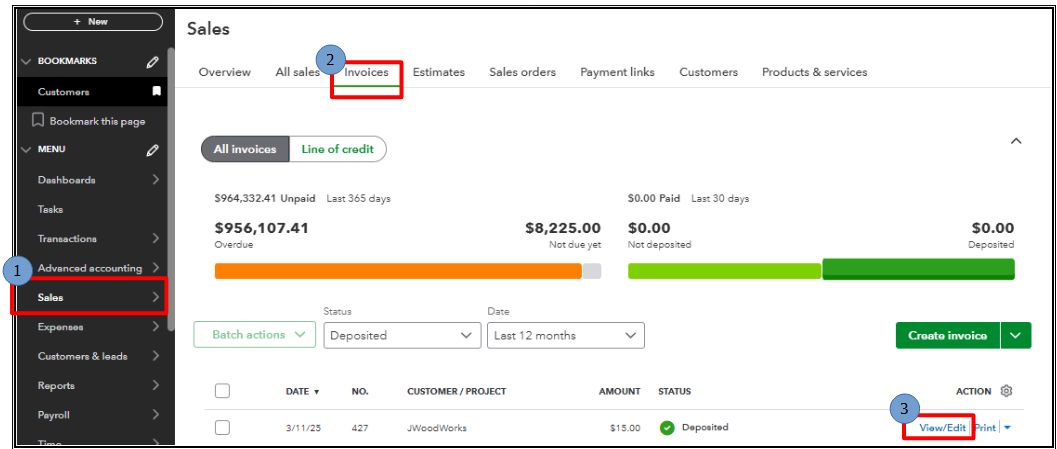
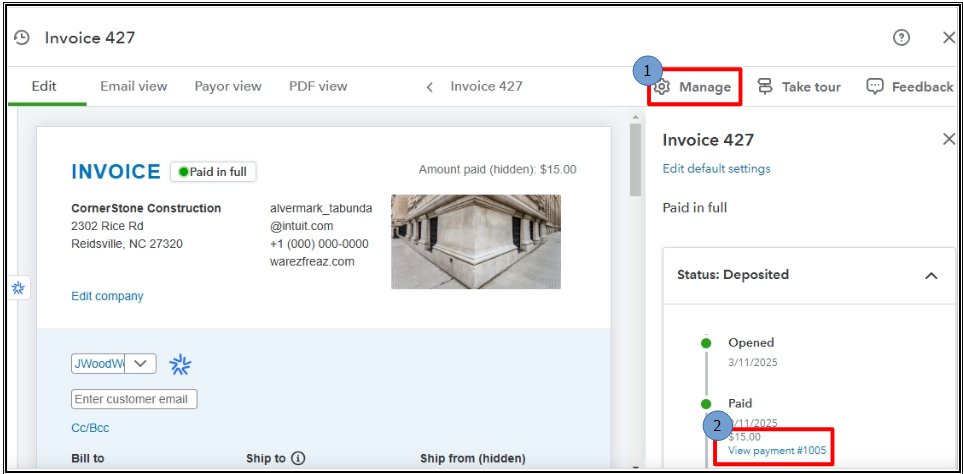
To correctly identify the payment transaction that needs to be voided or deleted, locate and open the invoice that triggered the duplicate deposit issue. This will allow them to trace the payment transaction and either void or delete it.
Here's how to void an invoice:
Here's how to delete an invoice:
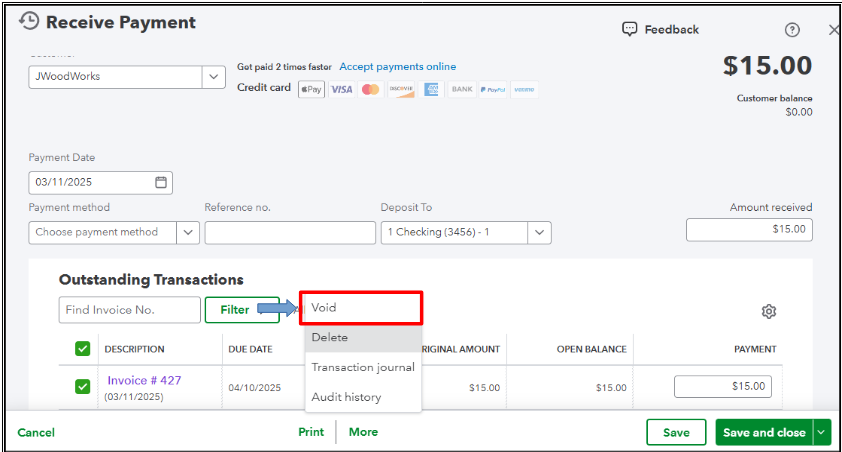
To learn more about how Accounts Receivable works, you can read this article: What is accounts receivable?
Additionally, you can refer to this useful article to guide you through reconciling bank accounts in QBO: Reconcile an account in QuickBooks Online.
Before we wrap up, I suggest you explore QuickBooks Live Bookkeeping to streamline your accounting, maintain precise financial records, and access professional support. This could free up valuable time, allowing you to concentrate on expanding your business.
If you further questions regarding A/R management, drop a message below. We'll provide prompt assistance. Have a great one.


You have clicked a link to a site outside of the QuickBooks or ProFile Communities. By clicking "Continue", you will leave the community and be taken to that site instead.
For more information visit our Security Center or to report suspicious websites you can contact us here


