Turn on suggestions
Auto-suggest helps you quickly narrow down your search results by suggesting possible matches as you type.
Showing results for
Get 50% OFF QuickBooks for 3 months*
Buy nowA vendor has credit in their account, we are trying to get it removed.
- We had to void a "paid" bill from a vendor because it should have never entered.
- By doing so, the vendor have a Credit balance
- We tried to Credit the vendor, but that caused a bigger credit balance.
Question: How do we basically delete that original Payment that was linked to the "bill that was never suppose be paid"? Or, just debit out the account (probably not the correct accounting way) to get the account back to a 0 Balance? Thank you!

Assuming you didn't actually send the bill payment check, locate it in your bank account and void or delete it.
If you did send it, then your vendor owes you money. In turn, if you collect that from them, deposit the money using a deposit transaction and use the AP account as the "income" account. Then use the Pay Bills feature to apply the previous payment to the deposit. It's a little convoluted, but it works!
Vendor is USPS, there is a customer that is linked to USPS account for a bill, which is then Paid.
We went back to the customer, void the order/usps account, voided the actual USPS bill, but once the bill was voided USPS vendor now has a credit. How do we void that bill that was paid or debit the account into an account to get it zeroed out?
Hi there, Erss.
I'd be glad to help you delete the bill and the credit. First, open the bill so you can remove the payment. Here's how:
Once done, go back to the bill and do the same thing to delete or void it. More details about these processes are discussed here: Void or Delete a Bill or Bill Payment Check.
Let me also share this article for additional reference: Accounts Payable Workflows in QuickBooks Desktop.
Reply to me or visit us again if you have further queries. We're always here to help you any time of the day.
Thank you. Yes the bill was deleted or voided, but we actually paid that bill that was just deleted. How do we delete or unpaid that bill? Thank you!
Hi , Erss.
It's glad to know that you figured out to be able to delete the bill, Erss.
But before deleting a check, I wanted you to know that voiding check will affect your financial record. Not just only showing zero in the bank register, but will also remove the payroll expenses made by the checks.
I'm also attaching an article with some helpful information about the basic steps on how and when to void or delete a check or bill payments in QuickBooks Desktop. Read through: Void or delete a bill or bill payment check.
Feel free to comment below to add more information about your concern or if you have follow-up questions. We're always delighted to be of your service.
@Erss RE: Yes the bill was deleted or voided, but we actually paid that bill that was just deleted. How do we delete or unpaid that bill?
I'll try again:
If your vendor had a 0.00 balance, where everything was paid, and then you deleted one of the paid bills, they'll then have a negative balance.
If you deleted the bill, you cannot "unpaid that bill" (?) because it no longer exists. You need to make a change to another transaction to change the vendor balance.
If the negative balance is wrong, if the vendor does not owe you money because you overpaid them, then presumably the payment that paid that bill did not happen.
In this case, find the payment in your checking account and delete it or void it.
After doing that, the vendor will have a 0.00 balance again.
Yes you are correct in describing the issue that we are having.
- but we still have a negative balance because that bill was paid. When we delete the bill, there is a credit to the account from it being paid.
How do we zero out that payment to that bill? Looked under Bill pment for that date, that invoice # is not there...
Allow me to help you zero out the bill payment in QuickBooks Desktop, Erss.
To zero out the payment, you can go to the vendor's profile, find and delete the bill payment from there. Here's how:
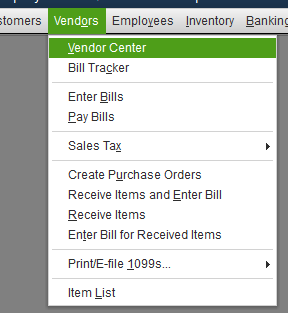
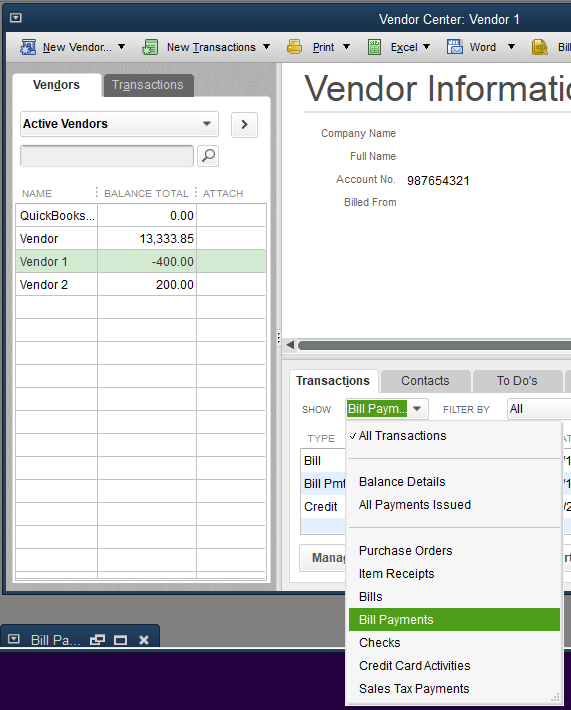

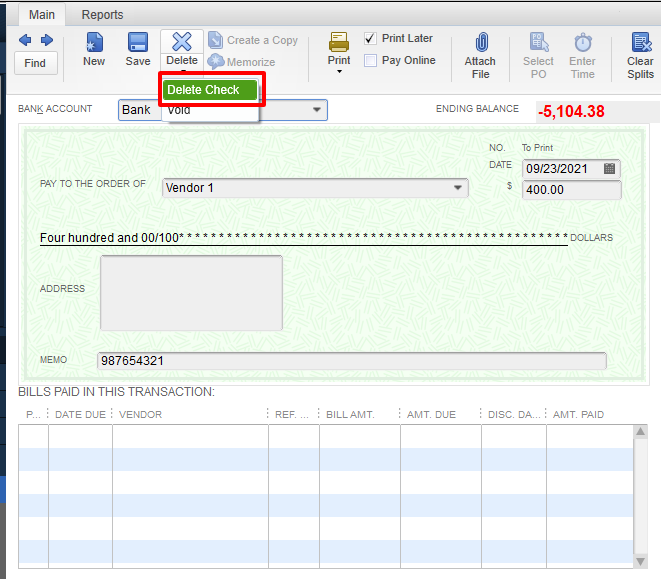
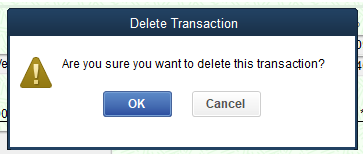
You may want to take a look at this article: Unapplied cash payment income on your profit and loss. Even if this article is for QuickBooks Online, the same principles can be applied to your QuickBooks Desktop.
Feel free to drop me a reply below if there anything else I can help you with. I'll be around to help.
Thank you, we did just that, but by deleting that it gave us the negative balance.
This is what we did:
- Invoiced - invoice item against a Vendor
- Enter Bill for that vendor
- Pay Bill for that Vendor
- Void the invoice item against that vendor
- Void bill for that Vendor
- Negative balance with that Vendor. We are assuming we need to void that bill that was paid? Which is what you shown, void and delete should give you the same result correct? Why are we still getting the negative?
We also searched for that invoice and customer related to that vendor, all is Zero. Please advise, thank you!
Hello @Erss,
I'm joining in to help you resolve the credit balance in your Accounts Payable account.
There are a few reasons why you get a negative balance in the A/P account. Consider the following reasons:
When you delete a bill that is paid without deleting its payment, this will create a credit (negative balance). If you want to resolve this, you can follow my colleague's advise to delete any payments that are not linked to an invoice.
Other than that, you can also use the information in this article to resolve A/P balances: Resolve AR and AP balances on the cash basis Balance Sheet
If you need further assistance with your account balances, please let me know in the comment below. I'll be more than happy to share some more insights with you at any time. Have a lovely day, and thanks for reaching out to the QuickBooks Community.


You have clicked a link to a site outside of the QuickBooks or ProFile Communities. By clicking "Continue", you will leave the community and be taken to that site instead.
For more information visit our Security Center or to report suspicious websites you can contact us here


