Turn on suggestions
Auto-suggest helps you quickly narrow down your search results by suggesting possible matches as you type.
Showing results for
Get 50% OFF QuickBooks for 3 months*
Buy now
Hey there, @mthompson-revive.
It's great to see a new face here. Welcome to the Community. I appreciate you coming to us with your QuickBooks Online (QBO) question.
If you have two separate businesses, it's best to have two accounts to ensure that your books are correct. Once you get the first business set up, you can easily use the same log in as the first to set up the next account. Here's how:
Note: Don't forget to ensure the company names are different so you can switch between them when you're ready.
If there's anything else I can help you with QuickBooks, please let me know. I'd be more than willing to lend you a hand. Have a splendid day!
One QBO account is for one company file. You may manage branches/divisions by utilizing the Class/Location feature available in QBO Plus and Advanced. Otherwise you should open a new account.
https:// quickbooks.grsm.io/US
https:// quickbooks.grsm.io/us-promo
If our two business have different partners and we want to give access to a partner to one quickbooks a/c but not the other, how can we keep access separate. I opened a new gmail account for the separate business but the new gmail account shows up when I sign into the first gmail account. So if I give a partner the gmail account login, it seems they might have access to my other gmail account.
Hello there, @KPWM1.
When giving access to a QuickBooks account, another user from a different company can't see it if you have a different email associated with it.
Also, if the other partner didn't know the password, they can't even log in with the account.
I've added this article about different options for user roles and access permissions in QuickBooks: User roles and access rights in QuickBooks Online.
Let me know if you have other questions about QuickBooks. I'm always here to help.
I already have 2 businesses in Quickbooks but need to separate them. How can I do that?
Thank for joining this thread, Kris20261.
I'm happy to provide some info about having separate QuickBooks Online accounts for two businesses.
QuickBooks views each legal business as its own separate entity, which means they do require their own individual paid subscriptions. The good news is that you don’t need a bunch of different logins to manage them; you can keep everything under one username and simply hop back and forth between the two companies whenever you need. Here's how to get this done:
1. Create a New Company Subscription
You'll need to purchase a second subscription for the second business.
2. Move Your Data
Once the new account is set up, you need to transfer the relevant information from the original account:
3. Switch Between Businesses
After setup, you can easily toggle between your companies:
I'm linking a couple of articles below that I believe you'll find helpful:
With this information you'll be able to successfully manage two businesses with QuickBooks Online. Assistance is only a comment or post away here in the Community if you have any other questions. Take care!
If you manage your business by class to separate them, you can purchase a third-party service to migrate your data to 2 new QBO accounts.
Yes I already have two accounts in Quick books but I don’t want them to merge the data. I want to be able to report them separately. Example, when I run a profit loss statement I need it ran separately. What can I do to separate the companies
Hi there, Kris20261. May I ask how you create those companies under one subscription? Did you create separate accounts for those companies? Please keep in mind it's ideal to have one subscription per company file to avoid mixed data and confusion.
If you have created distinct accounts for each company, you can customize your Profit and Loss report by filtering for the specific Distribution account associated with each business.
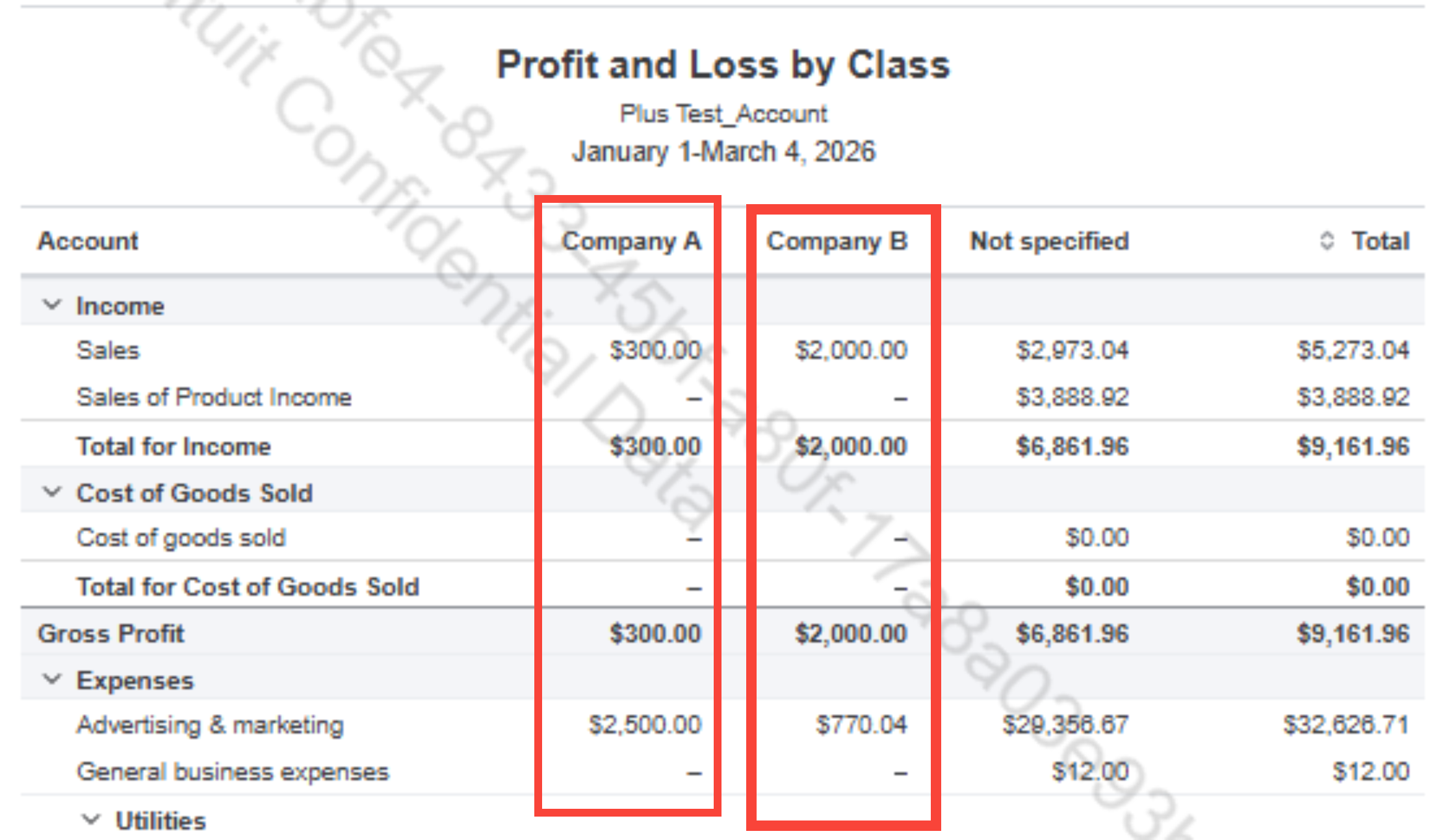
However, if you prefer a side-by-side view of transactions for both companies in a single report, the Class Tracking feature is your best option. By running a Profit and Loss by Class, you can compare both entities at a glance. First, we need to enable this feature, and then manually add each transaction to the respective company file, assigning a unique class name to identify it easily.
Please note that, the class tracking feature is only available in higher tiers of QuickBooks Online, like Plus and Advanced. If you're using a lower-tier subscription, consider upgrading to access these reporting features and improve multi-company tracking.
Please see the attached photo of the Profit & Loss by class report looks when two accounts have each transaction categorized by class:
Please don't hesitate to leave a post below if you need further assistance. We're here to help.
Have you tracked your transactions by class?


You have clicked a link to a site outside of the QuickBooks or ProFile Communities. By clicking "Continue", you will leave the community and be taken to that site instead.
For more information visit our Security Center or to report suspicious websites you can contact us here





