Turn on suggestions
Auto-suggest helps you quickly narrow down your search results by suggesting possible matches as you type.
Showing results for
Get 50% OFF QuickBooks for 3 months*
Buy nowI am trying to run a sales by item summary and no data is showing up on the report. what am I doing wrong?

Hello, @sales item.
Let’s go through a few steps to ensure that your report displays the data you need.
First, check the date range of the report to ensure it covers the period during which sales occurred. If the selected range does not include a timeframe with recorded sales transactions, the report will be blank. To adjust the date range, select the Dates drop-down menu and choose from the available options, or manually select the dates by clicking the Calendar icon in the From and To fields.
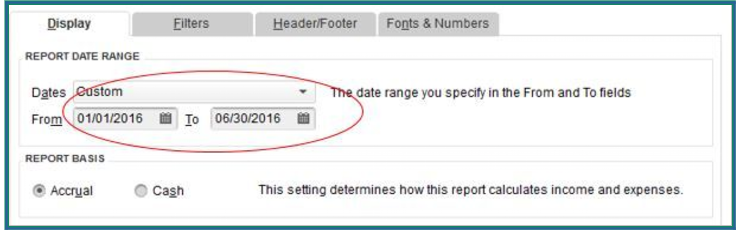
Additionally, you can customize the filters in your report. These filters allow you to focus on specific data, such as particular products and services, customers, or locations, enabling you to view exactly what you need.
If you have any further questions or need assistance, please let us know. We're here to help you anytime.
i have double checked to make sure the report included all sales and have changed the dates.
I appreciate you getting back on this thread, @sales item. Since the report still shows no data even after confirming the correct filters and date range, this suggests a data integrity issue with the company file itself rather than with the report settings.
The next step is to run Verify Data and Rebuild Data to identify and repair any damage that may be preventing the report from reading your sales transactions. If the issue persists, I recommend running the QuickBooks File Doctor tool to check for deeper file corruption.
Before proceeding, please ensure your QuickBooks Desktop software is updated to the latest version for optimal performance.
I’ll ensure this conversation remains open for any future updates and discussions.
I am having the same issue with the report being blank. I have done a system rebuild and still no details.
Thanks for getting involved with this thread, sdirr.
If you've already performed the troubleshooting processes shared by my colleagues, but are still encountering blank Sales by Item Summary reports, Id recommend getting in touch with our Customer Care team.
They'll be able to pull your account up in a secure environment, conduct further research with you, and create an investigation ticket if necessary.
They can be reached while you're signed in.
Here's how:
Be sure to review their support hours so you'll know when agents are available.
If there's any questions, I'm just a post away. Have a wonderful Monday!
Any developments here for this issue?
We have 4x company files facing this exact same issue as of 3 days ago (Feb 25th, 2026).
Each Summary Report for "Sales by Item Summary" is showing up as Zero. However, the details are not zero.
In the meantime, we have found a simple workaround (until the actual problem is addressed and fixed at the desktop level).
Simply click the "Hide Category" check box at the top of the report.
Hello, PM Computing. Thank you for sharing this update and for identifying a workaround by using the "Hide Category" checkbox in the "Sales by Item Summary" report.
Let me connect you with our Live Support Team for a more thorough examination of the underlying problem. Through secure screen sharing, they'll review your account and investigate why the summary totals are showing as zero. Rest assured, our team will prioritize resolving this for you across all impacted files.
You can get in touch with our Live Support Team for assistance using these steps:
To check the availability of Live Support, refer to our support hours here: Get help with QuickBooks products and services.
If you have any questions navigating QuickBooks, don't hesitate to reach out. We'll be here to help.
February 26, 2026- I am having the same issue. Blank Sales by Item Summary reports. I spent an hour and a half on line with the help and they were not able to solve my problem. I was hoping to find help here.
THANK YOU!!! THIS WORKED!!!
Hide Catagory does work. Problem solved for now.
Thanks for this work around. Quickbooks Support had me unistall and reinstall the QB program, which does make the Item Summary Report work again, until Quickbooks does an update. Once QB updates the program, the report quits working, so it is definitely a problem with one of the updates QB released and a not a company data file issue.
Same issue here. My data file is good, I ran verify data and no problems were found. Clicking hide category works as a work-around. I'm running QB Enterprise 24.0 R18_67. I have another PC on R18_60 that does not have the bug. So I'd say it's definitely a bug in an update.
I use this report all the time for sales tax. Must be the latest software update messed this up? I can no longer run this report, I spent an hour this morning & thought I was doing something wrong. The report for item summary with detail works fine.
Need this fixed!!!!
Just joined to add that I'm having the same issue, this is 100% a QB issue all of a sudden. I run this report almost every week, and it suddenly stopped.
Thank god for the user above (not QB) who figured that Hide Category seems to fix it.
Hello, Rando. I understand how challenging this situation is for you. Since you're experiencing technical issues after the update, I recommend reaching out to our Live Support team so they can take a closer look at this matter.
To contact support, please follow these steps:
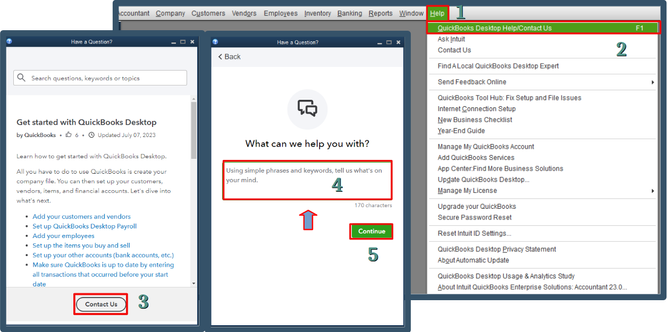
Please check our support hours to find the most convenient time for assistance.
Let us know if you have further questions. We're here to help you anytime.
I am having the same issue. I am so glad a workaround was posted. The odd thing was there were some
items listed from years ago when we first started using Quickbooks. 2005 to be exact. And it is only a small portion of items sold that year. Everything shows up after checking "hide category".


You have clicked a link to a site outside of the QuickBooks or ProFile Communities. By clicking "Continue", you will leave the community and be taken to that site instead.
For more information visit our Security Center or to report suspicious websites you can contact us here


