Turn on suggestions
Auto-suggest helps you quickly narrow down your search results by suggesting possible matches as you type.
Showing results for
Get 50% OFF QuickBooks for 3 months*
Buy nowWe use Shopify to host a website for us. Starting in January 2025 if our customer uses some app Shopify has been deducting the sales tax from the payment to us, and paying the tax agency direct. They only pay us for the goods sold minus their processing fee. How do I record this in Quickbooks?
Below is what it said on Shopify's website when I was questioning it.
Sales tax in Shop
Starting on January 1, 2025, the Shop channel will automatically collect, remit, and file taxes for all orders shipping to or within the United States. The Shop channel collects taxes on orders in all states (plus the District of Columbia) that administer statewide sales tax, as well as Alaska local sales tax. Tax is reported under SC Commerce Services Inc. For more information on how these taxes are calculated, refer to the US taxes reference page.
Note
Orders placed using Shop Pay from online stores are excluded from these tax calculations. This only applies to orders placed on Shop app.
Please help. I can't find anything on this online other than what AI gave me, and I don't know if it is accurate.

You can use the Bank Deposits feature in QuickBooks Desktop (QBDT) to manually record your revenue, sales tax remitted, and Shopify processing fees, Bray3214.
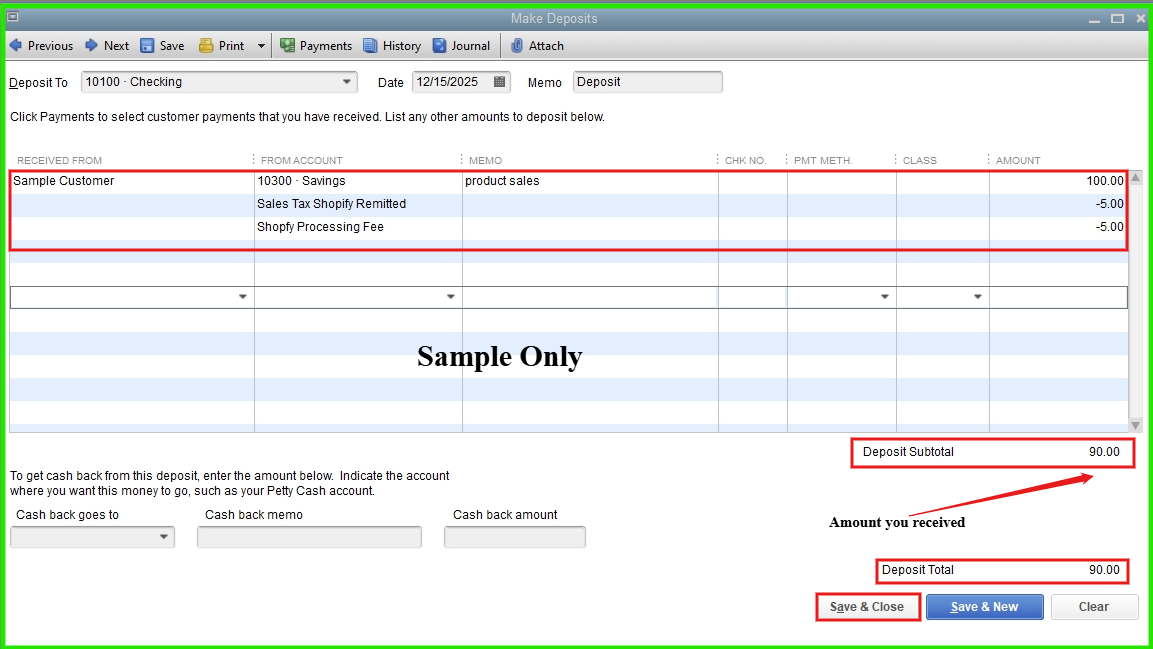
I recommend consulting your accountant to ensure proper recording methods, account classifications, and the use of appropriate accounts for deposits and processing fees.
If you have any additional concerns, please don’t hesitate to let us know.
I really do appreciate your response. I usually generate an invoice to code the payment to, but what do I put in the sales tax section of the invoice?
Thanks for your follow-up, Bray3214.
Since Shopify handles sales tax remittance directly, and you're entering the net payment you receive into QuickBooks, it's best to manage the sales tax within the deposit record instead of on an invoice.
However, since you prefer to use an invoice for recording sales revenue, processing fees, and the sales tax that Shopify remits on your behalf, we can create a sales tax adjustment item. Here's how:
Once done, create an invoice and enter the necessary line items for the products sold. Here's how:
Entering a negative value for your sales tax remitted and fee ensures your total invoice reflects that the sales tax was not directly received by you, but will still account for it properly in your reports.
The invoice should now reflect the total payment due.
Sales tax remittance processes can be complex, so I highly recommend consulting with your accountant or a tax professional to ensure everything aligns with your specific reporting and compliance requirements.
Please leave a reply below if you have further questions or concerns. We'd be glad to provide the necessary help.
This isn't working for me. Am I missing something?
If I create a line item, deduct the amount of Sales Tax paid by Shopify and leave the normal Sales Tax, I believe the amount is still going to show on my Sales Tax Liability Report that I use to file sales tax. Correct??
If I create a line item, deduct the amount of Sales Tax paid by Shopify and make the Sales Tax "Non Taxable" the amount doesn't balance to what I received. Because it is deducting the amount from the price of the products and not the sales tax.
Please help.
I appreciate you getting back to clarify managing sales taxes on invoices, @Bray3214.
You’re correct that the amount will be accounted for on your Sales Tax Liability Report after you add it as a separate line item, whether you leave the item taxable or mark it non-taxable.
When creating a sales transaction, it indicates that you collected the tax and increases your receivables.
Since we’re recording only in QuickBooks Desktop (QBDT) and Shopify collected the actual taxes, let's create the invoice with the available details and record the payment. Right after that, process a sales tax adjustment to keep your reports accurate.
I also recommend consulting a professional advisor about other ways to handle this type of transaction, as it may affect your financial records and reporting.
Please don't hesitate to reply if you have other QuickBooks-related questions. We're available around the clock to help.


You have clicked a link to a site outside of the QuickBooks or ProFile Communities. By clicking "Continue", you will leave the community and be taken to that site instead.
For more information visit our Security Center or to report suspicious websites you can contact us here


